111
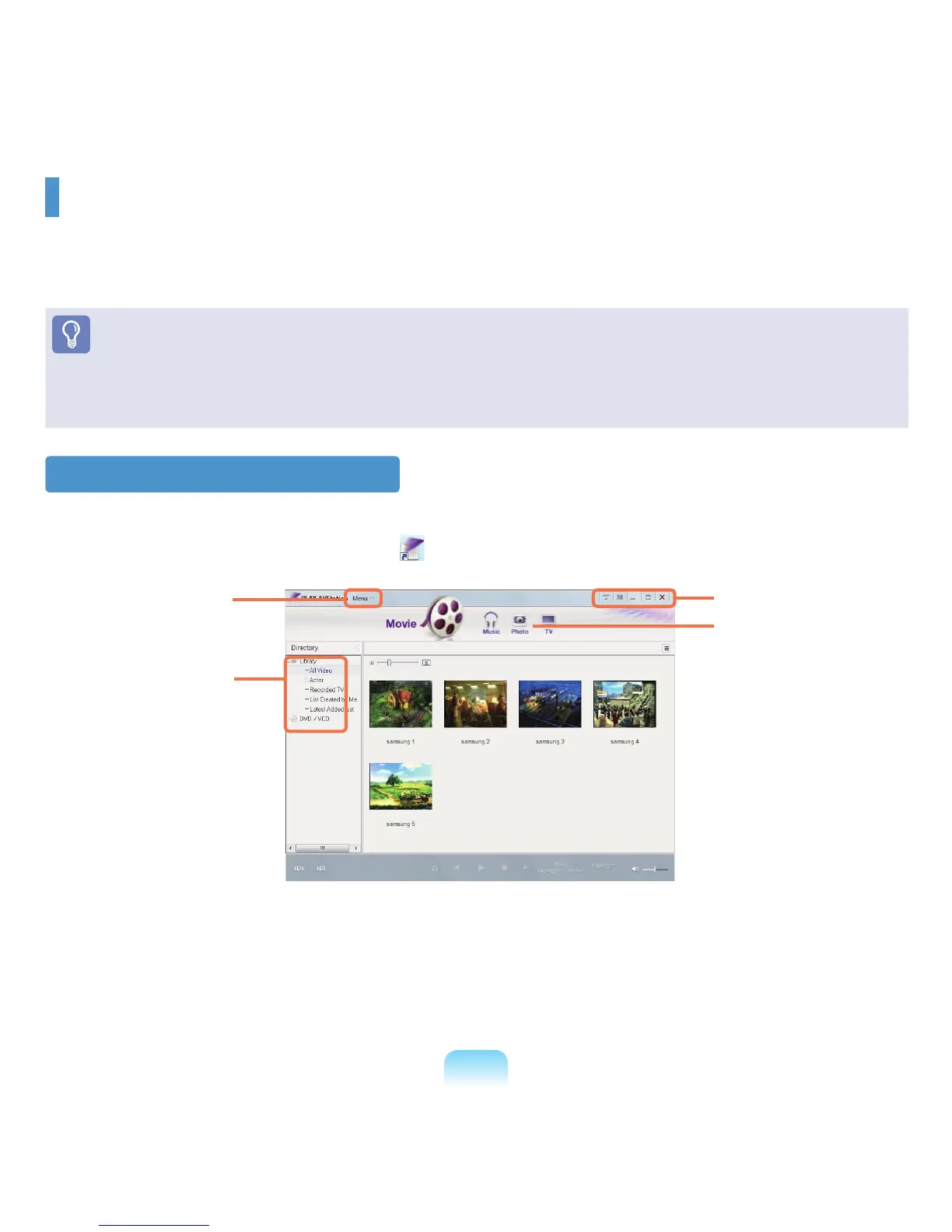
Tolaunchtheprogram,clickStart > All Programs > Samsung > Play AVStation > Play AVStation.
Alternatively,double-clickthePlayAVStationicon(
)ontheDesktop.
Movie
Youcanplayavideo(movie)leoraDVD/VCDtitle.
Music
YoucanplayamusicleoranaudioCD.
Photo
Youcanvieworeditaphotograph(image),andalsoviewthephotographsinaSlideShow.
Play AVStation (Optional)
PlayAVStationisanintegratedmultimediaprogramthatenablesuserstoenjoymusic,photographs,video,movies,
etc.usingasingleprogram.
ThissectiondescribesthebasicusageofPlayAVStation.
Before You Start!
■
Thescreensusedinthismanualmaydifferfromactualscreensaccordingtotheprogramversion.
■
Fordetailedusage,refertotheprogramhelp.
■
TVStationisonlyavailableforsystemssupportingtheTVfunction.Thiscomputerisnotsupported.
Launching and Screen Layouts
Menu
Library
Resize Window And
Exit Buttons
Station Bar



 To Next Page