146
Media Center Setup
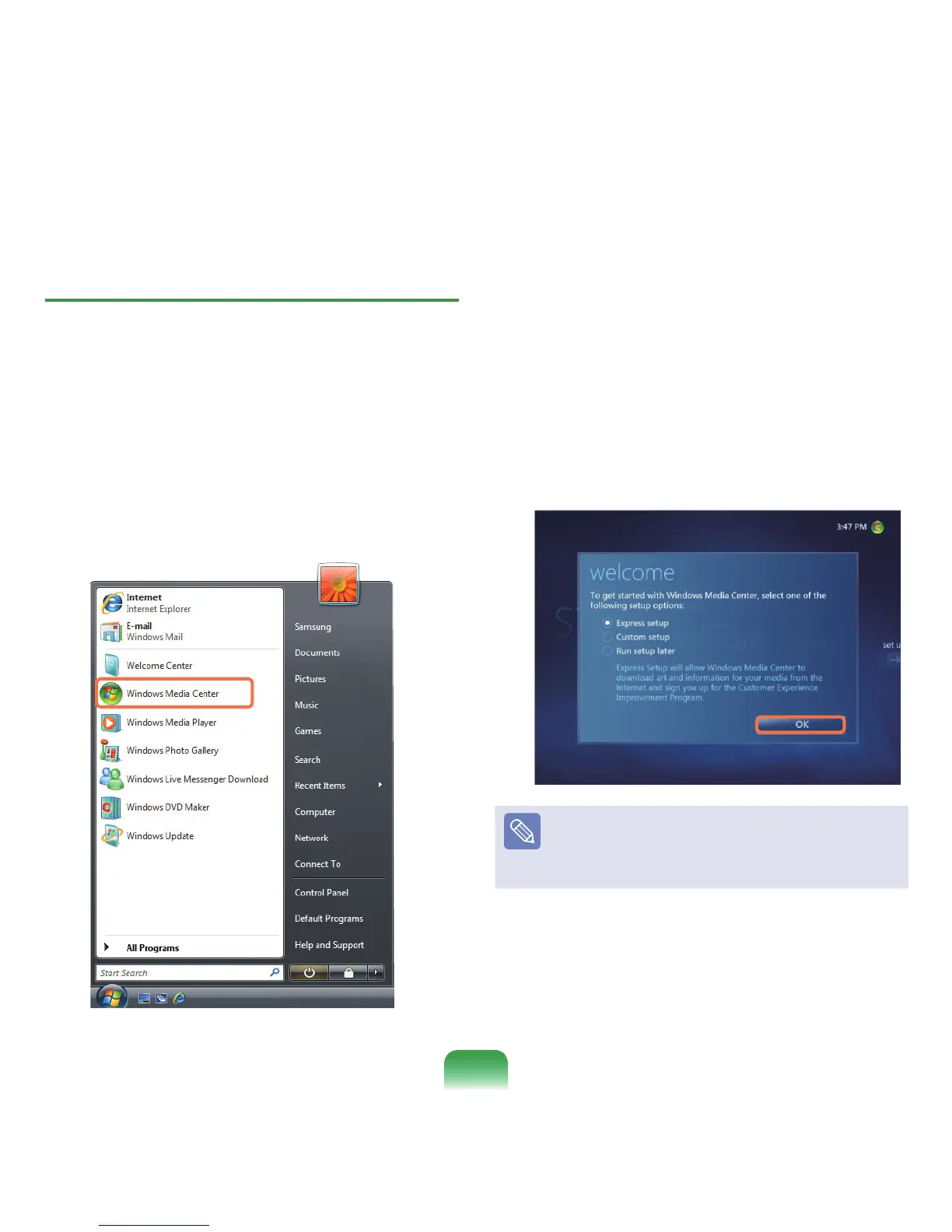
ConnectallnecessarydevicesandsetupMediaCenter.
YouhavetocompletethesettingstouseMediaCenter.
1
Turnthecomputeron.
2
ClickStart > Windows Media Center or Start > All
Programs > Windows Media Center.
3
Ifthefollowingstartscreenappears,selectthe
installationoption.
ExpressSetupenablesyoutousethebasic
functionsofMediaCenterwhenclicking
OK.
However,youcannotuseTVandInternetrelated
functionsusingExpressSetup.
CustomSetupallowsyoutocongureallsettings
includingTVandInternetsettings.Ifyouclick
OK,
theSetupWizardstarts.
Note
TosetuptheTVorInternetafteranExpressSetup,
select
Tasks > Settings > General > Windows Media
Center SetupintheMediaCenterstartscreenand
setupthefollowingitems.









 To Next Page