SAMWONTECH
4st Edition of TEMI2000_Series IM : Aug. 18. 2009 Page 21 / 55
4. FUNCTION & FIX OPEARTION setting
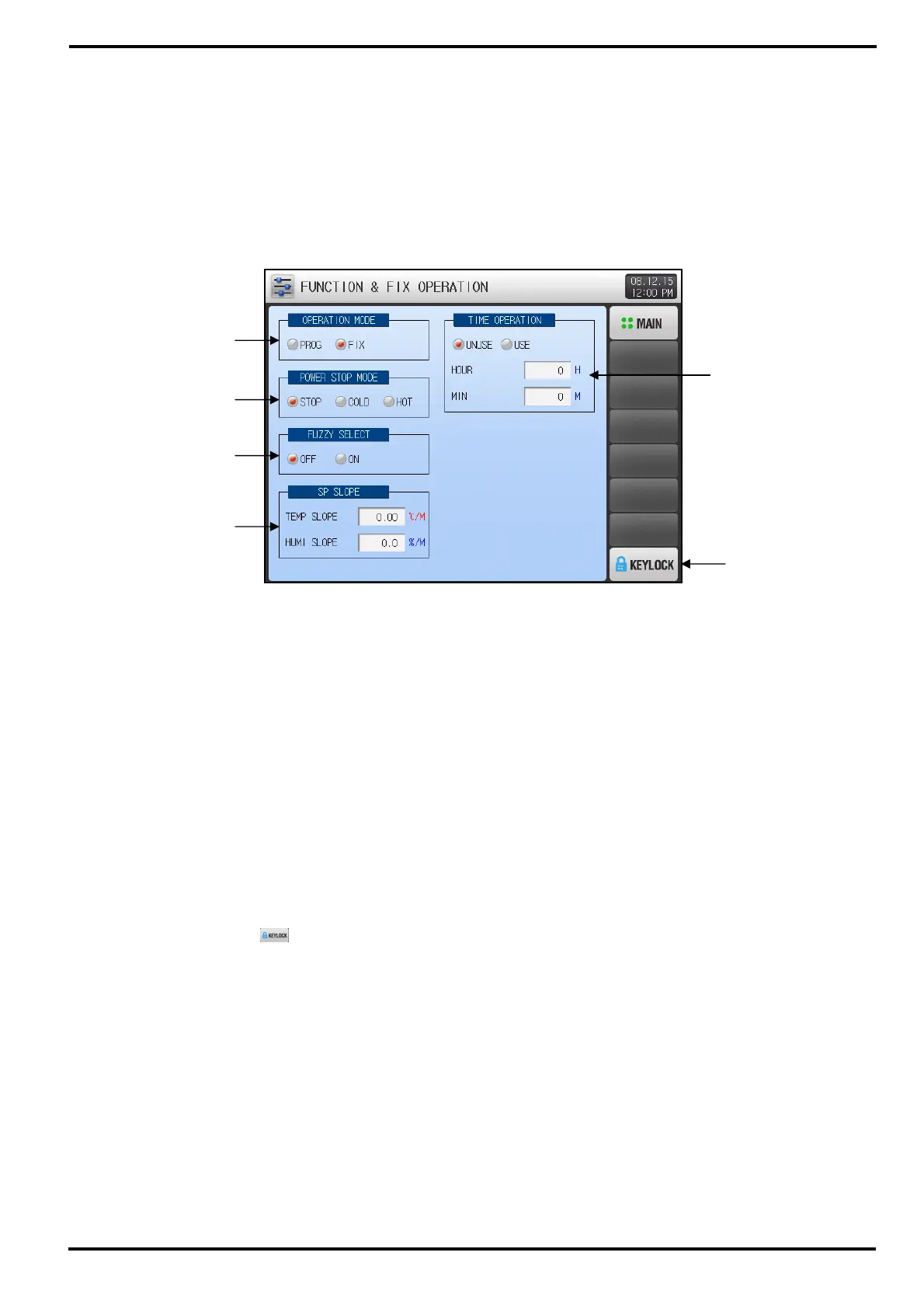
▶ Press [FUNCTION&FIX] button on MAIN MENU screen to enter into this function section.
▶ This screen is to set parameters concerned additional function for general operation and FIX operation.
4.1 Operation mode & Functions
① Setup box to set Operation Mode. (PROGRAM / FIX Operation)
② Setup box to set Power Stop Mode.
☞ Power Stop Mode is the function to set how to operate after power recovery from failure.
☞ STOP : Operation will stay STOP state after power recovery, and ‘OPERATION STOP’ will display.
☞ COLD : Same operation before power failure will re-start after recovery power recovery.
For FIX run state, operation will re-start from the beginning (of TIME OPERATION)
For PROG run state, operation will re-start from the first segment of processed pattern.
☞ HOT : Operation will resume from the running state right before power failure.
③ Setup box to set whether or not using FUZZY function. Refer to [4.2 FUZZY function]
☞ OFF : Not using FUZZY function.
☞ ON : Using FUZZY function.
④ Setup box to set SP SLOPE for ramping rate on FIX operation. Refer to [4.3 SP SLOPE function]
⑤ Setup box to set whether or not using TIME OPERATION for total process time on FIX Operation.
⑥ KEYLOCK button to prevent from any of unauthorized parameter setting. Every setting operation will
be denied if the
(KEY LOCk) button is currently being activated
☞ Screen transition and key unlock are still active.
①
②
③
④
⑤
⑥
[Image 4-1] Operation Settings Screen



 To Next Page