Installation and Operation Manual
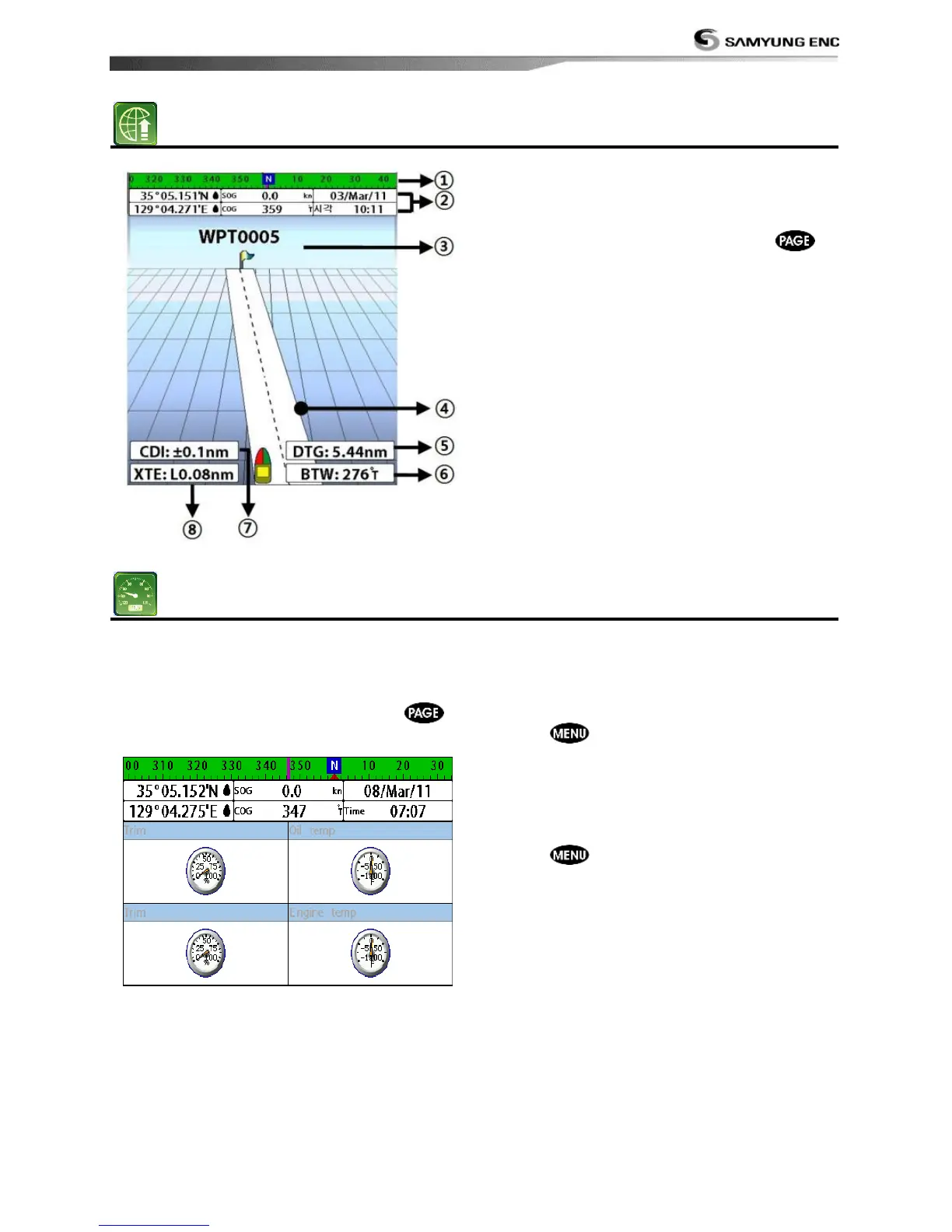
The Highway window shows a 3D view of
the vessel traveling through the water when
navigating to a destination point.
To go to the Highway window, press
and select Highway icon.
The Highway window shows:
① Compass.
② Data bar.
③ Destination waypoint.
④ Boat’s plotted course to destination.
⑤ DTG scale (Distance To Go).
⑥ BTW scale (Bearing to waypoint).
⑦ CDI (Course Deviation Indicator).
⑧ XTE scale (Cross Track Error).
The Gauges window displays all the
information you need during navigation such
as water, engine, fuel related information,
etc.
To select the Gauges window, press
and select Data icon.
Selecting a Gauges layout
The Gauges window can show one of seven
gauge layouts.
To select a layout from the Gauges window:
1 Press
and select Gauge Layout.
2 Select one layout.
Changing a gauge in one selected
To change a gauge displayed in a layout in
Data display.
1 Press and select Gauge Setup then
the upper left side gauge will be
highlighted.
2 Select a gauge you want to change and
select Gauge type.
3 Select a data type you want to display.



 To Next Page