Installation and Operation Manual
The system menu mainly consists of settings which do not require frequent adjustment.
To go to system menu, press and hold
then select the icon you want.
① System Configuration.
② Chart.
③ Communication.
④ GPS.
⑤ Track & Log.
⑥ Memory.
⑦ AIS.
⑧ Alarms.
⑨ Others.
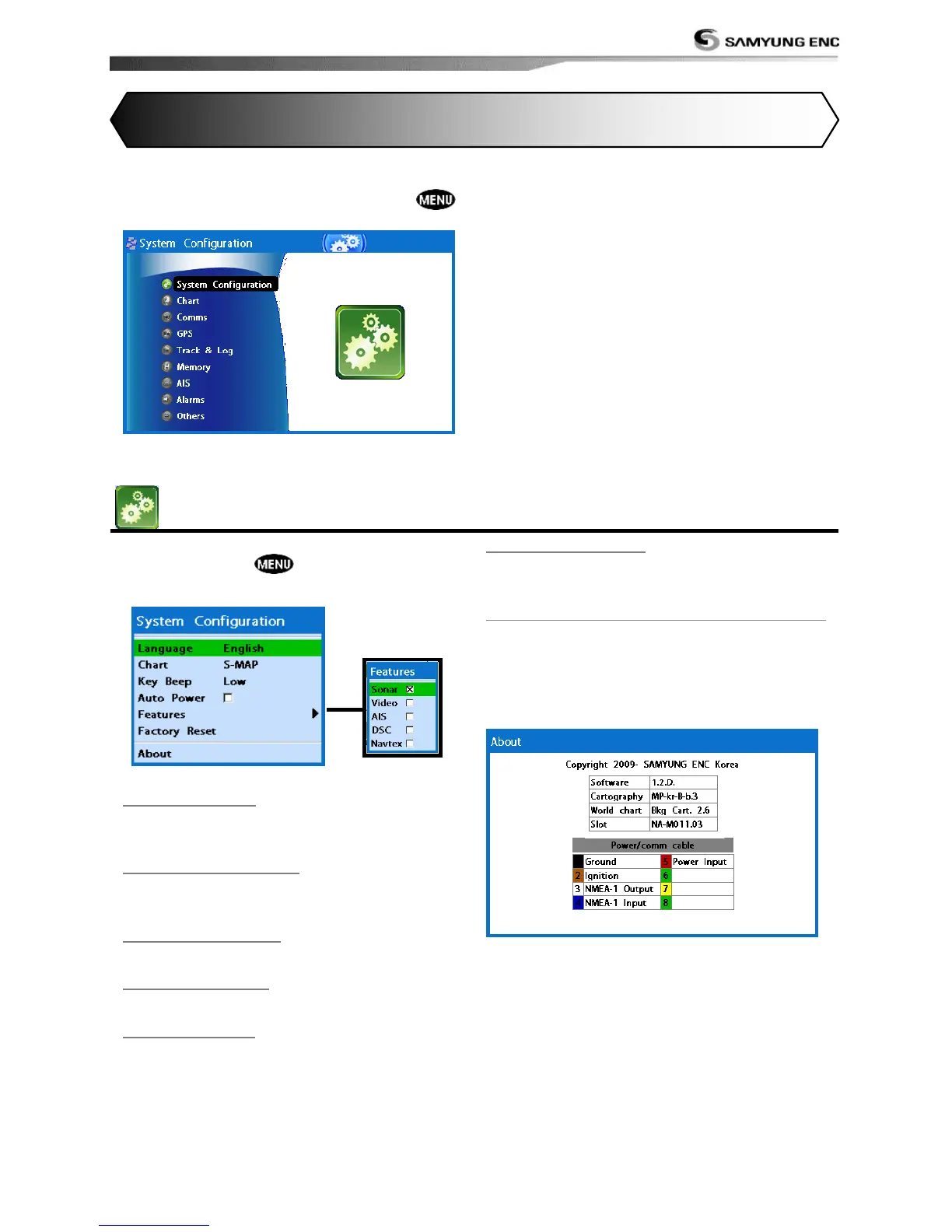
4-1 System Configuration Settings
To go to System configuration:
1 Press and hold .
2 Select the system configuration icon.
4-1-1 Language
Change the language for menus and data
screens.
4-1-2 Chart Selection
Select a chart between S-MAP or NAVIONICS
chart.
4-1-3 Beep volume
Select the level of beep sound.
4-1-4 Auto power
See section 3-1.
4-1-5 Features
When external devices are connected to the
unit, the corresponding options need to be
set.
4-1-6 Factory reset
When this option is selected. All settings of
this unit returns to default factory settings.
4-1-7 Unit information
The unit information window shows:
1 Software version and release date.
2 NAVIONICS version.
3 Stored waypoints, routes and tracks count
4 Wiring information of connector.



 To Next Page