EasyManua.ls Logo

Sandstrom S66IDAB10 - User Manual

Sandstrom S66IDAB10
28 pages
Print Icon
To Next Page IconTo Next Page
Loading...
Instruction Manual
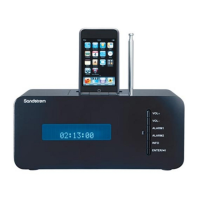
DAB Radio
with docking for iPod
S66IDAB10
(iPod not included)
Question and Answer IconNeed help?

Do you have a question about the Sandstrom S66IDAB10 and is the answer not in the manual?

Summary

Unpacking

Product Overview

Front View

Identifies components on the front panel of the unit.

Top View

Identifies components on the top panel of the unit.

Rear View

Identifies components on the rear panel of the unit.

Remote Control

Remote Control Operation Range

Specifies the effective distance and angle for remote operation.

Battery Installation for the Remote Control

Handling the Battery

Provides guidance on safe battery usage and disposal.

Handling the Remote Control

Power Source

Mains Power

Details how to connect the unit to the mains power supply.

Switching on Your Unit for the First Time

Guides initial setup and power-on procedure.

Basic Operation

Powering ON;OFF

Instructions for turning the unit on, off, and to standby mode.

Selecting Modes

How to switch between DAB, FM, iPod, and AUX modes.

Adjusting Volume

How to control the sound volume using the unit or remote.

Setting the Alarms

Step-by-step guide to setting up the unit's alarm functions.

Snooze Function

Sleep Timer Function

DAB Operation

Memory

How the unit remembers the last mode and station.

Storing Stations

Procedure for saving favourite DAB stations to presets.

Recalling a Stored Station

Procedure for accessing saved DAB stations.

Display Modes

DLS (Dynamic Label Segment)

Describes scrolling text messages from broadcasters.

Programme Type

Indicates the music genre or style being broadcast.

Multiplex Name

Explains a collection of stations transmitted on one frequency.

Time;Date

Shows automatically provided clock and date information.

Software Version

Auto Scan Modes

Secondary Services

Manual Tuning

System Reset

FM Operation

Selecting FM Mode

How to switch the unit to FM radio mode.

Auto Scan

How to automatically scan for FM stations.

Manual Scan

How to manually tune FM stations.

Storing Stations

Procedure for saving favourite FM stations to presets.

Recalling a Stored Station

Procedure for accessing saved FM stations.

Display Modes

Programme Type

Indicates the music genre or style being broadcast.

Signal Strength

Visual indicator of the signal strength.

Time;Date

Shows automatically provided clock and date information.

Channel Frequency

Displays the current station's frequency.

Audio Mode

Shows if the station is mono or stereo and how to switch.

Radio Text

Displays scrolling text information from broadcasters.

Software Version

System Reset

iPod Operation

Selecting iPod Mode

How to switch the unit to iPod playback mode.

Inserting the iPod

Step-by-step guide to connecting and playing an iPod.

Charging Your iPod

AUX Operation

Maintenance

Hints and Tips

Specification

Safety Warnings

General Safety Precautions

Covers damage, location, temperature, flames, moisture, ventilation, and electrical safety.

Service

Summary

Unpacking

Product Overview

Front View

Identifies components on the front panel of the unit.

Top View

Identifies components on the top panel of the unit.

Rear View

Identifies components on the rear panel of the unit.

Remote Control

Remote Control Operation Range

Specifies the effective distance and angle for remote operation.

Battery Installation for the Remote Control

Handling the Battery

Provides guidance on safe battery usage and disposal.

Handling the Remote Control

Power Source

Mains Power

Details how to connect the unit to the mains power supply.

Switching on Your Unit for the First Time

Guides initial setup and power-on procedure.

Basic Operation

Powering ON;OFF

Instructions for turning the unit on, off, and to standby mode.

Selecting Modes

How to switch between DAB, FM, iPod, and AUX modes.

Adjusting Volume

How to control the sound volume using the unit or remote.

Setting the Alarms

Step-by-step guide to setting up the unit's alarm functions.

Snooze Function

Sleep Timer Function

DAB Operation

Memory

How the unit remembers the last mode and station.

Storing Stations

Procedure for saving favourite DAB stations to presets.

Recalling a Stored Station

Procedure for accessing saved DAB stations.

Display Modes

DLS (Dynamic Label Segment)

Describes scrolling text messages from broadcasters.

Programme Type

Indicates the music genre or style being broadcast.

Multiplex Name

Explains a collection of stations transmitted on one frequency.

Time;Date

Shows automatically provided clock and date information.

Software Version

Auto Scan Modes

Secondary Services

Manual Tuning

System Reset

FM Operation

Selecting FM Mode

How to switch the unit to FM radio mode.

Auto Scan

How to automatically scan for FM stations.

Manual Scan

How to manually tune FM stations.

Storing Stations

Procedure for saving favourite FM stations to presets.

Recalling a Stored Station

Procedure for accessing saved FM stations.

Display Modes

Programme Type

Indicates the music genre or style being broadcast.

Signal Strength

Visual indicator of the signal strength.

Time;Date

Shows automatically provided clock and date information.

Channel Frequency

Displays the current station's frequency.

Audio Mode

Shows if the station is mono or stereo and how to switch.

Radio Text

Displays scrolling text information from broadcasters.

Software Version

System Reset

iPod Operation

Selecting iPod Mode

How to switch the unit to iPod playback mode.

Inserting the iPod

Step-by-step guide to connecting and playing an iPod.

Charging Your iPod

AUX Operation

Maintenance

Hints and Tips

Specification

Safety Warnings

General Safety Precautions

Covers damage, location, temperature, flames, moisture, ventilation, and electrical safety.

Service

Sandstrom S66IDAB10 Specifications

General IconGeneral
BrandSandstrom
ModelS66IDAB10
CategoryDocking Station
LanguageEnglish