EasyManua.ls Logo

Sansui AU-6500 - ALIGNMENT PROCEDURES; Power Amplifier Output Alignment; Power Amplifier Current Alignment

Sansui AU-6500
27 pages
Print Icon
To Next Page IconTo Next Page
To Previous Page IconTo Previous Page
Loading...
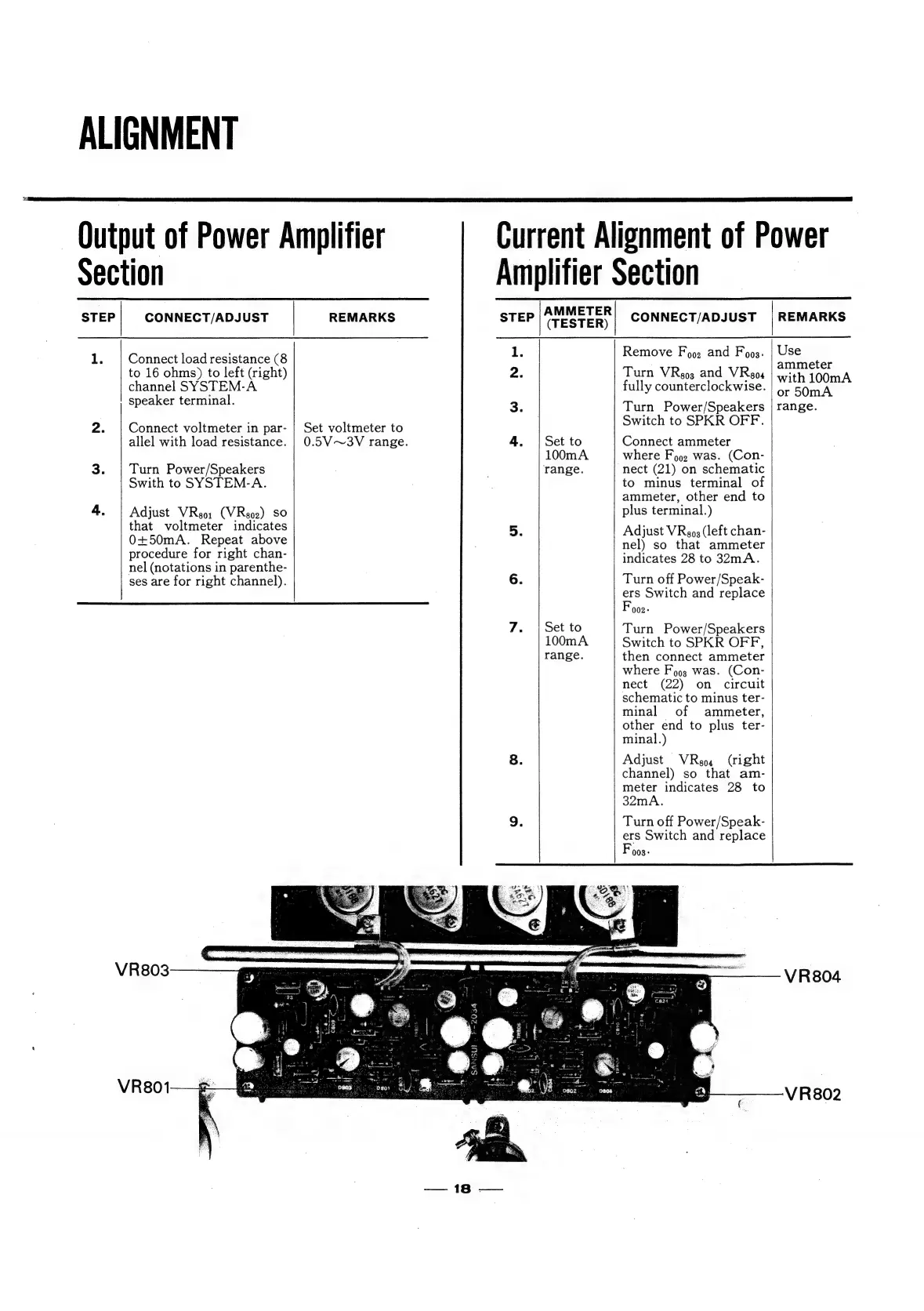
ALIGNMENT
Output
of
Power
Amplifier
Current
Alignment
of
Power
Section
Amplifier
Section
STEP
CONNECT/ADJUST
REMARKS
step
|AMMETER|
CONNECT/ADJUST
[REMARKS
(TESTER)
1.
Remove
Foo.
and
Foo.
|
Use
1.
|
Connect
load
resistance
(8
ee
ene
ee
to
16
ohms)
to
left
(right)
2.
Turn
VRgo3
and
VRgox
|v.
channel
SYSTEM-A
fully
eaunterelociewise:
laa
speancraceminal:
3.
Turn
Power/Speakers
|
range.
Switch
to
SPKR
OFF.
Set
to
Connect
ammeter
100mA
where
Fo92
was.
(Con-
3.
|
Turn
Power/Speakers
?
range.
nect
(21)
on
schematic
|
Swith
to
SYSTEM-A.
,
2
to
minus
terminal
of
ammeter,
other
end
to
4.
Adjust
VRgo:
(VRgo2)
so
plus
terminal.)
that
voltmeter
indicates
5
Adjust
VRene
(left
chan-
0+50mA.
Repeat
above
eels
SO
that
Nee
procedure
for
right
chan-
‘nadicates
O08
to
Som
A
nel
(notations
in
parenthe-
ses
are
for
right
channel).
6.
Turn
off
Power/Speak-
|
ers
Switch
and
replace
Foo2
:
7.
|
Set
to
Turn
Power/Speakers
100mA
Switch
to
SPKR
OFF,
range.
then
connect
ammeter
where
Fo93
was.
(Con-
nect
(22)
on
circuit
schematic
to
minus
ter-
minal
of
ammeter,
other
end
to
plus
ter-
minal.)
8
.
Adjust
VReos
(right
channel)
so
that
am-
meter
indicates
28
to
32mA.
9.
Turn
off
Power/Speak-
ers
Switch
and
replace
Foos.
2.
|
Connect
voltmeter
in
par-
|
Set
voltmeter
to
allel
with
load
resistance.
|
0.5V~3V
range.
>
VR803
VR804
VR801-