EasyManua.ls Logo

Sansui AU-6500 - TAPE RECORDING AND PLAYBACK; Tape Deck Connectivity; Recording and Playback Process; Tape Copying and Notes

Sansui AU-6500
27 pages
Print Icon
To Next Page IconTo Next Page
To Previous Page IconTo Previous Page
Loading...
RECORDING
AND
PLAYBACK
BY
TAPE
DECKS
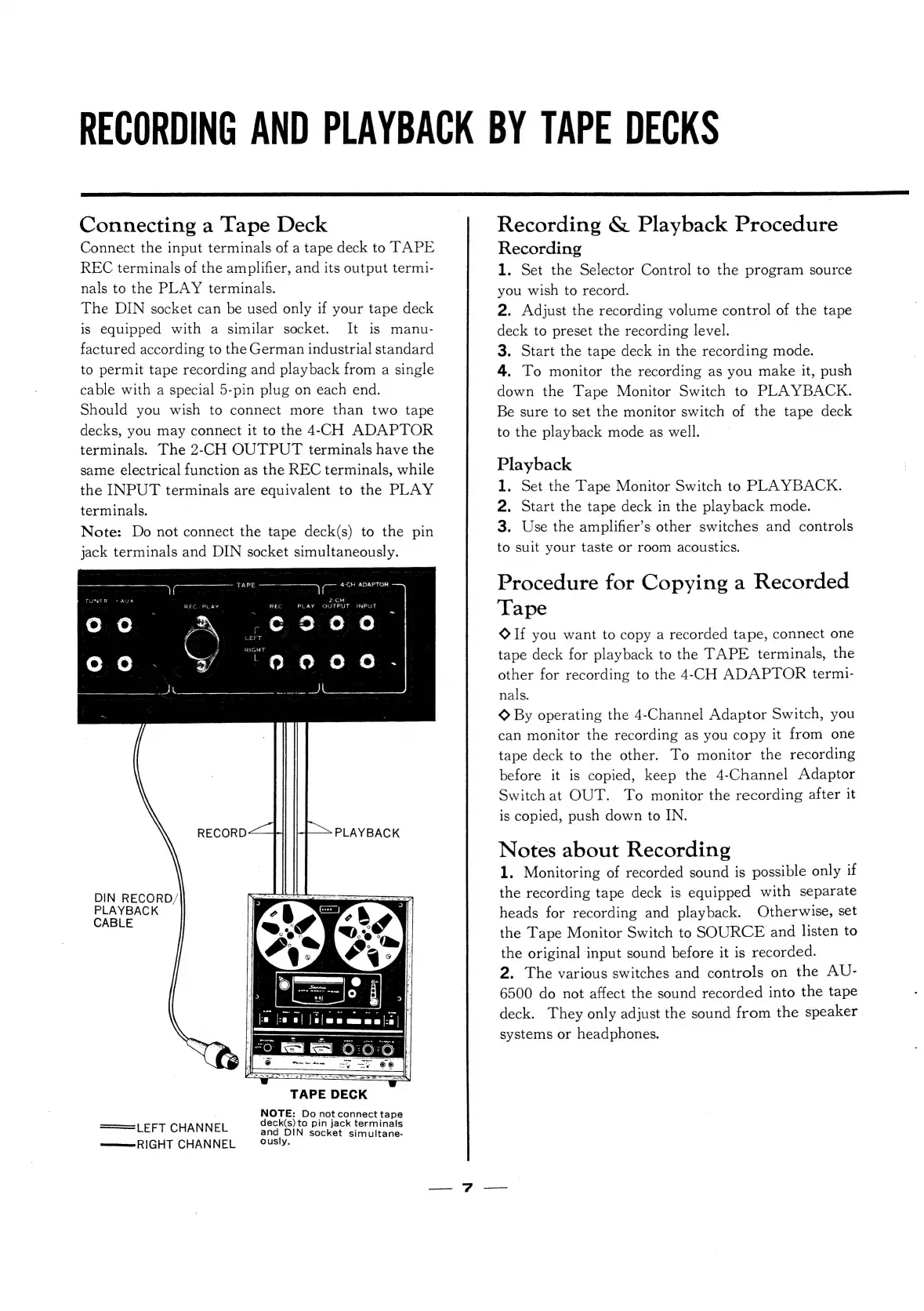
Connecting
a
Tape
Deck
Connect
the
input
terminals
of
a
tape
deck
to
TAPE
REC
terminals
of
the
amplifier,
and
its
output
termi-
nals
to
the
PLAY
terminals.
The
DIN
socket
can
be
used
only
if
your
tape
deck
is
equipped
with
a
similar
socket.
It
is
manu-
factured
according
to
the
German
industrial
standard
to
permit
tape
recording
and
playback
from
a
single
cable
with
a
special
5-pin
plug
on
each
end.
Should
you
wish
to
connect
more
than
two
tape
decks,
you
may
connect
it
to
the
4-CH
ADAPTOR
terminals.
The
2-CH
OUTPUT
terminals
have
the
same
electrical
function
as
the
REC
terminals,
while
the
INPUT
terminals
are
equivalent
to
the
PLAY
terminals.
Note:
Do
not
connect
the
tape
deck(s)
to
the
pin
jack
terminals
and
DIN
socket
simultaneously.
:
es
TAPE
se
az
4-CH
ADAPTOR
2-CH
REO
YPLAY
REC
PLAY
GUTPUT
INPUT
fom
,eo200
‘9oao00d.
eek
RECORD—_.
|
PLAYBACK
DIN
RECORD/
PLAYBACK
CABLE
NOTE:
Do
not
connect
tape
deck(s)
to
pin
jack
terminals
and
DIN
socket
simultane-
wm
RIGHT
CHANNEL
ously.
===
LEFT
CHANNEL
Recording
&
Playback
Procedure
Recording
1.
Set
the
Selector
Control
to
the
program
source
you
wish
to
record.
2.
Adjust
the
recording
volume
control
of
the
tape
deck
to
preset
the
recording
level.
3.
Start
the
tape
deck
in
the
recording
mode.
4.
To
monitor
the
recording
as
you
make
it,
push
down
the
Tape
Monitor
Switch
to
PLAYBACK.
Be
sure
to
set
the
monitor
switch
of
the
tape
deck
to
the
playback
mode
as
well.
Playback
1.
Set
the
Tape
Monitor
Switch
to
PLAYBACK.
2.
Start
the
tape
deck
in
the
playback
mode.
3.
Use
the
amplifier’s
other
switches
and
controls
to
suit
your
taste
or
room
acoustics.
Procedure
for
Copying
a
Recorded
Tape
Oo
If
you
want
to
copy
a
recorded
tape,
connect
one
tape
deck
for
playback
to
the
TAPE
terminals,
the
other
for
recording
to
the
4-CH
ADAPTOR
termi-
nals.
©
By
operating
the
4-Channel
Adaptor
Switch,
you
can
monitor
the
recording
as
you
copy
it
from
one
tape
deck
to
the
other.
To
monitor
the
recording
before
it
is
copied,
keep
the
4-Channel
Adaptor
Switch
at
OUT.
To
monitor
the
recording
after
it
is
copied,
push
down
to
IN.
Notes
about
Recording
1.
Monitoring
of
recorded
sound
is
possible
only
if
the
recording
tape
deck
is
equipped
with
separate
heads
for
recording
and
playback.
Otherwise,
set
the
Tape
Monitor
Switch
to
SOURCE
and
listen
to
the
original
input
sound
before
it
is
recorded.
2.
The
various
switches
and
controls
on
the
AU-
6500
do
not
affect
the
sound
recorded
into
the
tape
deck.
They
only
adjust
the
sound
from
the
speaker
systems
or
headphones.

Related product manuals