EasyManua.ls Logo

Sansui AU-6500 - Input Source and Volume Settings; Playback and Mode Features

Sansui AU-6500
27 pages
Print Icon
To Next Page IconTo Next Page
To Previous Page IconTo Previous Page
Loading...
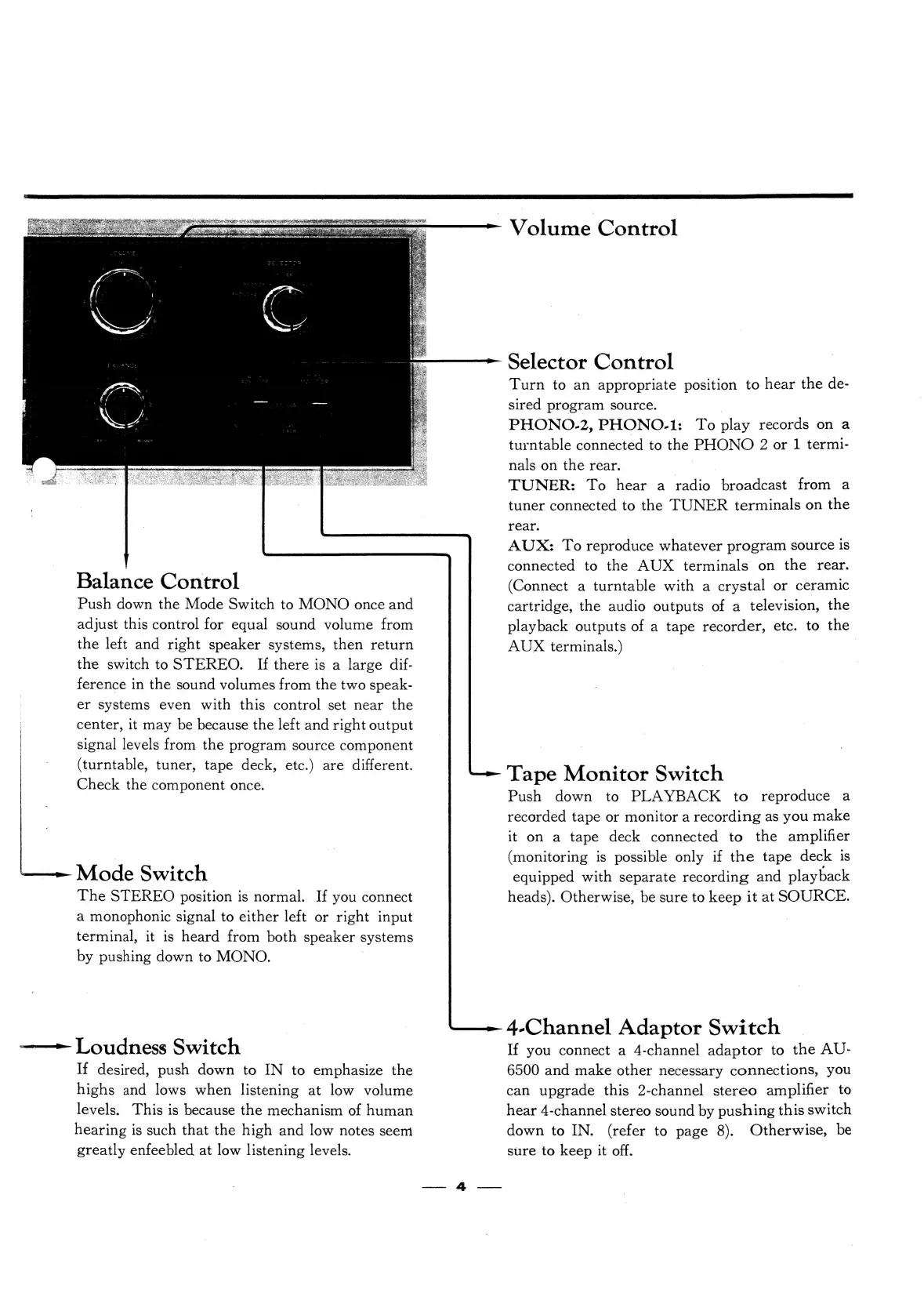
Balance
Control
Push
down
the
Mode
Switch
to
MONO
once
and
adjust
this
control
for
equal
sound
volume
from
the
left
and
right
speaker
systems,
then
return
the
switch
to
STEREO.
If
there
is
a
large
dif-
ference
in
the
sound
volumes
from
the
two
speak-
er
systems
even
with
this
control
set
near
the
center,
it
may
be
because
the
left
and
right
output
signal
levels
from
the
program
source
component
(turntable,
tuner,
tape
deck,
etc.)
are
different.
Check
the
component
once.
__-
Mode
Switch
The
STEREO
position
is
normal.
If
you
connect
a
monophonic
signal
to
either
left
or
right
input
terminal,
it
is
heard
from
both
speaker
systems
by
pushing
down
to
MONO.
——
Loudness
Switch
If
desired,
push
down
to
IN
to
emphasize
the
highs
and
lows
when
listening
at
low
volume
levels.
This
is
because
the
mechanism
of
human
hearing
is
such
that
the
high
and
low
notes
seem
greatly
enfeebled
at
low
listening
levels.
Velanie
Control
Selector
Control
Turn
to
an
appropriate
position
to
hear
the
de-
sired
program
source.
PHONO-2,
PHONO-1:
To
play
records
on
a
turntable
connected
to
the
PHONO
2
or
1
termi-
nals
on
the
rear.
TUNER:
To
hear
a
aid:
broadcast
from
a
tuner
connected
to
the
TUNER
terminals
on
the
rear.
AUX:
To
reproduce
whatever
program
source
1s
connected
to
the
AUX
terminals
on
the
rear.
(Connect
a
turntable
with
a
crystal
or
ceramic
cartridge,
the
audio
outputs
of
a
television,
the
playback
outputs
of
a
tape
recorder,
etc.
to
the
AUX
terminals.)
|
Tape
Monitor
Switch
Push
down
to
PLAYBACK
to
reproduce
a
recorded
tape
or
monitor
a
recording
as
you
make
it
on
a
tape
deck
connected
to
the
amplifier
(monitoring
is
possible
only
if
the
tape
deck
is
equipped
with
separate
recording
and
playback
heads).
Otherwise,
be
sure
to
keep
it
at
SOURCE.
4-Channel
Adaptor
Switch
If
you
connect
a
4-channel
adaptor
to
the
AU-
6500
and
make
other
necessary
connections,
you
can
upgrade
this
2-channel
stereo
amplifier
to
hear
4-channel
stereo
sound
by
pushing
this
switch
down
to
IN.
(refer
to
page
8).
Otherwise,
be
sure
to
keep
it
off.

Related product manuals