EasyManua.ls Logo

Sansui SC-5100 - Playback; Playback Procedures

Sansui SC-5100
49 pages
Print Icon
To Next Page IconTo Next Page
To Previous Page IconTo Previous Page
Loading...
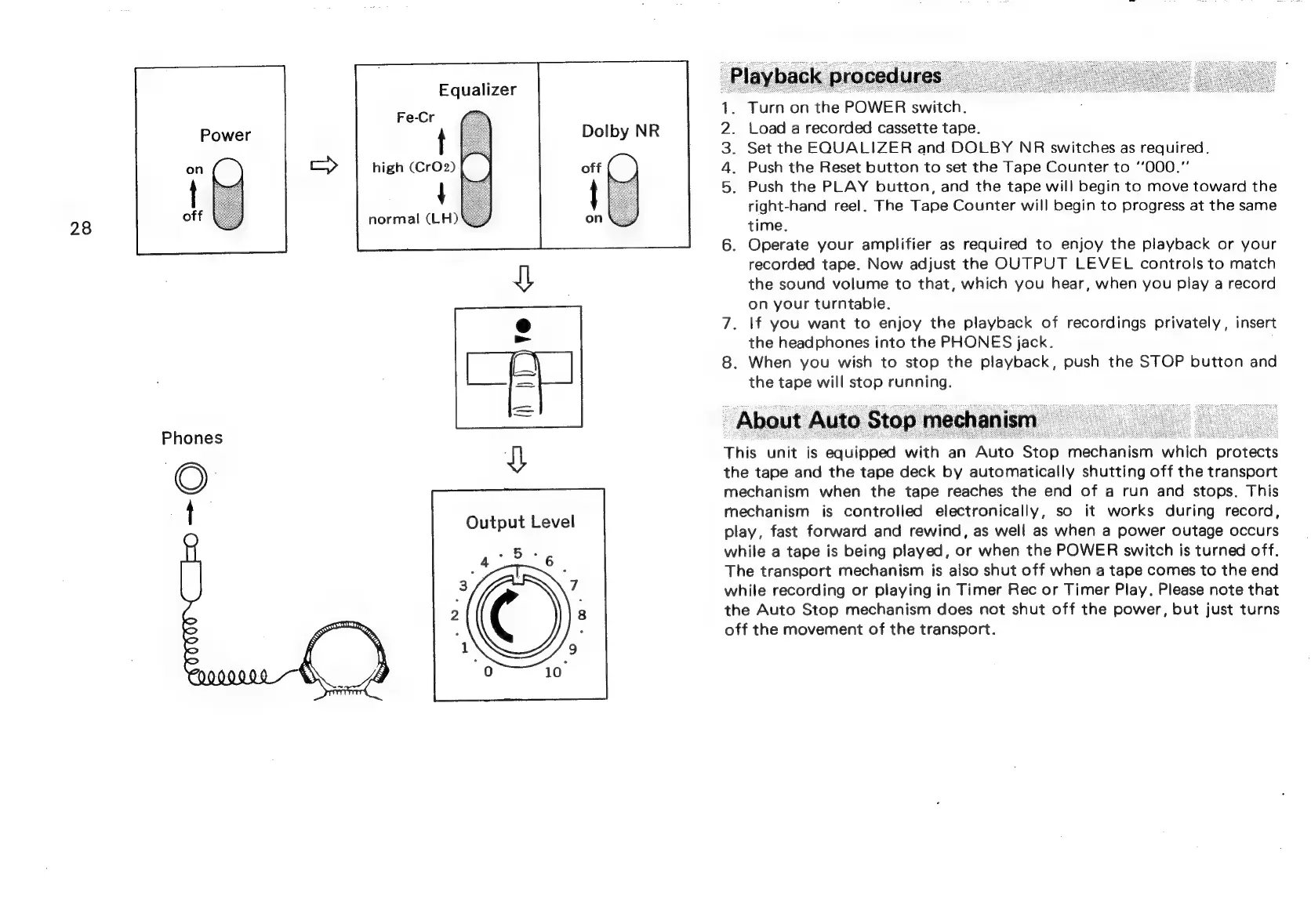
28
Phones
Equalizer
Fe-Cr
t
high
(CrO2)
{
normal
(LH)
\
Output
Level
Dolby
NR
.
Load
a
recorded
cassette
tape.
.
Set
the
EQUALIZER
and
DOLBY
NR
switches
as
required.
.
Push
the
Reset
button
to
set
the
Tape
Counter
to
*‘000."
.
Push
the
PLAY
button,
and
the
tape
will
begin
to
move
toward
the
right-hand
reel.
The
Tape
Counter
will
begin
to
progress
at
the
same
time.
.
Operate
your
amplifier
as
required
to
enjoy
the
playback
or
your
recorded
tape.
Now
adjust
the
OUTPUT
LEVEL
controls
to
match
the
sound
volume
to
that,
which
you
hear,
when
you
play
a
record
on
your
turntable.
7.
If
you
want
to
enjoy
the
playback
of
recordings
privately,
insert
the
headphones
into
the
PHONES
jack.
8.
When
you
wish
to
stop
the
playback,
push
the
STOP
button
and
the
tape
will
stop
running.
About
Auto
Stop
mechanism
This
unit
is
equipped
with
an
Auto
Stop
mechanism
which
protects
the
tape
and
the
tape
deck
by
automatically
shutting
off
the
transport
mechanism
when
the
tape
reaches
the
end
of
a
run
and
stops.
This
mechanism
is
controlled
electronically,
so
it
works
during
record,
play,
fast
forward
and
rewind,
as
well
as
when
a
power
outage
occurs
while
a
tape
is
being
played,
or
when
the
POWER
switch
is
turned
off.
The
transport
mechanism
is
also
shut
off
when
a
tape
comes
to
the
end
while
recording
or
playing
in
Timer
Rec
or
Timer
Play.
Please
note
that
the
Auto
Stop
mechanism
does
not
shut
off
the
power,
but
just
turns
off
the
movement
of
the
transport.

Related product manuals