EasyManua.ls Logo

Sansui SC-5100 - Recording; How to Record Audio; Microphone Recording Guide

Sansui SC-5100
49 pages
Print Icon
To Next Page IconTo Next Page
To Previous Page IconTo Previous Page
Loading...
30
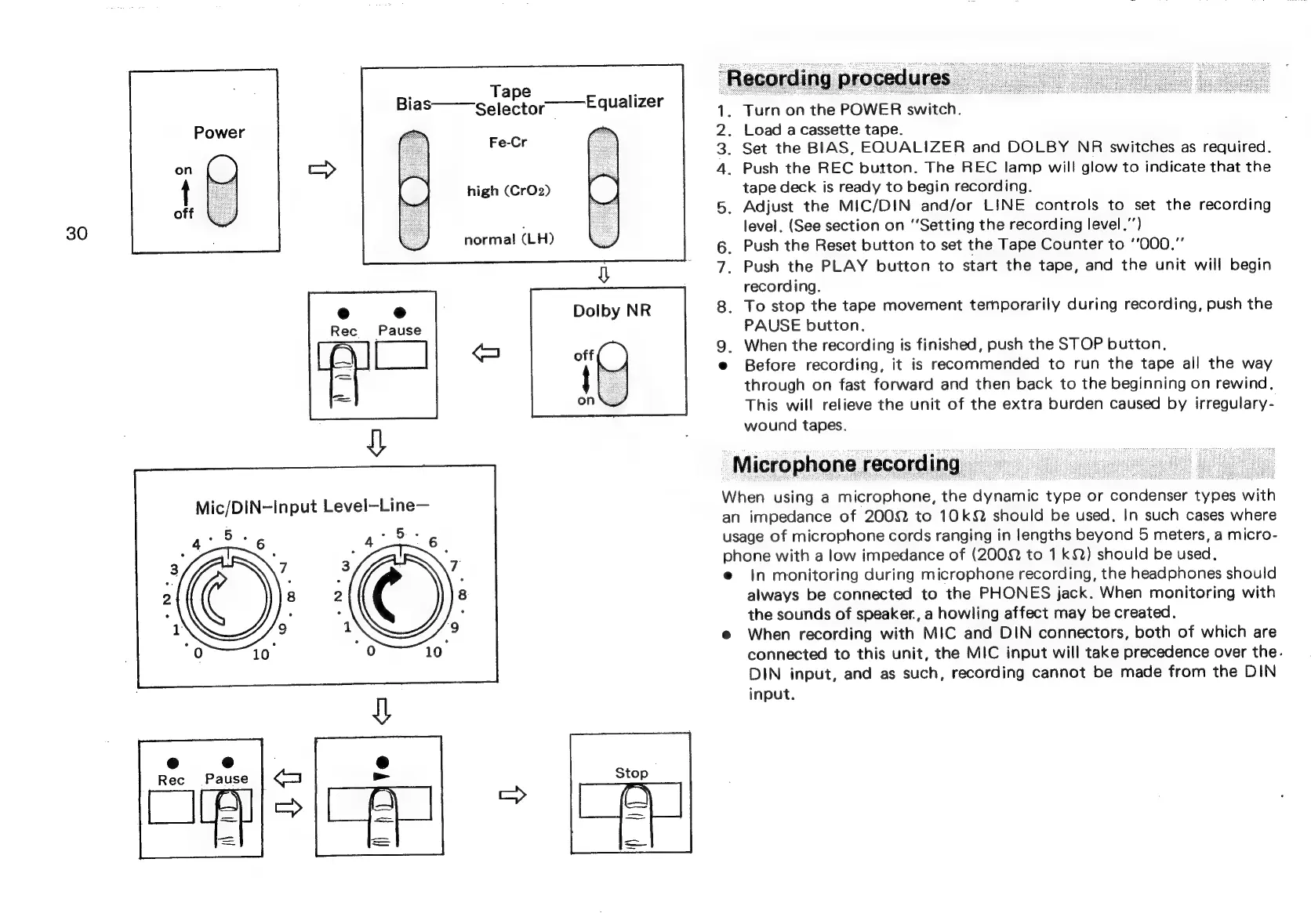
Tape
;
Bias——gelector——Equalizer
Fe-Cr
high
(CrO2)
normal
(LH)
1.
2.
Load
a
cassette
tape.
3.
Set
the
BIAS,
EQUALIZER
and
DOLBY
NR
switches
as
required.
4.
Push
the
REC
button.
The
REC
lamp
will
glow
to
indicate
that
the
tape
deck
is
ready
to
begin
recording.
5.
Adjust
the
MIC/DIN
and/or
LINE
controls
to
set
the
recording
level.
(See
section
on
“Setting
the
recording
level.”’)
6.
Push
the
Reset
button
to
set
the
Tape
Counter
to
‘’000.”’
7.
Push
the
PLAY
button
to
start
the
tape,
and
the
unit
will
begin
recording.
8.
To
stop
the
tape
movement
ternporarily
during
recording,
push
the
PAUSE
button.
9.
When
the
recording
is
finished,
push
the
STOP
button,
@
Before
recording,
it
is
recommended
to
run
the
tape
all
the
way
through
on
fast
forward
and
then
back
to
the
beginning
on
rewind.
This
will
relieve
the
unit
of
the
extra
burden
caused
by
irregulary-
wound
tapes.
Microphone
recording
=
When
using
a
microphone,
the
dynamic
type
or
condenser
types
with
an
impedance
of
2002
to
10k
should
be
used,
In
such
cases
where
usage
of
microphone
cords
ranging
in
lengths
beyond
5
meters,
a
micro-
phone
with
a
low
impedance
of
(2002
to
1k)
should
be
used,
e
In
monitoring
during
microphone
recording,
the
headphones
should
always
be
connected
to
the
PHONES
jack.
When
monitoring
with
the
sounds
of
speaker.,
a
howling
affect
may
be
created.
@
When
recording
with
MIC
and
DIN
connectors,
both
of
which
are
connected
to
this
unit,
the
MIC
input
will
take
precedence
over
the.
DIN
input,
and
as
such,
recording
cannot
be
made
from
the
DIN
input.

Related product manuals