EasyManua.ls Logo

Sansui SC-5100 - MEMORY Switch

Sansui SC-5100
49 pages
Print Icon
To Next Page IconTo Next Page
To Previous Page IconTo Previous Page
Loading...
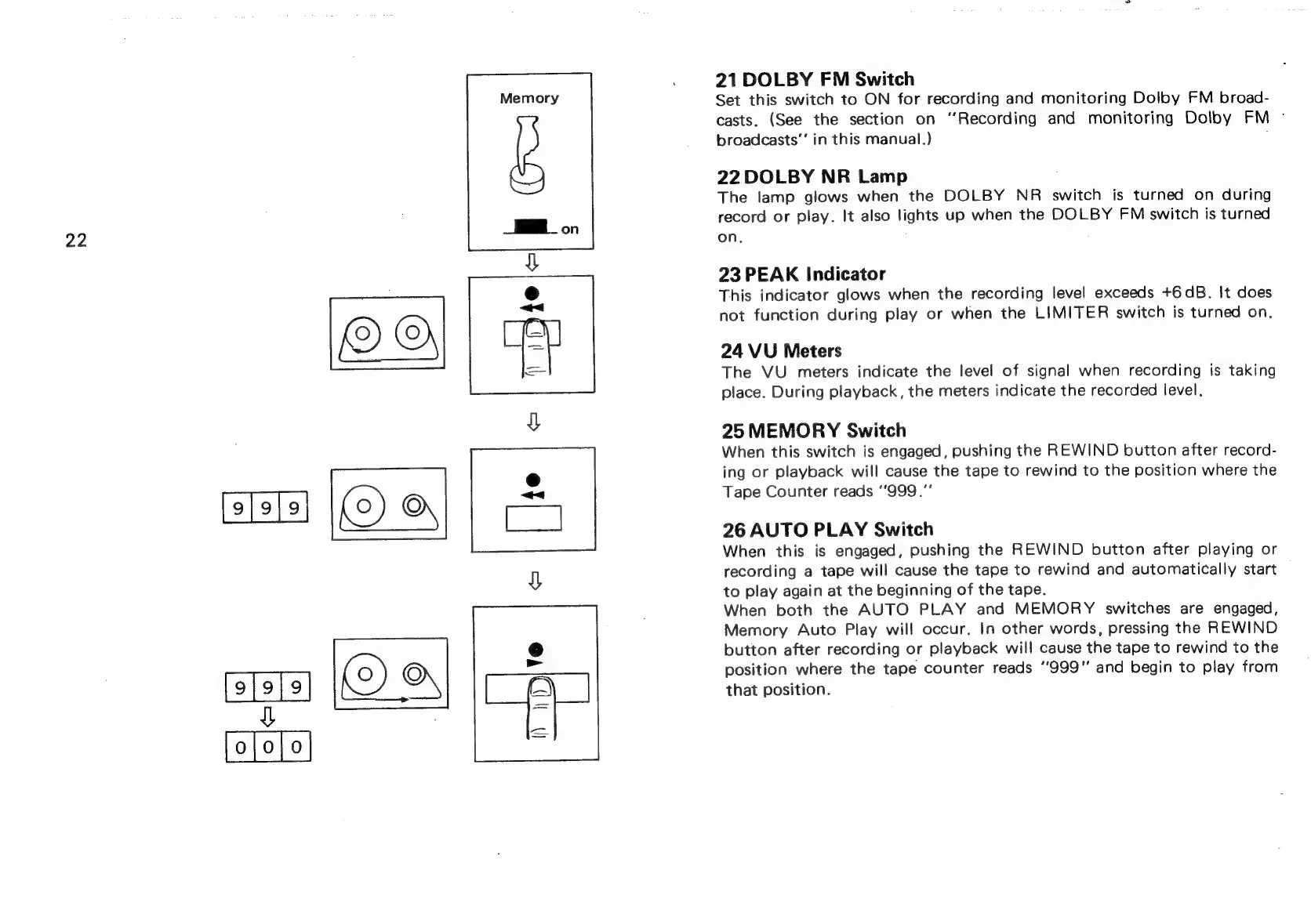
22
Memory
Eon
21
DOLBY
FM
Switch
Set
this
switch
to
ON
for
recording
and
monitoring
Dolby
FM
broad-
casts,
(See
the
section
on
‘Recording
and
monitoring
Dolby
FM
°
broadcasts’
in
this
manual.)
22
DOLBY
NR
Lamp
The
lamp
glows
when
the
DOLBY
NR
switch
is
turned
on
during
record
or
play.
It
also
lights
up
when
the
DOLBY
FM
switch
is
turned
on.
23
PEAK
Indicator
This
indicator
glows
when
the
recording
level
exceeds
+6dB.
It
does
not
function
during
play
or
when
the
LIMITER
switch
is
turned
on.
24
VU
Meters
The
VU
meters
indicate
the
level
of
signal
when
recording
is
taking
place.
During
playback,
the
meters
indicate
the
recorded
level.
25
MEMORY
Switch
When
this
switch
is
engaged,
pushing
the
REWIND
button
after
record-
ing
or
playback
will
cause
the
tape
to
rewind
to
the
position
where
the
Tape
Counter
reads
‘999."
26
AUTO
PLAY
Switch
When
this
is
engaged,
pushing
the
REWIND
button
after
playing
or
recording
a
tape
will
cause
the
tape
to
rewind
and
automatically
start
to
play
again
at
the
beginning
of
the
tape.
When
both
the
AUTO
PLAY
and
MEMORY
switches
are
engaged,
Memory
Auto
Play
will
occur,
In
other
words,
pressing
the
REWIND
button
after
recording
or
playback
will
cause
the
tape
to
rewind
to
the
position
where
the
tape
counter
reads
‘'999"’
and
begin
to
play
from
that
position.

Related product manuals