EasyManua.ls Logo

Sansui SC-5100 - Advanced Recording and Playback; Mixing Audio Sources and Setting Levels

Sansui SC-5100
49 pages
Print Icon
To Next Page IconTo Next Page
To Previous Page IconTo Previous Page
Loading...
32
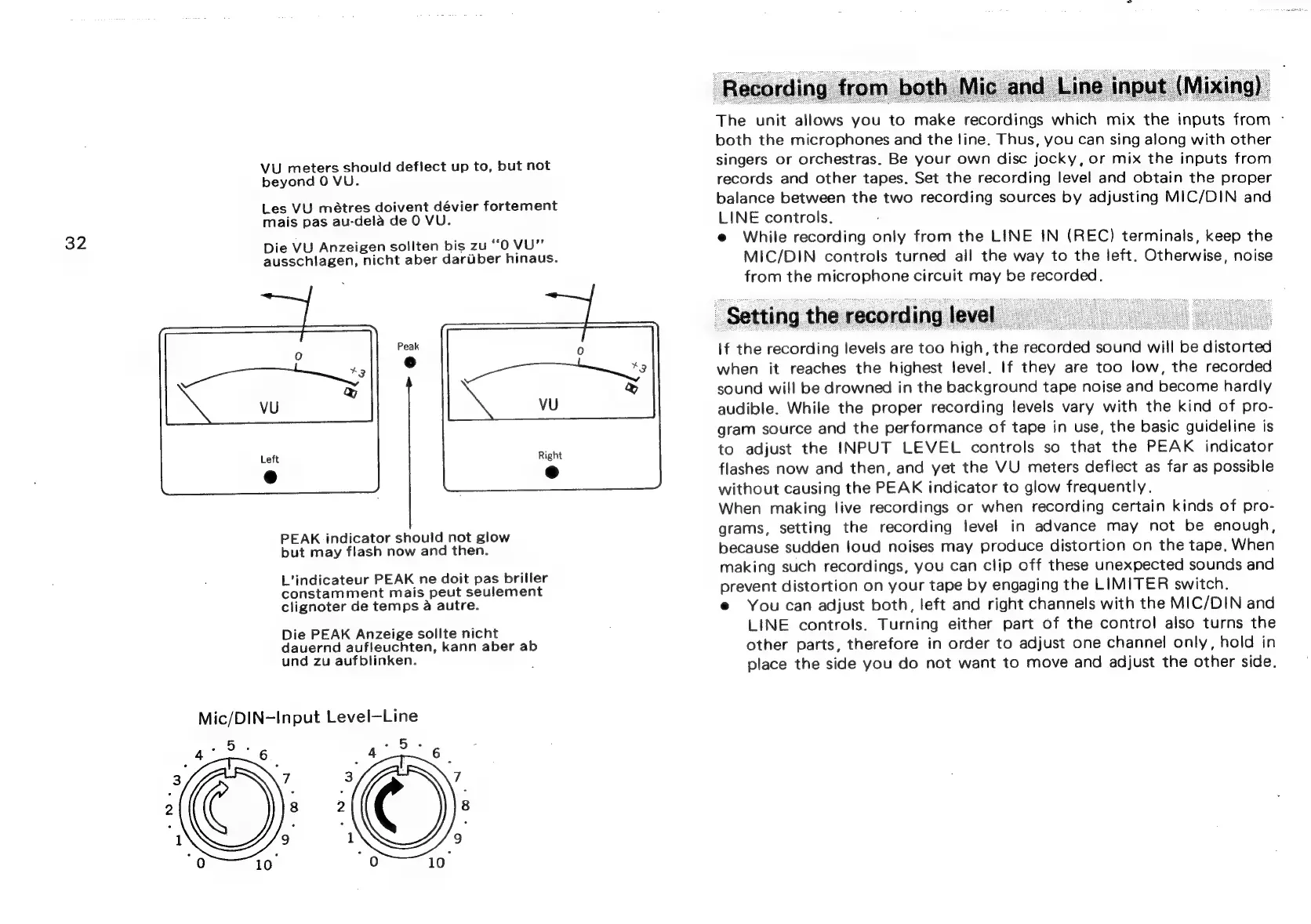
VU
meters
should
deflect
up
to,
but
not
beyond
0
VU.
Les
VU
métres
doivent
dévier
fortement
mais
pas
au-dela
de
0
VU.
Die
VU
Anzeigen
sollten
bis
zu
‘‘O
VU”’
ausschlagen,
nicht
aber
dariber
hinaus.
PEAK
indicator
should
not
glow
but
may
flash
now
and
then.
L’indicateur
PEAK
ne
doit
pas
briller
constamment
mais
peut
seulement
clignoter
de
temps
a
autre.
Die
PEAK
Anzeige
sollte
nicht
dauernd
aufleuchten,
kann
aber
ab
und
zu
aufblinken.
Mic/DIN-Input
Level—Line
The
unit
allows
you
to
make
recordings
which
mix
the
inputs
from
-
both
the
microphones
and
the
line.
Thus,
you
can
sing
along
with
other
singers
or
orchestras.
Be
your
own
disc
jocky,
or
mix
the
inputs
from
records
and
other
tapes.
Set
the
recording
level
and
obtain
the
proper
balance
between
the
two
recording
sources
by
adjusting
MIC/DIN
and
LINE
controls.
e
While
recording
only
from
the
LINE
IN
(REC)
terminals,
keep
the
MIC/DIN
controls
turned
all
the
way
to
the
left.
Otherwise,
noise
from
the
microphone
circuit
may
be
recorded.
Setting
the
recording
level
if
the
recording
levels
are
too
high,
the
recorded
sound
will
be
distorted
when
it
reaches
the
highest
level.
If
they
are
too
low,
the
recorded
sound
will
be
drowned
in
the
background
tape
noise
and
become
hardly
audible.
While
the
proper
recording
levels
vary
with
the
kind
of
pro-
gram
source
and
the
performance
of
tape
in
use,
the
basic
guideline
is
to
adjust
the
INPUT
LEVEL
controls
so
that
the
PEAK
indicator
flashes
now
and
then,
and
yet
the
VU
meters
deflect
as
far
as
possible
without
causing
the
PEAK
indicator
to
glow
frequently.
When
making
live
recordings
or
when
recording
certain
kinds
of
pro-
grams,
setting
the
recording
level
in
advance
may
not
be
enough,
because
sudden
loud
noises
may
produce
distortion
on
the
tape,
When
making
such
recordings,
you
can
clip
off
these
unexpected
sounds
and
prevent
distortion
on
your
tape
by
engaging
the
LIMITER
switch.
e
You
can
adjust
both,
left
and
right
channels
with
the
MIC/DIN
and
LINE
controls.
Turning
either
part
of
the
control
also
turns
the
other
parts,
therefore
in
order
to
adjust
one
channel
only,
hold
in
place
the
side
you
do
not
want
to
move
and
adjust
the
other
side.

Related product manuals