10
Note: Please follow the following steps to connect the generator:
Activate the generator and wait until the operation is stable
before supplying power of the generator to the UPS (be
sure that the UPS is in idle mode). Then turn on the UPS
according to the start-up procedure. After the UPS is turned
on, then the loads can be connected to the UPS one by
one.
The power capacity of the AC generator should be at least
twice of the UPS capacity.
2. Battery mode
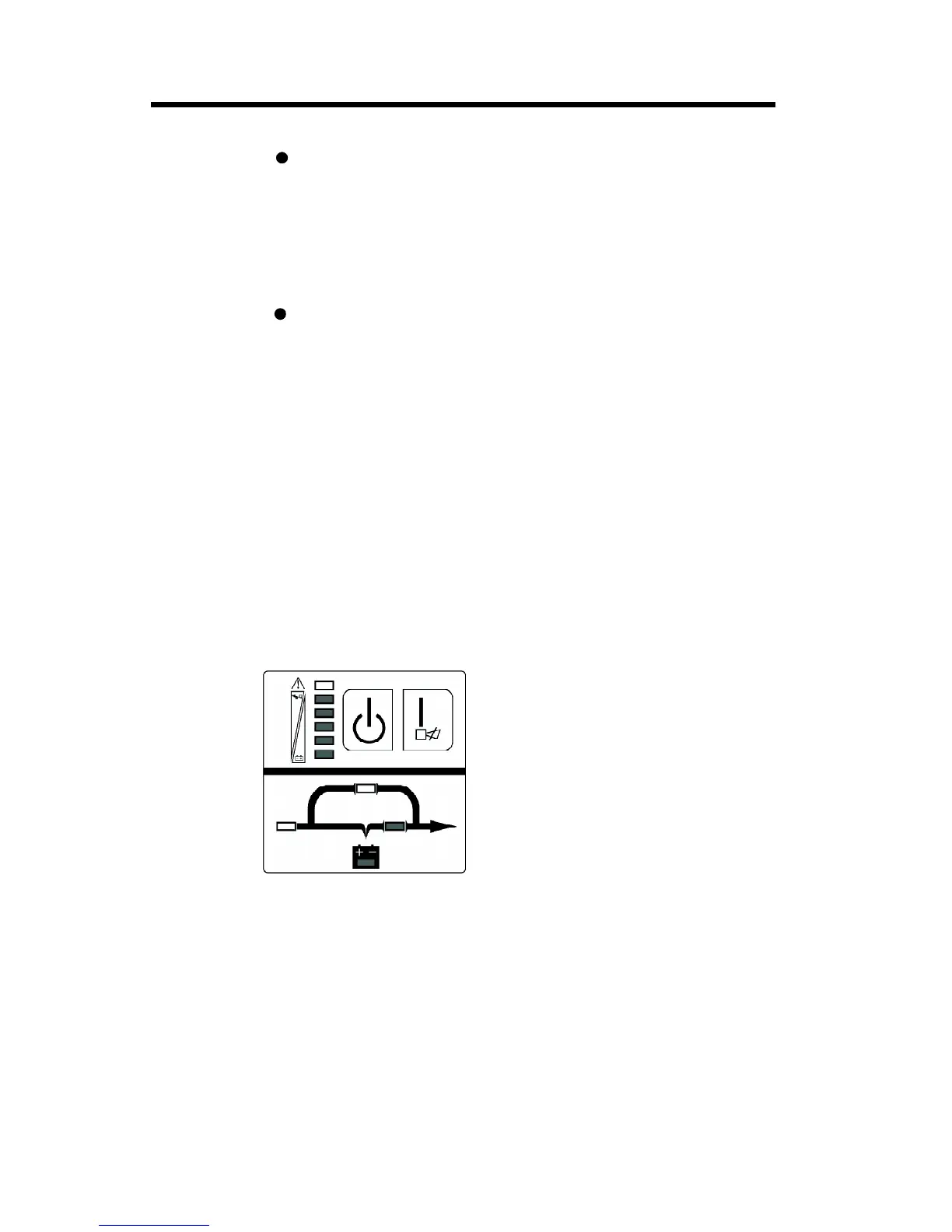
The display panel in battery mode is shown in the following dia-
gram Fig.3-2. The battery LED and the INV LED are turned on. The
displayed number of the battery level LEDs will be turned on in
accordance with the battery capacity. Note that the load level LEDs
in utility power mode will indicate the level of the battery capacity in
battery mode instead.
1) When the UPS is running in battery mode, the buzzer beeps once
every 4 seconds. If the “ON” button on the front panel is pressed
for more than 1 second again, the buzzer will stop beeping (in
silence mode). Press the “ON” button once again for more than
1 second to resume the alarm function.
Fig 3-2 Battery mode diagram
2) When the battery capacity decreases, the number of the battery
capacity LEDs turned on will be reduced. If the battery voltage
descends to the alarm level, the buzzer will beep once every
second to remind users of in sufficient battery capacity and the
UPS is soon going to shut down automatically. Then the load
operations should be carried out promptly and the loads should
be eliminated one by one.
3. Operation and Operating mode



 To Next Page