5
STEP 1 Attach TV Bracket to TV
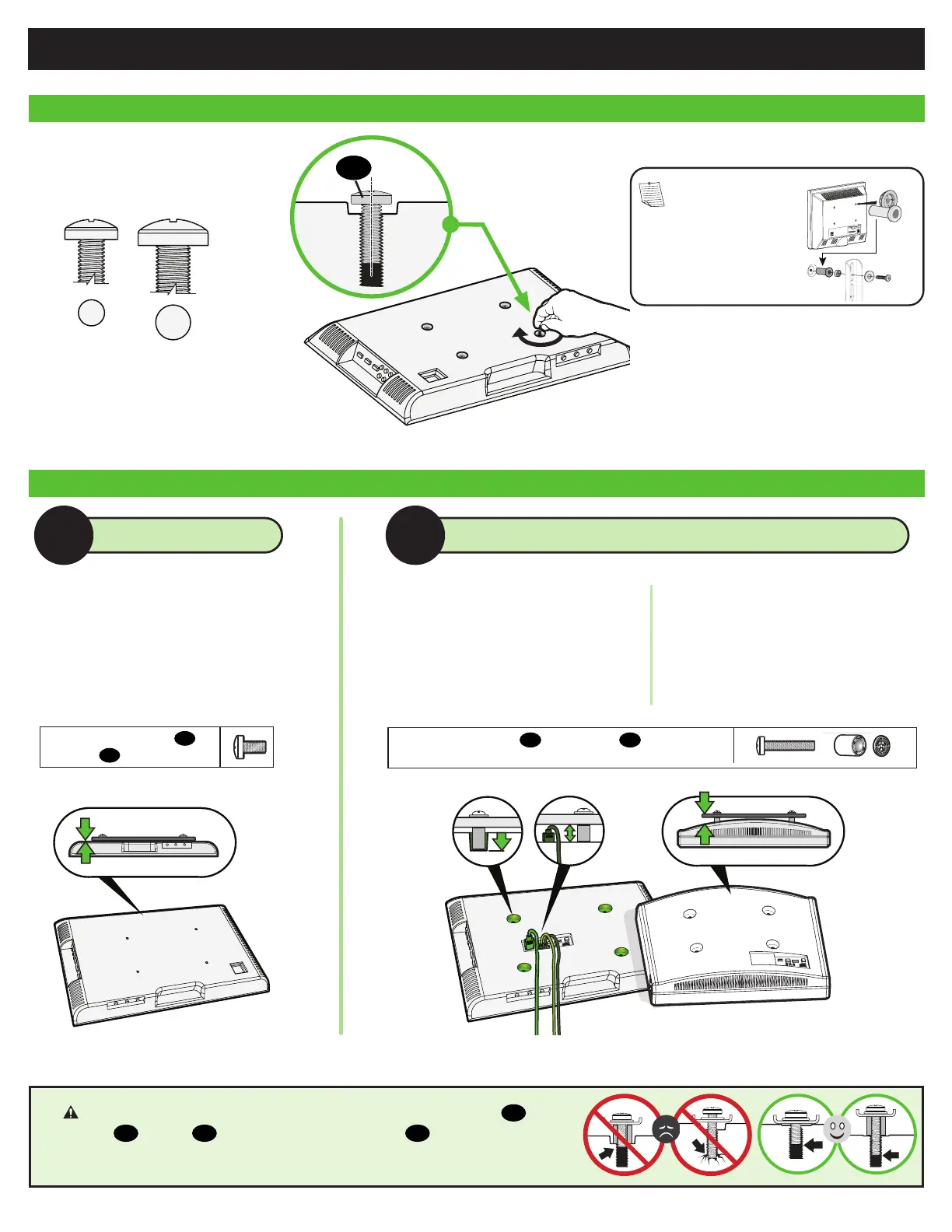
1.2 Select TV Screw Length and Spacers
NO SPACER SPACER NEEDED
A
B
1.1 Select TV Screw Diameter
Only one screw size fits your TV.
M6
M8
01
NOTE: If your TV
included inset spacers
or adapters, use them
UNDER the mount
hardware.
• Flat Back TV
[TV brackets lay flat on your TV]
Use short TV screws
01
.
Spacers
03
not needed.
Use long TV screws
01
and spacers
03
to create
extra space between the TV and TV bracket.
• Flat Back TV with extra space needed
[for deep inset holes or cable interference]
• Rounded or Irregular Back TV
[TV brackets NOT resting flat on your TV]
CAUTION: Verify adequate thread engagement with your screw
01
,
washer
02
, spacer
03
combination AND TV bracket
04
.
— Too short will not hold your TV. — Too long will damage your TV.


 To Next Page