EasyManua.ls Logo

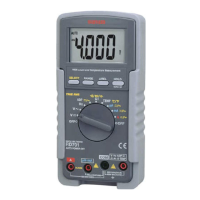
Sanwa PC700 - User Manual

Sanwa PC700
31 pages
Print Icon
To Next Page IconTo Next Page
Loading...
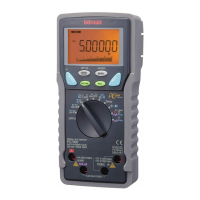
PC700
DIGITAL MULTIMETER
INSTRUCTION MANUAL
Question and Answer IconNeed help?

Do you have a question about the Sanwa PC700 and is the answer not in the manual?

Summary

User Safety Precautions

Explanation of Warning Symbols

Explains the meaning of symbols used in the manual and on the product.

Warning Instructions for Safe Use

Provides crucial warnings for safe operation and to prevent hazards.

Applications and Features Overview

Applications

Describes the intended uses and applications of the digital multimeter.

Features

Lists the key features and capabilities of the digital multimeter.

Digital Multimeter Parts Identification

Multimeter and Test Leads

Identifies the physical parts of the multimeter and its associated test leads.

Multimeter Display Layout

Details the different indicators and segments of the multimeter's LCD display.

Digital Multimeter Functions Explained

Power and Function Selection

Explains how to operate the power switch and select measurement functions.

Auto Power Saving Feature

Describes the auto power saving feature and how to re-activate the meter.

Low Battery Indicator

Explains the low battery indicator and when to replace the battery.

Selecting Measurement Functions

Details how to select different measurement functions using the SELECT button.

Manual Range Hold

Explains how to manually set the measurement range and resume auto-ranging.

Data Hold Function

Describes how to freeze the current reading on the display.

Beeper Control Settings

Explains how to enable or disable the beeper function.

PC Interface and Data Logging

Describes the interface for connecting the meter to a PC for data transfer.

Test Lead Connection Warnings

Explains the warning system for incorrect test lead connections.

Relative Measurement Mode

Details how to activate and use the relative measurement mode.

Technical Terms and Definitions

Defines technical terms used in the manual, like RMS.

Measurement Procedures

Pre-operational Check

Outlines the steps for performing a safety check before using the meter.

AC Voltage and Frequency Measurement

Explains how to measure AC voltage and frequency concurrently.

DC Voltage Measurement Guide

Details the procedure for measuring DC voltage.

DC Millivolt Measurement

Explains how to measure low DC voltages in millivolts.

AC Millivolt and Frequency Measurement

Describes measuring AC voltage (mV) and frequency simultaneously.

Resistance Measurement Procedure

Details the procedure for measuring resistance.

Continuity Check Function

Explains how to perform a continuity test, including the audible beep function.

Capacitance and Diode Testing

Covers the procedures for measuring capacitance and testing diodes.

Current (mA;µA) Measurement

Details procedures for measuring DC/AC current in mA and µA ranges.

Current (A) Measurement

Explains how to measure DC/AC current in Ampere ranges.

CL-20 D Clamp Probe for AC Current

Describes using the CL-20D clamp probe for AC current measurements.

CL-22 AD & CL-33 D Clamp Probes

Details the use of CL-22AD and CL-33D clamp probes for AC/DC current.

T-300 PC Temperature Probe Use

Explains how to use the T-300PC temperature probe with the multimeter.

Instrument Maintenance

Basic Inspection and Test Lead Check

Covers visual inspection of the meter and test leads for damage.

Battery and Fuse Replacement Guide

Provides instructions for replacing the battery and fuses safely.

Proper Storage Guidelines

Offers guidelines for proper storage of the instrument to maintain its condition.

After-Sales Service and Support

Product Warranty Information

Outlines the terms and conditions of the product's warranty.

Requesting Product Repair

Details the process and information required for requesting product repair.

Sanwa Contact Information

Provides contact information via the official Sanwa website and email.

Technical Specifications

General Specifications Overview

Lists general specifications like safety compliances, dimensions, and power source.

Detailed Measuring Ranges and Accuracy

Details the specific measuring ranges and accuracy for various functions.

Summary

User Safety Precautions

Explanation of Warning Symbols

Explains the meaning of symbols used in the manual and on the product.

Warning Instructions for Safe Use

Provides crucial warnings for safe operation and to prevent hazards.

Applications and Features Overview

Applications

Describes the intended uses and applications of the digital multimeter.

Features

Lists the key features and capabilities of the digital multimeter.

Digital Multimeter Parts Identification

Multimeter and Test Leads

Identifies the physical parts of the multimeter and its associated test leads.

Multimeter Display Layout

Details the different indicators and segments of the multimeter's LCD display.

Digital Multimeter Functions Explained

Power and Function Selection

Explains how to operate the power switch and select measurement functions.

Auto Power Saving Feature

Describes the auto power saving feature and how to re-activate the meter.

Low Battery Indicator

Explains the low battery indicator and when to replace the battery.

Selecting Measurement Functions

Details how to select different measurement functions using the SELECT button.

Manual Range Hold

Explains how to manually set the measurement range and resume auto-ranging.

Data Hold Function

Describes how to freeze the current reading on the display.

Beeper Control Settings

Explains how to enable or disable the beeper function.

PC Interface and Data Logging

Describes the interface for connecting the meter to a PC for data transfer.

Test Lead Connection Warnings

Explains the warning system for incorrect test lead connections.

Relative Measurement Mode

Details how to activate and use the relative measurement mode.

Technical Terms and Definitions

Defines technical terms used in the manual, like RMS.

Measurement Procedures

Pre-operational Check

Outlines the steps for performing a safety check before using the meter.

AC Voltage and Frequency Measurement

Explains how to measure AC voltage and frequency concurrently.

DC Voltage Measurement Guide

Details the procedure for measuring DC voltage.

DC Millivolt Measurement

Explains how to measure low DC voltages in millivolts.

AC Millivolt and Frequency Measurement

Describes measuring AC voltage (mV) and frequency simultaneously.

Resistance Measurement Procedure

Details the procedure for measuring resistance.

Continuity Check Function

Explains how to perform a continuity test, including the audible beep function.

Capacitance and Diode Testing

Covers the procedures for measuring capacitance and testing diodes.

Current (mA;µA) Measurement

Details procedures for measuring DC/AC current in mA and µA ranges.

Current (A) Measurement

Explains how to measure DC/AC current in Ampere ranges.

CL-20 D Clamp Probe for AC Current

Describes using the CL-20D clamp probe for AC current measurements.

CL-22 AD & CL-33 D Clamp Probes

Details the use of CL-22AD and CL-33D clamp probes for AC/DC current.

T-300 PC Temperature Probe Use

Explains how to use the T-300PC temperature probe with the multimeter.

Instrument Maintenance

Basic Inspection and Test Lead Check

Covers visual inspection of the meter and test leads for damage.

Battery and Fuse Replacement Guide

Provides instructions for replacing the battery and fuses safely.

Proper Storage Guidelines

Offers guidelines for proper storage of the instrument to maintain its condition.

After-Sales Service and Support

Product Warranty Information

Outlines the terms and conditions of the product's warranty.

Requesting Product Repair

Details the process and information required for requesting product repair.

Sanwa Contact Information

Provides contact information via the official Sanwa website and email.

Technical Specifications

General Specifications Overview

Lists general specifications like safety compliances, dimensions, and power source.

Detailed Measuring Ranges and Accuracy

Details the specific measuring ranges and accuracy for various functions.

Sanwa PC700 Specifications

General IconGeneral
TypeDigital Multimeter
Diode TestYes
Data HoldYes
Relative ValueYes
Continuity CheckYes
Auto Power OffYes
Safety StandardIEC61010 CAT.III 600V / CAT.II 1000V

Related product manuals