EasyManua.ls Logo

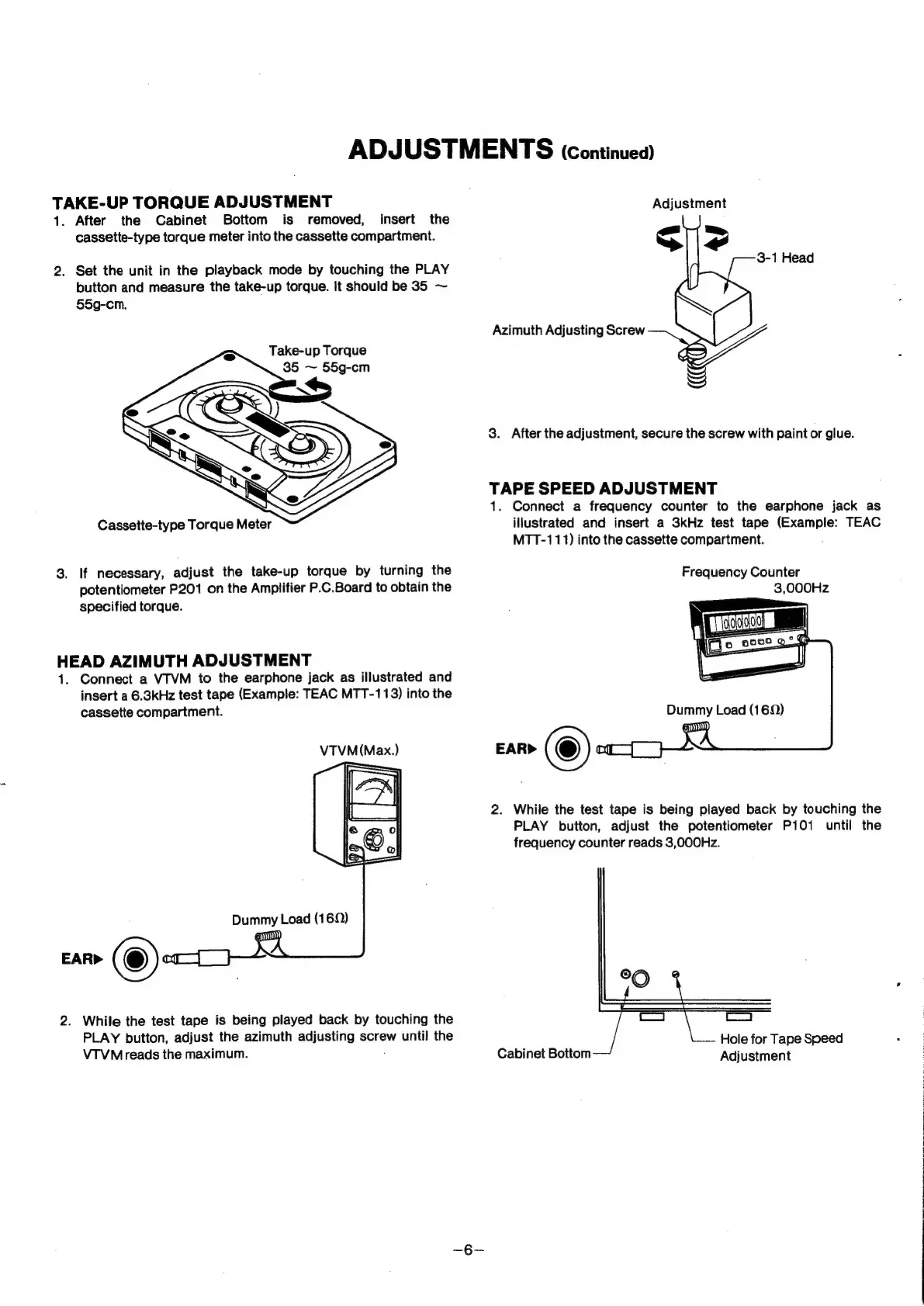
Sanyo TRC9010 - Tape Speed Adjustment

Sanyo TRC9010
22 pages
Print Icon
To Next Page IconTo Next Page
To Previous Page IconTo Previous Page
Loading...
ADJUSTMENTS
(continued)
TAKE-UP
TORQUE
ADJUSTMENT
1.
After
the
Cabinet
Bottom
is
removed,
insert
the
cassette-type
torque
meter
into
the
cassette
compartment.
2.
Set
the
unit
in
the
playback
mode
by
touching
the
PLAY
button
and
measure
the
take-up
torque.
it
should
be
35
~
§5g-cm.
Take-up
Torque
Cassette-type
Torque
Meter
3.
If
necessary,
adjust
the
take-up
torque
by
turning
the
potentiometer
P201
on
the
Amplifier
P.C.Board
to
obtain
the
specified
torque.
HEAD
AZIMUTH
ADJUSTMENT
1.
Connect
a
VTVM
to
the
earphone
jack
as
illustrated
and
insert
a
6.3kHz
test
tape
(Example:
TEAC
MTT-113)
into
the
cassette
compartment.
VTVM(Max.)
2.
While
the
test
tape
is
being
played
back
by
touching
the
PLAY
button,
adjust
the
azimuth
adjusting
screw
until
the
VTVM
reads
the
maximum.
Adjustment
Sie
3-1
Head
Azimuth
Adjusting
Screw
S
3.
After
the
adjustment,
secure
the
screw
with
paint
or
glue.
TAPE
SPEED
ADJUSTMENT
1.
Connect
a
frequency
counter
to
the
earphone
jack
as
illustrated
and
insert
a
3kHz
test
tape
prams:
TEAC
MTT-111)
into
the
cassette
compartment.
Frequency
Counter
3,000Hz
2.
While
the
test
tape
is
being played
back
by
touching
the
PLAY
button,
adjust
the
potentiometer
P101
until
the
frequency
counter
reads
3,Q000Hz.
re)
|
Cc
C4
Hole
for
Tape
Speed
Cabinet
Bottom
Adjustment