Instruction Manual for MiniTRACE CSDF
--------------------------------------------------------------------------------------------------------------------------------------------------------------------------------------------------------------------------------------------------------------------------------------------------------------------------
--------------------------------------------------------------------------------------------------------------------------------------------------------------------------------------------------------------------------------------------------------------------------------------------------------------------------
Page 20 08/2012
Step 2: Food measurement
The measurement result is always given in “Bq/L”. For a result in “Bq/kg” you will need to
carry out two steps:
1. Weigh the food. To do so, subtract the weight of the measurement cup (0.148 kg)
from the total weight.
2. Convert the result from “Bq/L” into “Bq/kg”.
Formula:
[ ]
[ ]
[ ]
L 0.6 Saphymo from cupt measuremen theof Volume*
[kg] food solid of Net weight
Bq/Lfood theofresult t Measuremen
Bq/kgActivity =
Example:
The net weight of the 0.6 L chopped food sample is 1.2 kg, and the result of the food
measurement was 800 Bq/L.
gBq/k400kg0.6*
L1.2
Bq/L800
Bq/kg ==
• Fill the measurement cup with the food, taking care to reach an exact capacity of
0.6 L by filling precisely to the measuring line in the cup!
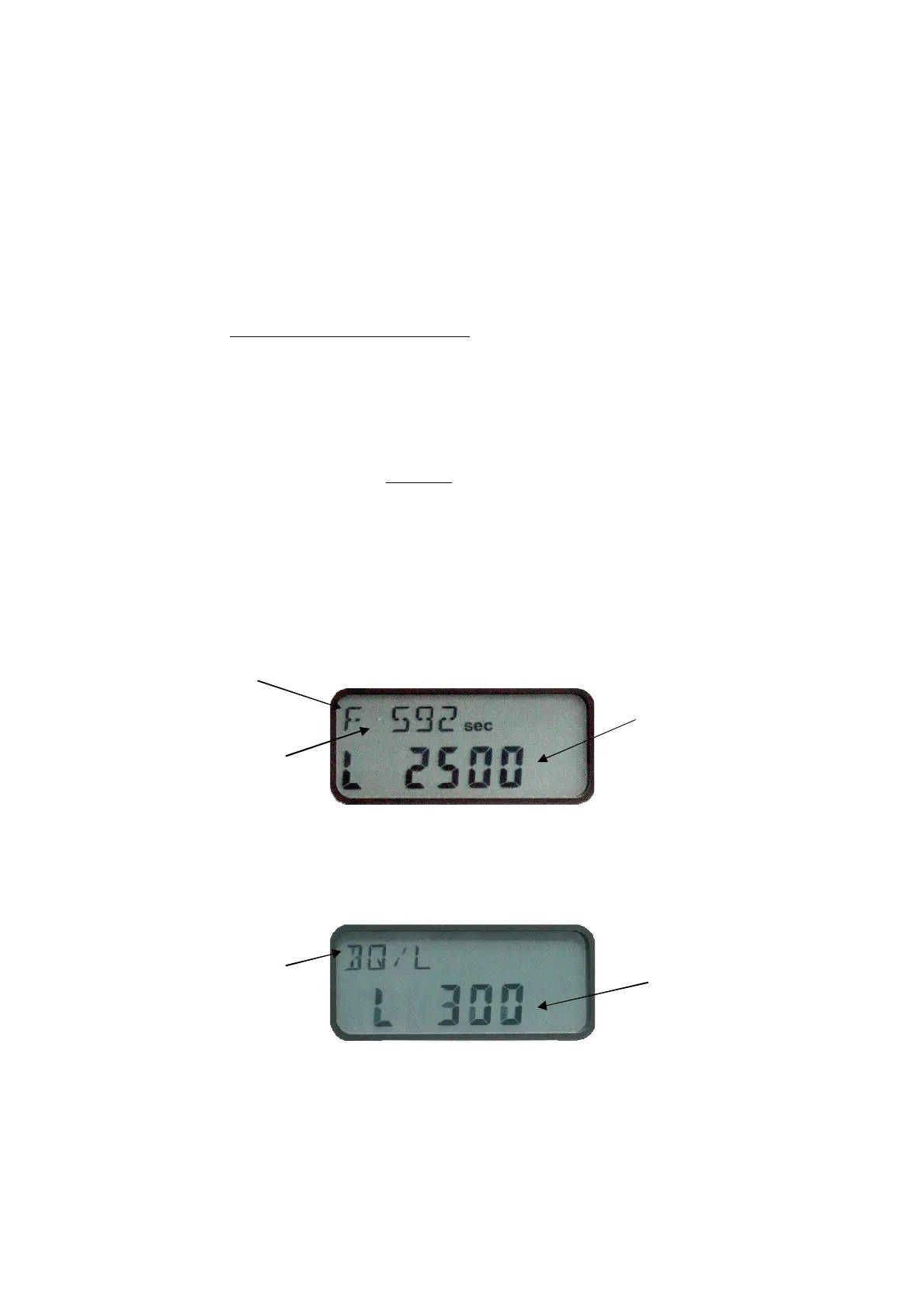
• Start the measurement of the sample (food) by pressing the mode button. After
approx. 1 minute (“Wait - - - - -“ is displayed) measurement starts automatically. In the
display the remaining measurement time (in seconds) is given as well as the possible
measurement limit (e.g. L2500) that can be achieved.
Figure 14: Display in the “Food” menu
• The end of the measurement will be indicated by a beep and in the display the result
given in “Bq/L”.
Figure 15: Result display in the “Food” menu
• The mode button enables the user to cancel the measurement and go back to the
menu.
• After the end of measurement or canceling of the menu you can start another
measurement by pressing the mode button again. If the measurement result is higher
than 500 Bq/L, a result is given on the display. If the result measurement is lower
Remaining
measurement
time
Limit
(L = LOWER THAN)
that can be achieved
(e. g. 2,500 Bq/L)
F = Food
measurement
Measurement
unit
Limit
(L = LOWER THAN)
that can be achieved
(e. g. 300 Bq/L)


 To Next Page