39
The Sapling Company, Inc.
670 Louis Drive
Warminster, PA 18974
USA
P. (+1) 215.322.6063
F. (+1) 215.322.8498
www.sapling-inc.com
39
The Sapling Company, Inc.
670 Louis Drive
Warminster, PA 18974
USA
P. (+1) 215.322.6063
F. (+1) 215.322.8498
www.sapling-inc.com
User Input Installation (3300 Only)
(IMPORTANT: Detach clock from power source before
installing new circuitry. DO NOT add new circuitry while
the clock is operating)
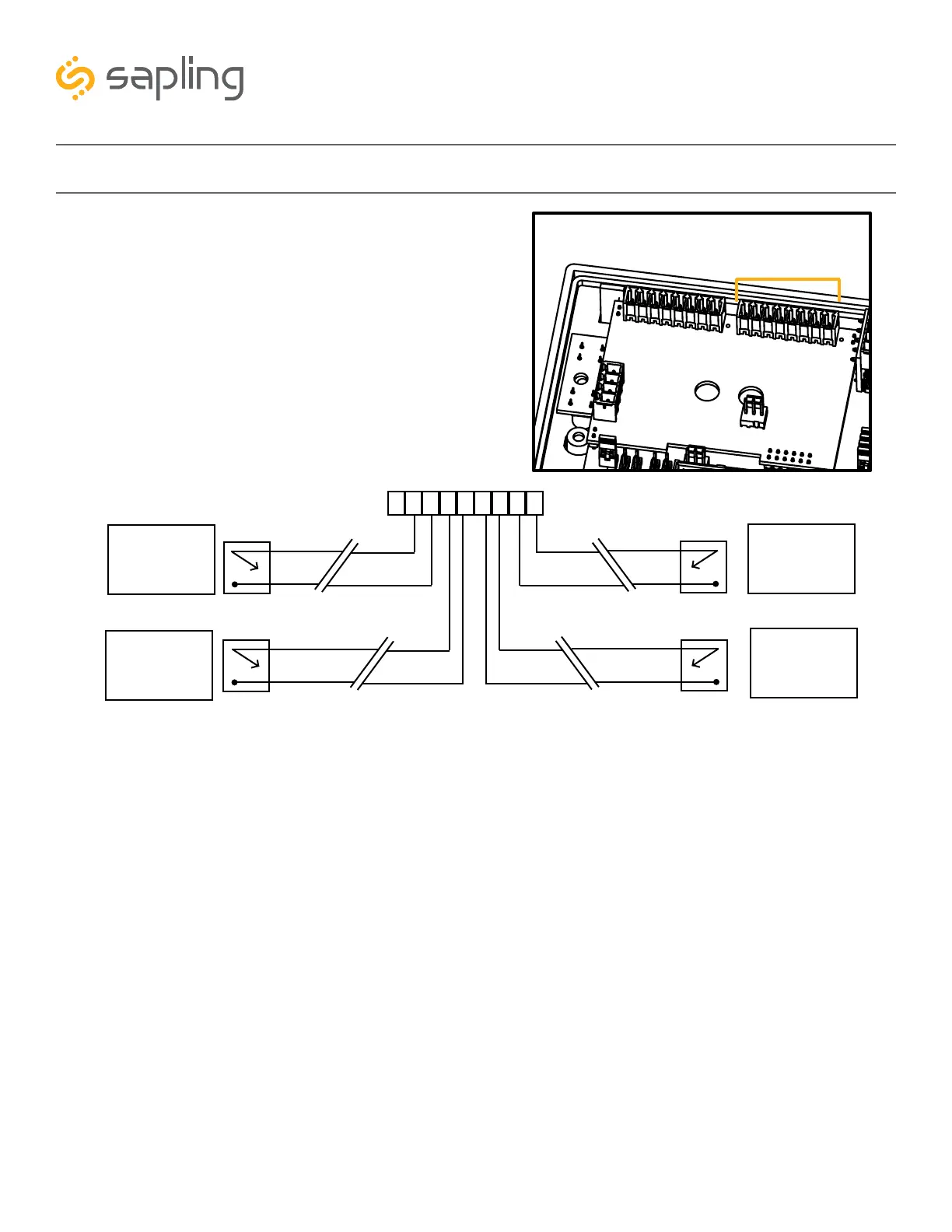
During installation, there is one port blocks mentioned.
The block on the upper-right will be called J2. Refer to
the diagram on the right for details. The four available
inputs are assigned per the diagram below.
1
9
J2
J2-
1
2
3
4
5
6
7 8
9
Input 1
(Dry Contact
Closure)
Input 2
(Dry Contact
Closure)
Input 3
(Dry Contact
Closure)
Input 4
(Dry Contact
Closure)
Relay
N.O.
Relay
N.O.
COM
COM
N.O.
COM
N.O.
COM
Relay
Relay
Use a dry contact closure between any of the two lines shown above to activate one of the numbered user
inputs. This input is a dry contact closure, which means that the user should not be providing external
power on either of the lines leading from the relay to the clock. The dry contact closure only needs
to complete the circuit when activated, and can be a simple switch or button.
To configure what a given input does to the clock when activated, refer to the section of this manual
labeled “Web Interface - Inputs.”



 To Next Page