44
The Sapling Company, Inc.
670 Louis Drive
Warminster, PA 18974
USA
P. (+1) 215.322.6063
F. (+1) 215.322.8498
www.sapling-inc.com
44
The Sapling Company, Inc.
670 Louis Drive
Warminster, PA 18974
USA
P. (+1) 215.322.6063
F. (+1) 215.322.8498
www.sapling-inc.com
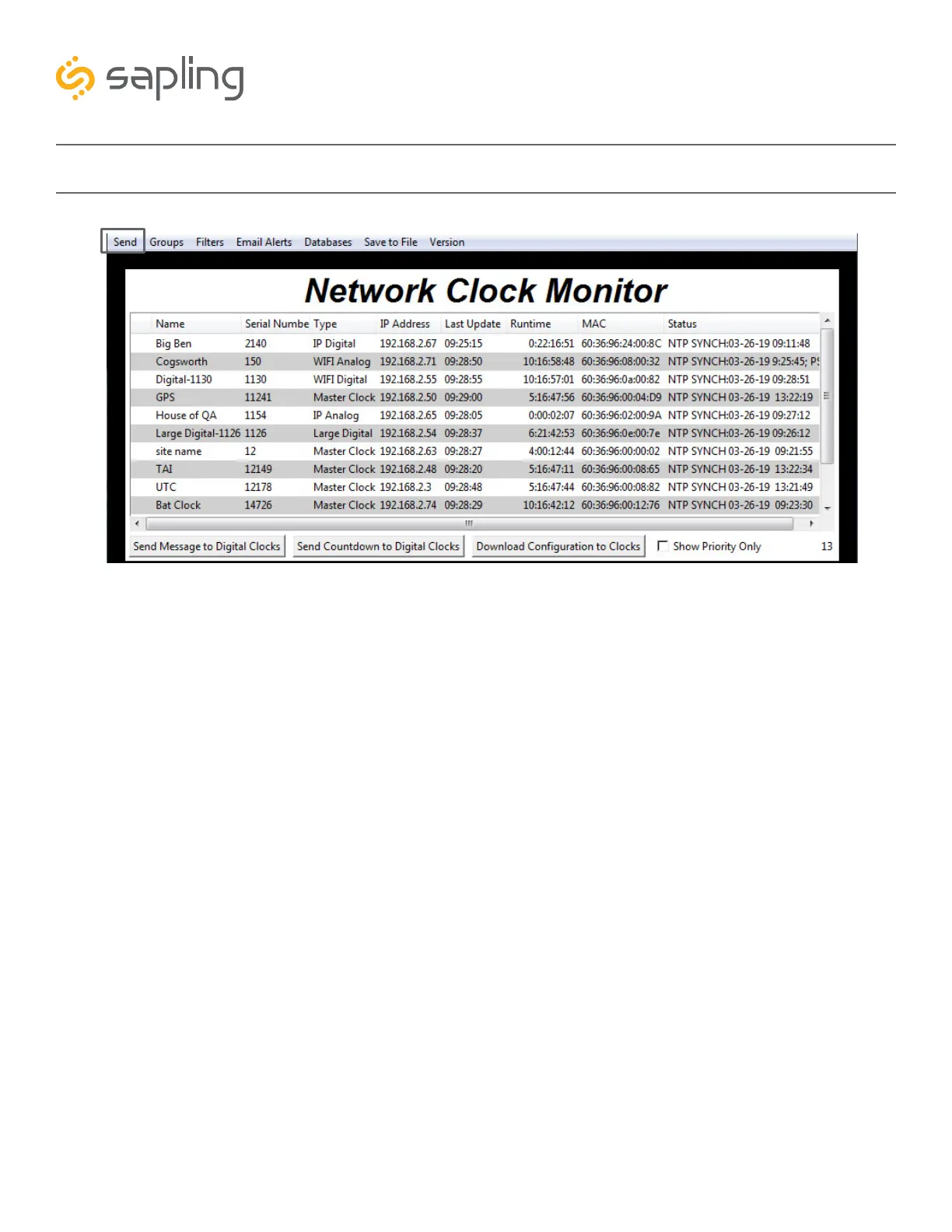
Network Monitor Software - Task Bar Options
1. Send - When clicked, this button will display the following options:
Send Message - Performs the same action as the Send Message to Digital Clocks button. Applies only
to Digital Clocks.
Send Looping Message - Performs a similar action to the Send Message to Digital clocks, but allows
the user to select the number of times that the message will repeat. It also provides a longer
text box for sending longer messages.
Send Countdown - Performs the same action as the Send Countdown to Digital Clocks button.
Applies only to Digital Clocks.
Find Hands - Commands Analog Clocks to resynchronize their hands. The user will be prompted to enter
a password to authenticate their permissions. This command can be sent to one analog clock, a selected
group of analog clocks, or all of the analog clocks in the system. Applies only to analog clocks.
1



 To Next Page