EasyManua.ls Logo

Sargon Prospector - Clearing the MEC Factor; Calibrating MEC

Sargon Prospector
47 pages
Print Icon
To Next Page IconTo Next Page
To Previous Page IconTo Previous Page
Loading...
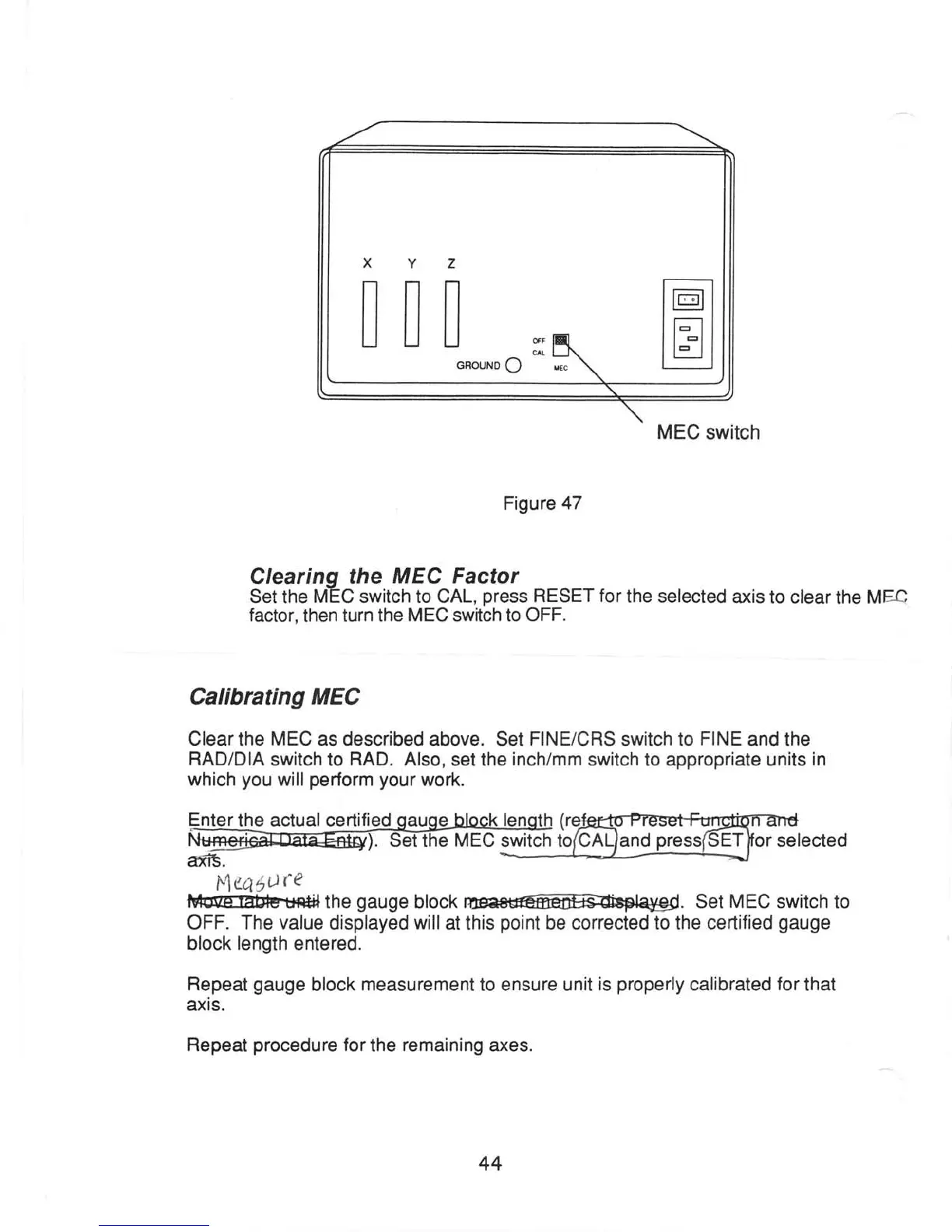
XYZ
t-r nn
| | tl
l_l
uu
il
GROUND
O
MEC
switch
Figure
47
Clearinq
the
MEC Factor
Set
the
MEC switch to CAL,
press
RESET for
the selected
axis to
clear the MEQ
factor.
then
turn the
MEC
switch to
OFF.
Calibrating MEC
Clear the
MEC
as described
above. Set
FINE/CRS switch to
FINE
and the
RAD/DIA
switch to
RAD.
Also,
set
the
inch/mm
switch to
appropriate units
in
which
you
will
perform
your
work.
selected
t4ca40te
ft@t?bfrgr#ilthe
gauge
block
@.
Set MEC
switch to
OFF. The
value
displayed
will
at this
point
be corrected to the ceftified
gauge
block length
entered.
Repeat
gauge
block
measurement
to ensure unit
is
properly
calibrated
for
that
axis.
Repeat
procedure
for
the
remaining
€xes.
nter
the actual certified
affi.
44