25
Setting the time and day
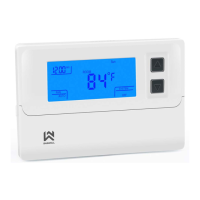
When the thermostat is turned on you can view the current time by short pressing button . If you wish to edit the
current time and day, short press the same button again. Now you’ll see that minutes are blinking, which means that
you’re currently editing minutes. You can change the values by pressing buttons and . After you’re done setting
the minutes, short press button to move to editing current hour. After you’ve set current hour, press the button
again and you’ll be setting the current day. When done setting time and day, press the button to exit and save.
Thermostat also automatically saves the settings if nothing is presses for more than 5 seconds
Turning the thermostat ON and OFF, display sleep
If the thermostat is completely turned off you can easily turn it on by short pressing the button. If you wish to turn it
off, wake the screen and hold the for at least 3 seconds, until screen shows “OFF.
The screen goes automatically into sleep mode because of energy savings. The thermostat works normally in the
background. This happens if no button is pressed for a few seconds or you can manually put the screen to sleep by
pressing button 6. You can wake up or put the screen back to sleep by short pressing button 6 or .
Tip – you can change the duration of awake time in the advanced thermostat settings. Default value is 10 seconds.
Pairing, connecting the thermostat with the receiver SAS2011DE and communication test
The devices are paired by default. If it occurs that the connection is not active or you’ve purchased this device outside
a kit, repeat the pairing procedure.
Procedure: Read the instruction for pairing in the receiver user manual. Put the receiver in to pairing mode. Turn off the
thermostat until the display shows OFF. Now hold the button for 3 seconds. The screen should show “-“, which
means the thermostat is waiting to be paired. The devices should now automatically pair and the thermostat display
should show “1”. Procedure is now finished. Turn both of the devices back on. Preform the communication test by
increasing and decreasing the set temperature on the thermostat. The receiver should confirm the communication by
blinking LED lights and turning on and off the heating.



 To Next Page
 Loading...