www.satlab.com.se
21
SL900 GNSS RTK System
Parameter Calculation
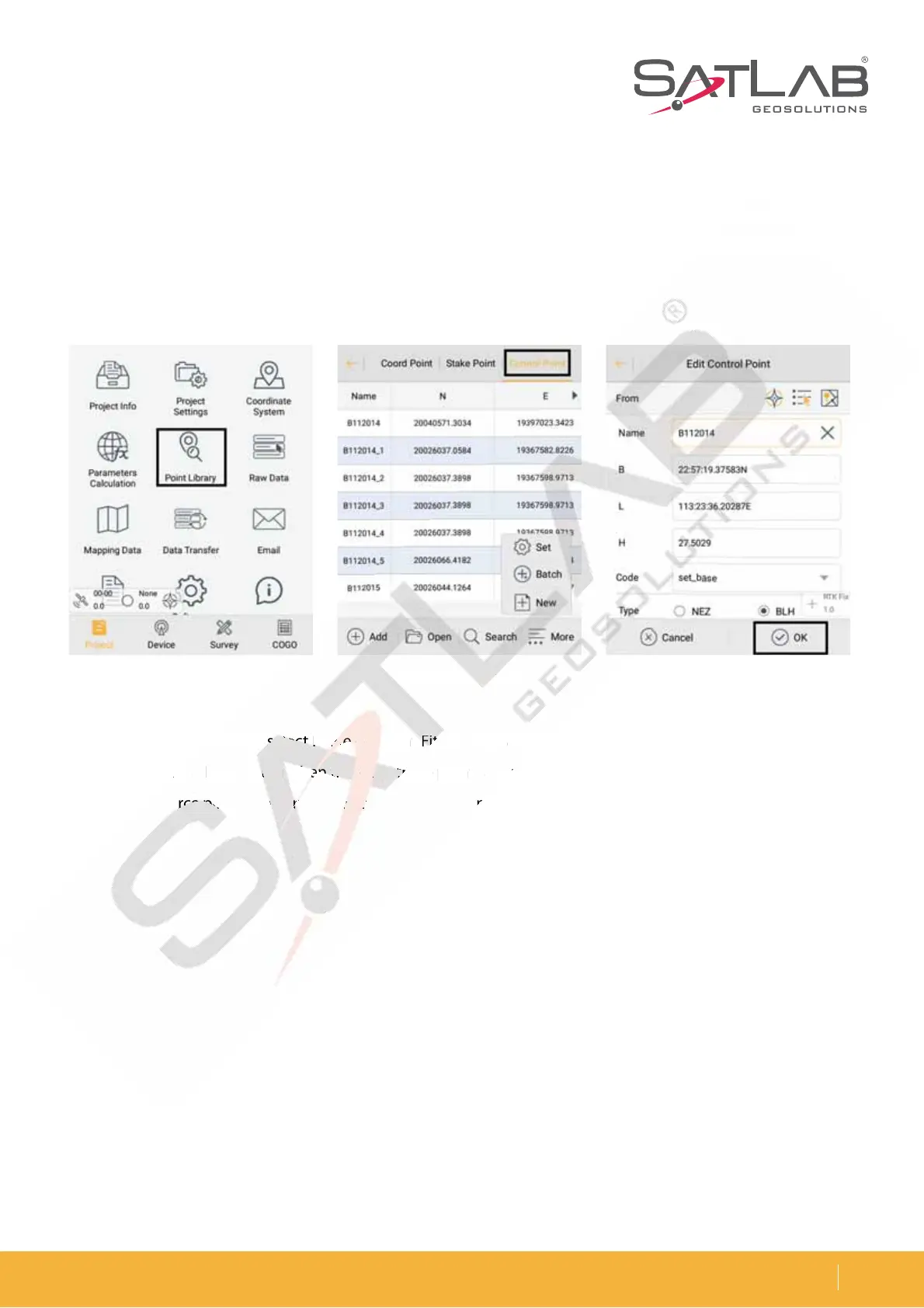
First set the control point library in Point Libraryė Control Point to add the control points. Enter the name and
the corresponding coordinates by using manual input, real-time collecting, the point library or map selection,
and then click OK.
$MJDL1BSBNFUFS$BMDVMBUJPOTFMFDU1MBOF)FJHIU'JUUJOHUZQFBOE$POTUBOU7FSUJDBM0õTFUJO)FJHIUUIF)FJHIU
DBOCFTFMFDUFEBT1MBOF'JUUJOHXIFOUIFSFBSFUISFFQPJOUTBCPWFBOEUIFOBEEQPJOUQBJST4FMFDUUIFDPMMFDUFE
point as the source point, then enter the corresponding control point coordinate in the local point and click Save.
Figure 3-18 Point library Figure 3-19 Control point Figure 3-20 Edit point
JH
U
ure 3-19
oint



 To Next Page