www.satlab.com.se
22
SL900 GNSS RTK System
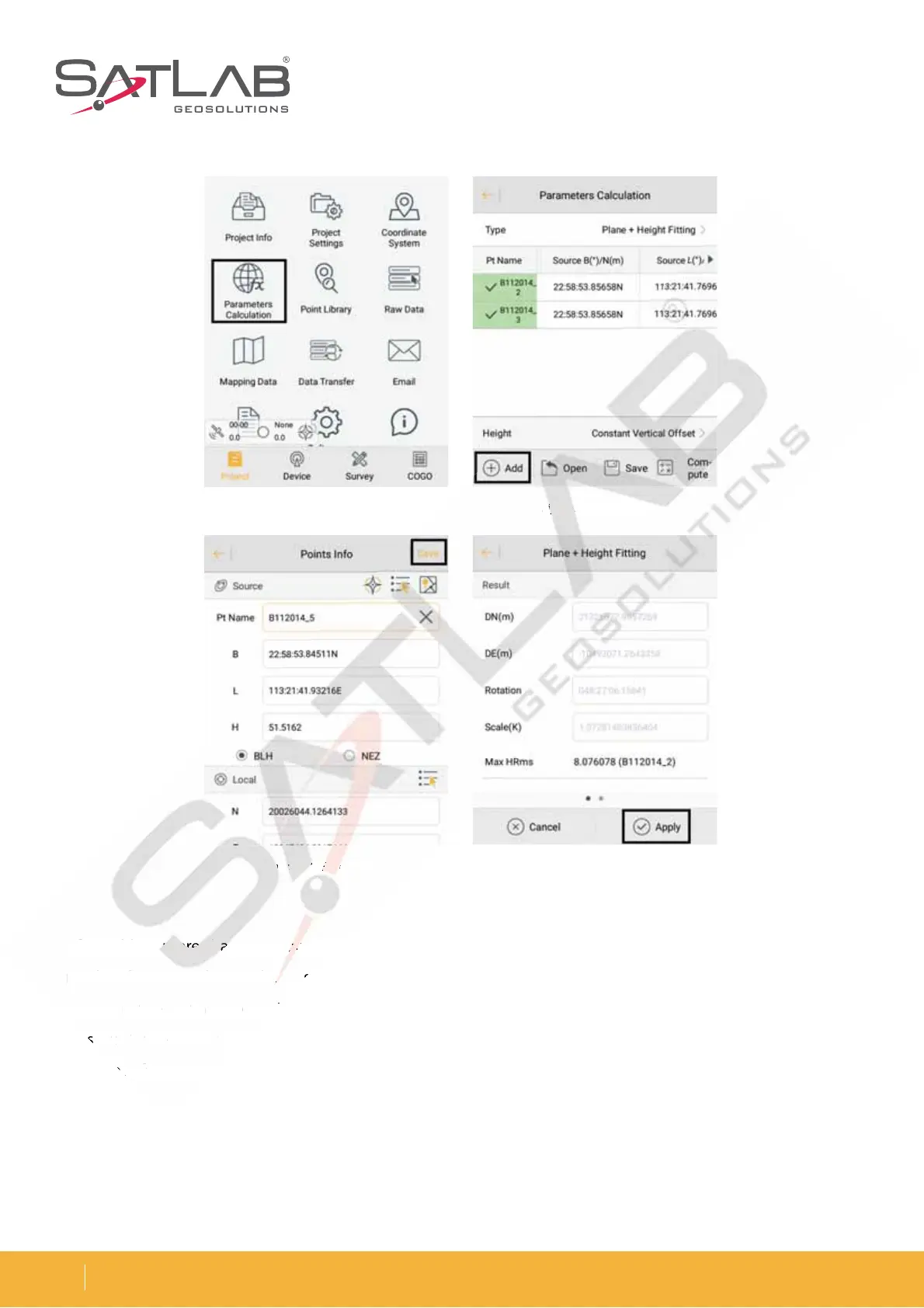
After adding more than two point-pairs, click Calculate and it will show the calculated Plane + Height Fitting
results. This is mainly in order to see the rotation and the scale. The result of the plane translation is generally
TNBMMFSJOUIFOPSUIBOEFBTU5IFSPUBUJPOJTBCPVU[FSPUIFTDBMFJTCFUXFFOBOEJOHFOFSBMUIF
DMPTFSUPUIFCFUUFSUIFTDBMFJT5IFTNBMMFSUIFQMBOFBOEFMFWBUJPOSFTJEVBMJTUIFCFUUFSUIFSFTVMU$MJDL"QQMZ
and the software will automatically use the new parameters to update the coordinate point library.
Figure 3-21 Parameters calculation
Figure 3-23 Save point
Figure 3-22 Add point
Figure 3-24 Result
results. This is mainly in ord
MMF
O
O
oint
22 A
poin



 To Next Page