EasyManua.ls Logo

SatLab SL900 - Detail Survey; Stake Out

Default Icon
38 pages
Print Icon
To Next Page IconTo Next Page
To Previous Page IconTo Previous Page
Loading...
www.satlab.com.se
23
SL900 GNSS RTK System
Detail Survey
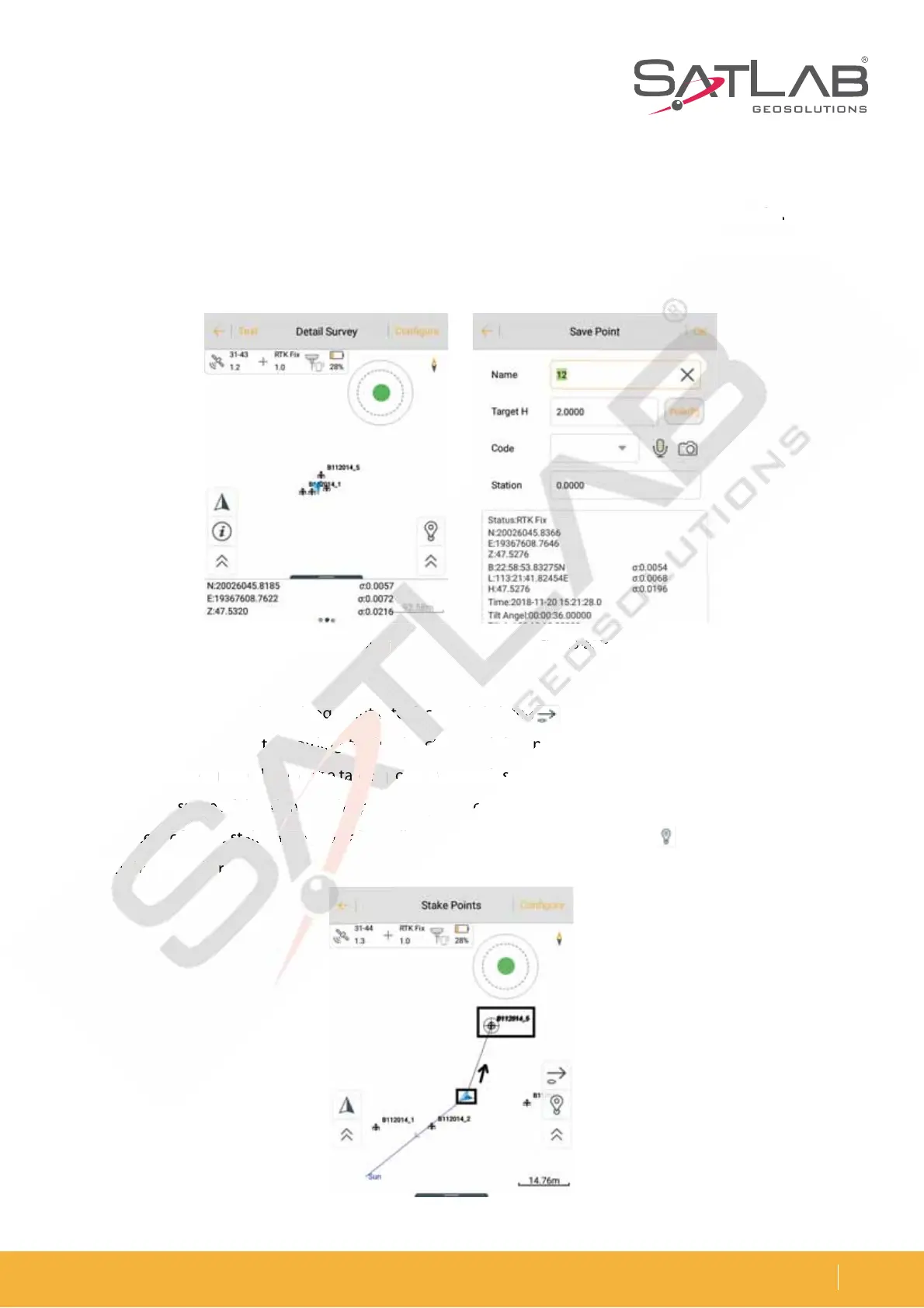
Start the coordinates collection work in the Detail Survey interface when RTK Fix is displayed. After the rover
station is on the unknown point and centered, you can press the collection key and enter the Name, Target H and
Target-H type. Then press OK to record the point.
Figure 3-25 Detail survey
Figure 3-27 Staking point
Figure 3-26 Save point
Stake Out
Click Stake Points to enter the staking point interface and click the button to select the staking point.
Then, find the staking point according to the direction and distance tips. There is a process used to make the
DVSSFOUQPJOUCMVFBSSPXDMPTFUPUIFUBSHFUQPJOUSPVOEQMVTDSPTTTJHO8IFOUIFTUBLJOHDJSDMFUVSOTSFEUIF
staking point is successful and meets the precision parameters.
In the process of point staking, you can also collect detail points by using the Store on the interface or keying
store on the controller.
ed
. Af
te
r
t
he
Name, Targe
t
H
3-
25 Detail
su
u
u
r
r
rve
y
Fig
ure
e
e
3- 3- 3-
26
26
26
Sav
Sa
Sa
e p
oin
te
r the stak
in
n
n
g
g
po
o
o
in
in
in
n
n
t
t
t
t
t
in
in
in
i
te
te
te
rf
ac
c
c
e
e
e
and click
th
th
th
e e
e
b
k
in
g poin
t
t
t
ac
co
o
o
rd
rd
rd
in
in
in
n
n
g g
g
g
g
to
to
to
to
to
t
h
h
he
h
h
dir
ec
ec
ec
t
t
ti
on and dista
n
C
MV
F
BS
SP
X
DM
DM
M
PT
F
F
F
U
P
UI
U
U
UI
UI
F
F
F
UB
UB
UB
B
B
S
HF
F
F
U
QP
QP
QP
J
O
U
S
PV
OE
QM
VT
o
in
t
is
s
s
s
s
s
u
uc
ce
e
e
ss
s
s
ful
an
d
d
d
m
m
m
me
m
ets
th
h
h
h
h
e
p
p
pr
p
p
ecision para
me
e
p
ro
ce
ce
ce
ss
s
o
o
o
f
f
f
poin
t
t
t
st
st
st
ak
ak
ak
in
g
g,
g,
y
o
o
ou
c
a
a
a
an
a
a
a
a
a
a
lso collect
de
t
or
e
on
n
n
t
he
he
he
con
tr
r
r
o
ol
le
e
e
r
r.
r.

Related product manuals