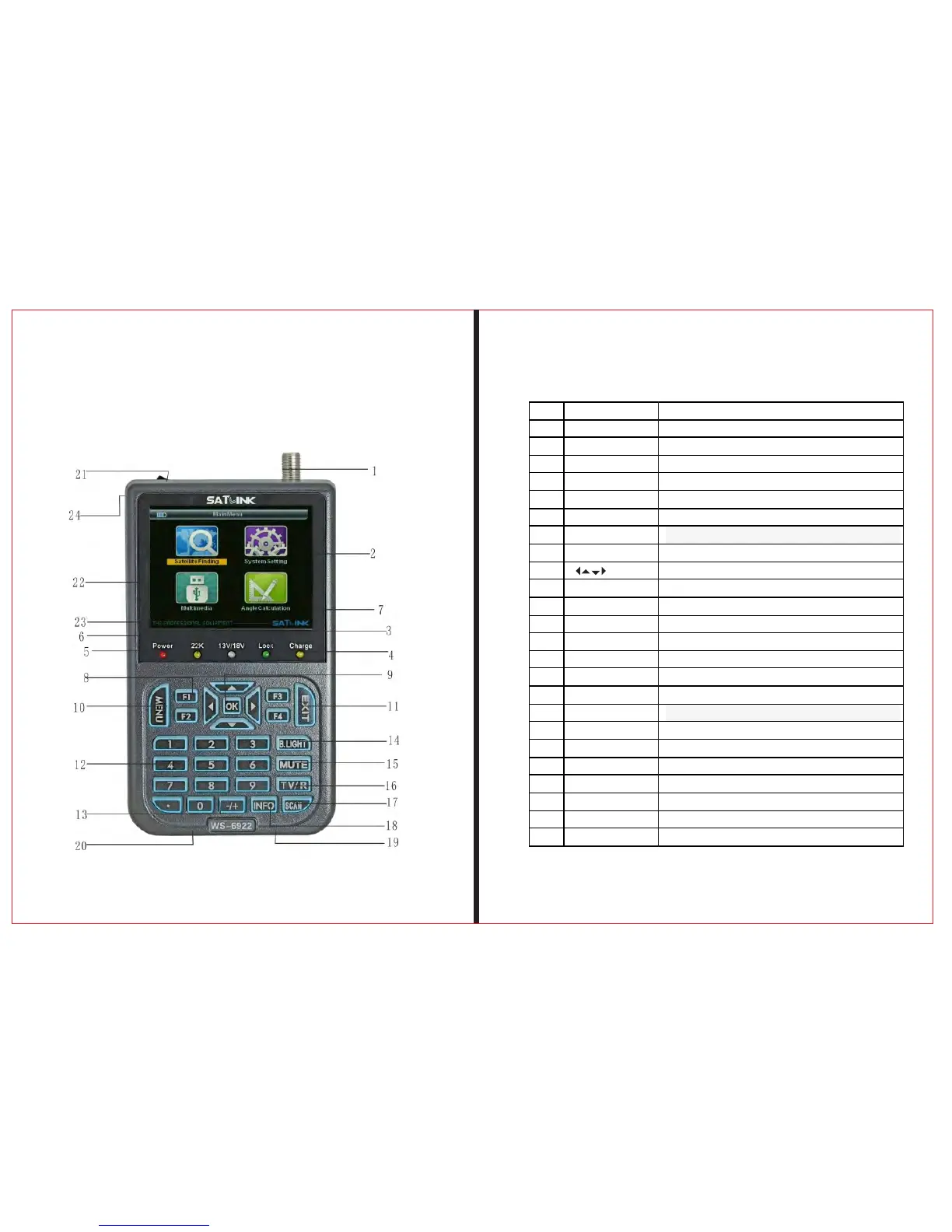
NO. Name Function
1 signal input port connect antenna
2 LCD screen shows menu and image of programs
3 lock indicator light This light will be on when signal is locked.
4 charge light This light will be on when it is charging and off when it is full.
5 power light the light will be on when the meter is on.
6 22K light open the light
7 13/18V light Horizontal/vertical switching output instructions
8 F1 F2 F3 F4 key funtion key
9 OK key Arrow key uses to move cursor and OK key usesto confirm.
10 MENU key Shows main menu and return to previous menu
11 EXIT key to cancel and exit from the present menu.
12 0-9 numerical keys to enter numerical parameter setting
13 +/- key 空
14 B.Light KEY Swithch LCD display
15 MUTE to turn on or turn off the sound
16 TV/Radio KEY Press to switch between TV and radio
17 M.INFO KEY Multi-channel display shortcuts
18 INFO KEY To show parameter of current channel
19 USB PORT Port for Upgrade or connecting to multimedia
20 Power Connection port Port for connecting to external power supply
21 Power Connection port to turn on and turn off the meter’s power
22 AV OUT audio and vedio output
23 AV IN audio and vedio input
24 flashlight holes flashlight



 To Next Page