Section Two
37
www.Satloc.com Falcon User Manual, Rev A
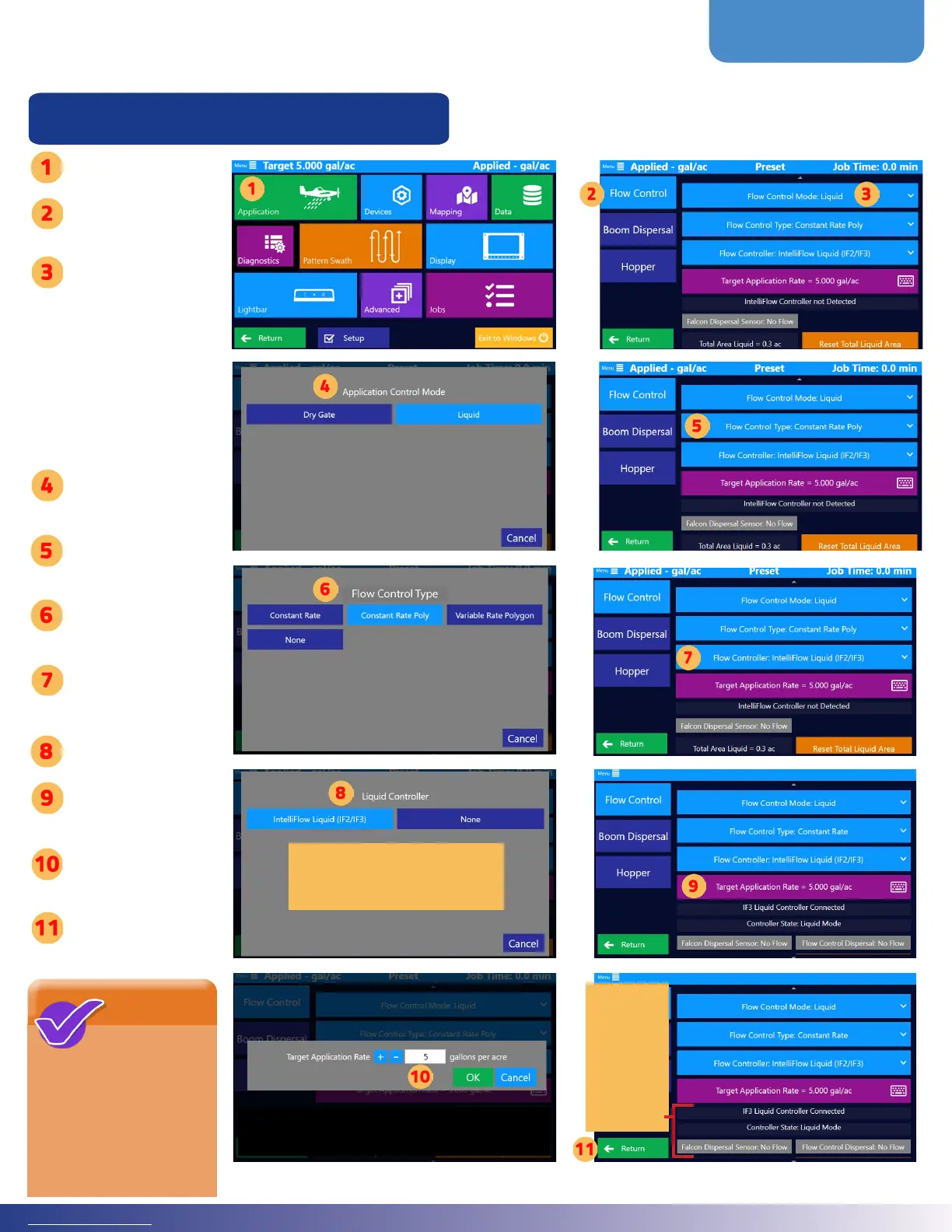
2.9 FLOW CONTROL SETUP & TESTING
Setting Up Flow Control for Liquid
NOTE
e buttons
to reset ‘Total
Liquid Area’, ‘Total
Liquid Volume’, and
‘Total Liquid Time’ are
located in the lower
part of the moving map
screen.
e connected
controller,
controllers
state, Falcon
dispersal
sensor, and
ow control
dispersal are
displayed.
Tap ‘Application’
Tap ‘Flow
Control’
Tap the ‘Flow
Control Mode’
(is might have
the words “None”,
“Liquid”, or “Dry
Gate” aer the
colon in the
button name.)
Select Application
Mode
Tap ‘Flow Control
Type’
Select Application
Type
Tap ‘Flow
Controller’
Select a Controller
Tap ‘Target
Application Rate’
Set a Target Rate.
en, tap ‘Ok.’
Tap ‘Return’
If the connected controller is
unavailable, you can make it visible
by navigating to Home Screen >
Advanced > Visibility Settings.



 To Next Page