Section One
10
www.Satloc.com Falcon User Manual, Rev A
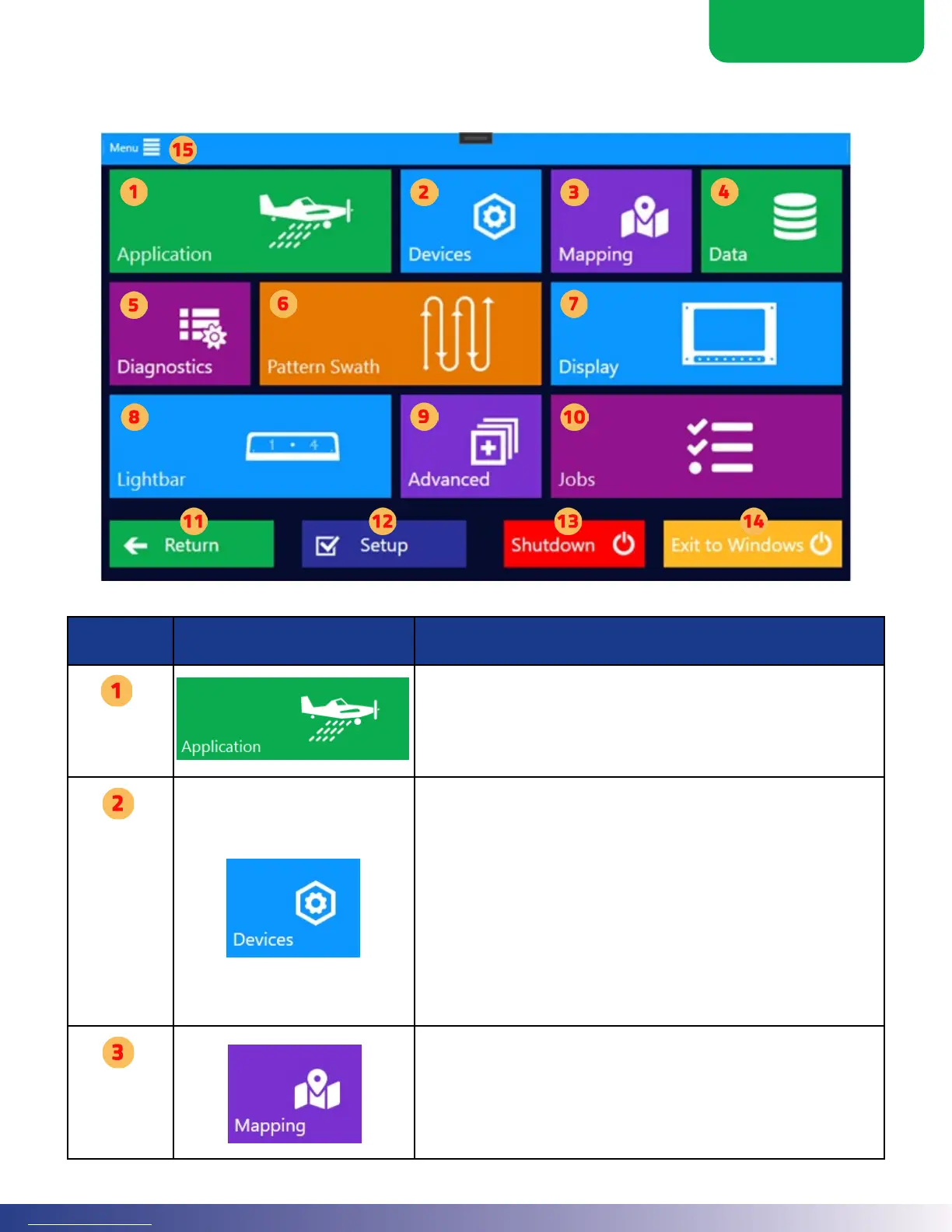
1.7 MAIN MENU OVERVIEW
From the Moving Map screen, touch the ‘Menu’ button to navigate to the Main Menu.
Menu
Name
Menu Button Image Associated Function
Application
e ‘Application’ button takes the user to settings for the particular application
mode selected. is button will lead a user to the following functions.
Liquid 2nd Level Menu
1. Flow Control
2. Boom Dispersal
3. Hopper
Devices
The ‘Devices’ menu is where the user can initially set up the Falcon system
hardware. is menu sets the details of how hardware connects and functions.
Additionally, this includes setting how the inputs function for various Guidance
Modes. Information in this menu is not oen changed once set. is button will
lead a user to the following functions.
1. Booms
2. Liquid Advanced
3. Liquid Accesories
4. Liquid Controller
5. Falcon Advanced
6. Aircra Setup
7. Spreader Setup
8. Input
9. Output
Mapping
e Mapping menu sets the Falcon’s interaction with the world around it. is
button will lead a user to the following functions.
1. Map Setup
2. Guidance Modes
3. Waypoints
4. GPS/IMU Setup
5. ADS-B In Setup
Dry 2nd Level Menu
1. Flow Control
2. Gate Dispersal
3. Hopper



 To Next Page