Step 1
Look for this icon. It means a
video assembly tip is available at
www.sauder.com/services/tips
å
Assemble your unit on a carpeted fl oor or on the empty
carton to avoid scratching your unit or the fl oor.
å
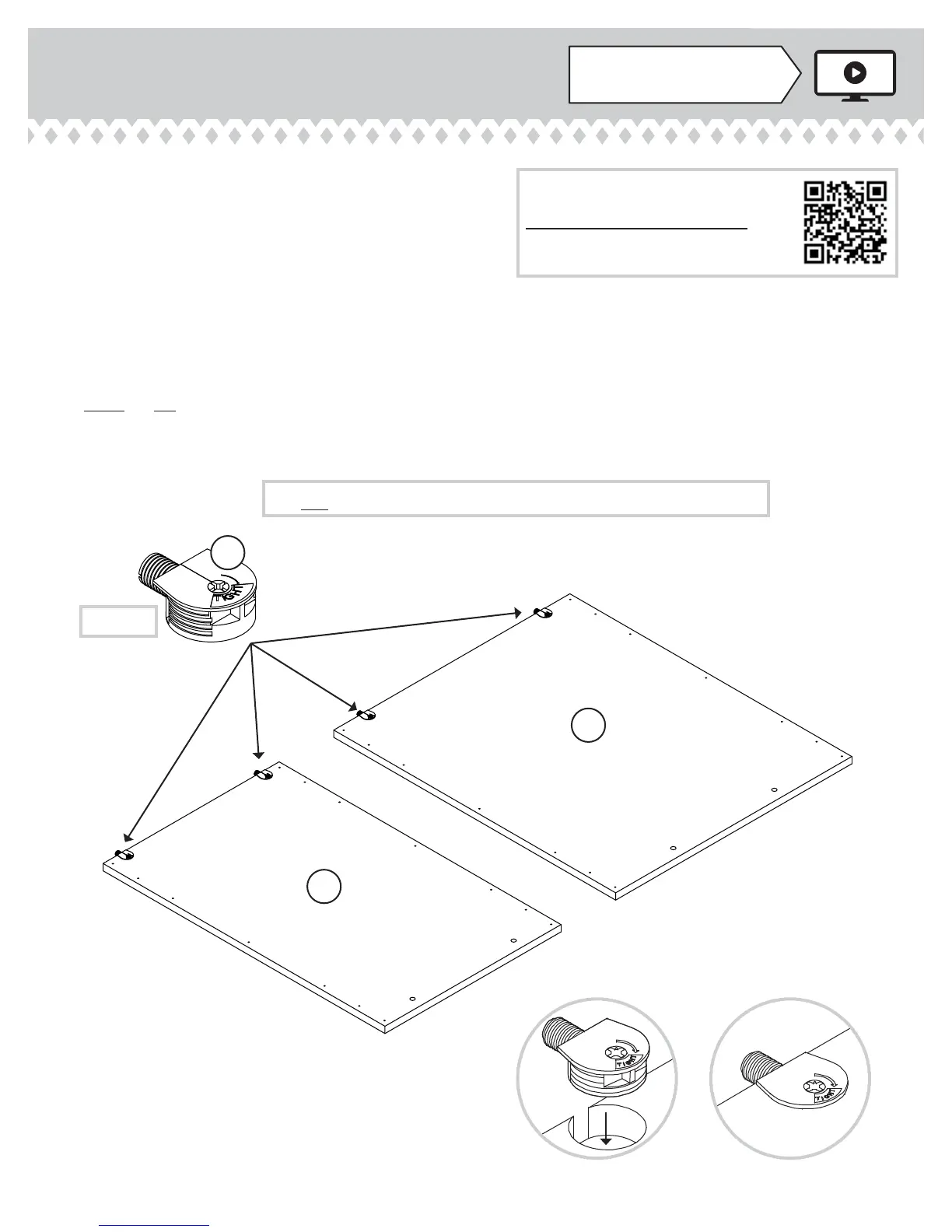
To begin assembly, push a SAUDER TWIST-LOCK®
FASTENER (7F) into the large holes in the
OUTER ENDS (A and C).
å
Repeat this step for the INNER ENDS (B2 and D2),
BOTTOMS (I and J), RIGHT MODESTY PANEL (K),
BACKS (N and O), LEGS (R and T), KEYBOARD
UPRIGHT (VV), and both SPACERS (LLL).
å
NOTE: Do not insert a SAUDER TWIST-LOCK® FASTENER into
the UPRIGHTS (E and F) at this time.
417714www.sauder.com/services
Page 7
7F
A
C
(29 used)
Do not tighten the TWIST-LOCK® FASTENERS in this step.
Scan this QR code or go to this address:
http://qr.sauder.com/?ID=1497
to watch a video on how to assemble your unit.


 To Next Page