Step 3
å
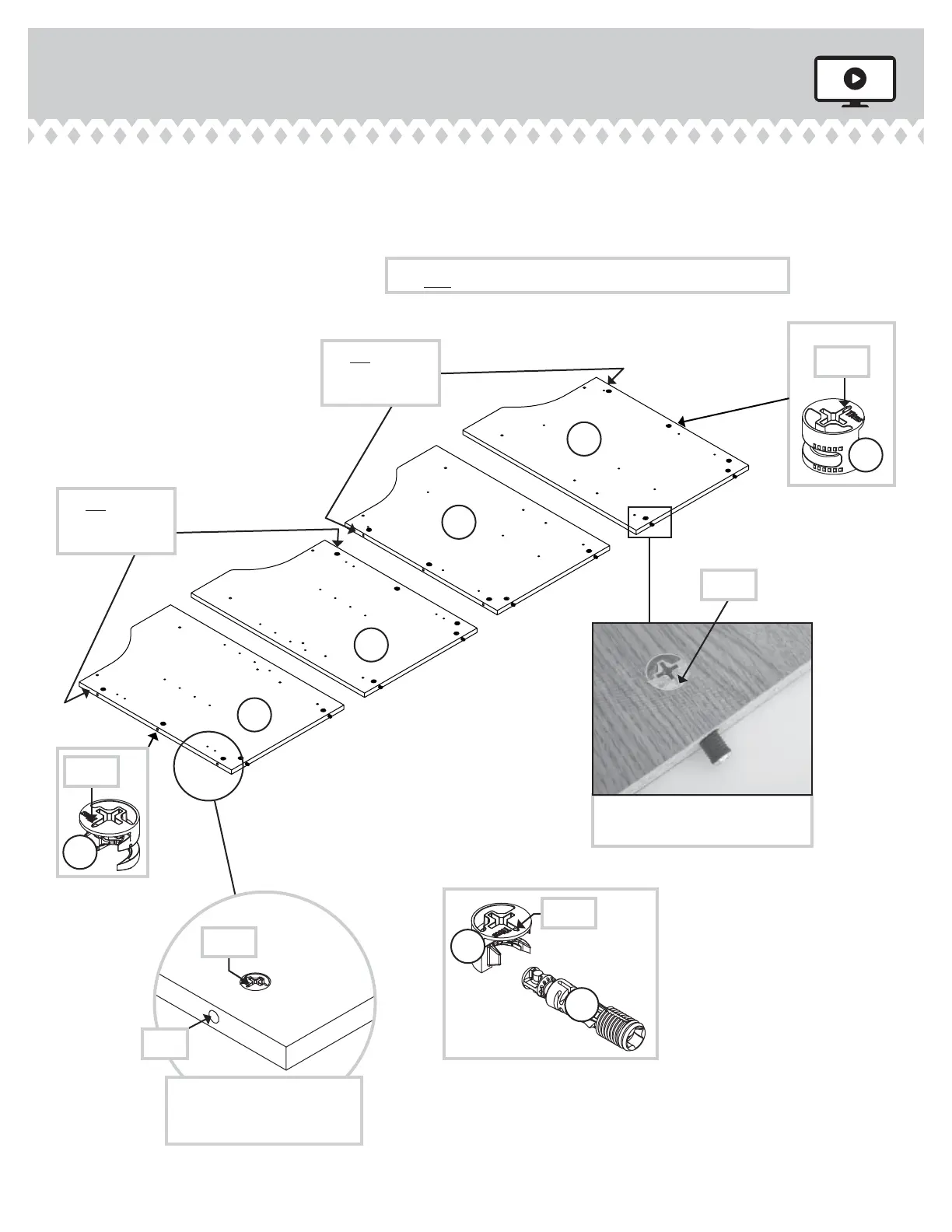
Push twenty HIDDEN CAMS (1F) into the ENDS (A, B, C, and D).
Then, insert the metal end of eiht CAM DOWELS (2F) into each
HIDDEN CAM in the short edes.
416969 www.sauder.com/servicesPae 8
Arrow
1F
2F
1F
1F
Arrow
(8 used)
(20 used)
Insert the metal end of the CAM
DOWEL into the HIDDEN CAM.
Arrow
Do not tihten the HIDDEN CAMS in this step.
Do not insert
CAM DOWELS
into these edes.
Do not insert
CAM DOWELS
into these edes.
A
B
C
D
Arrow
The arrow in the HIDDEN
CAM must point toward the
hole in the ede of the board.
Hole
Arrow





 To Next Page