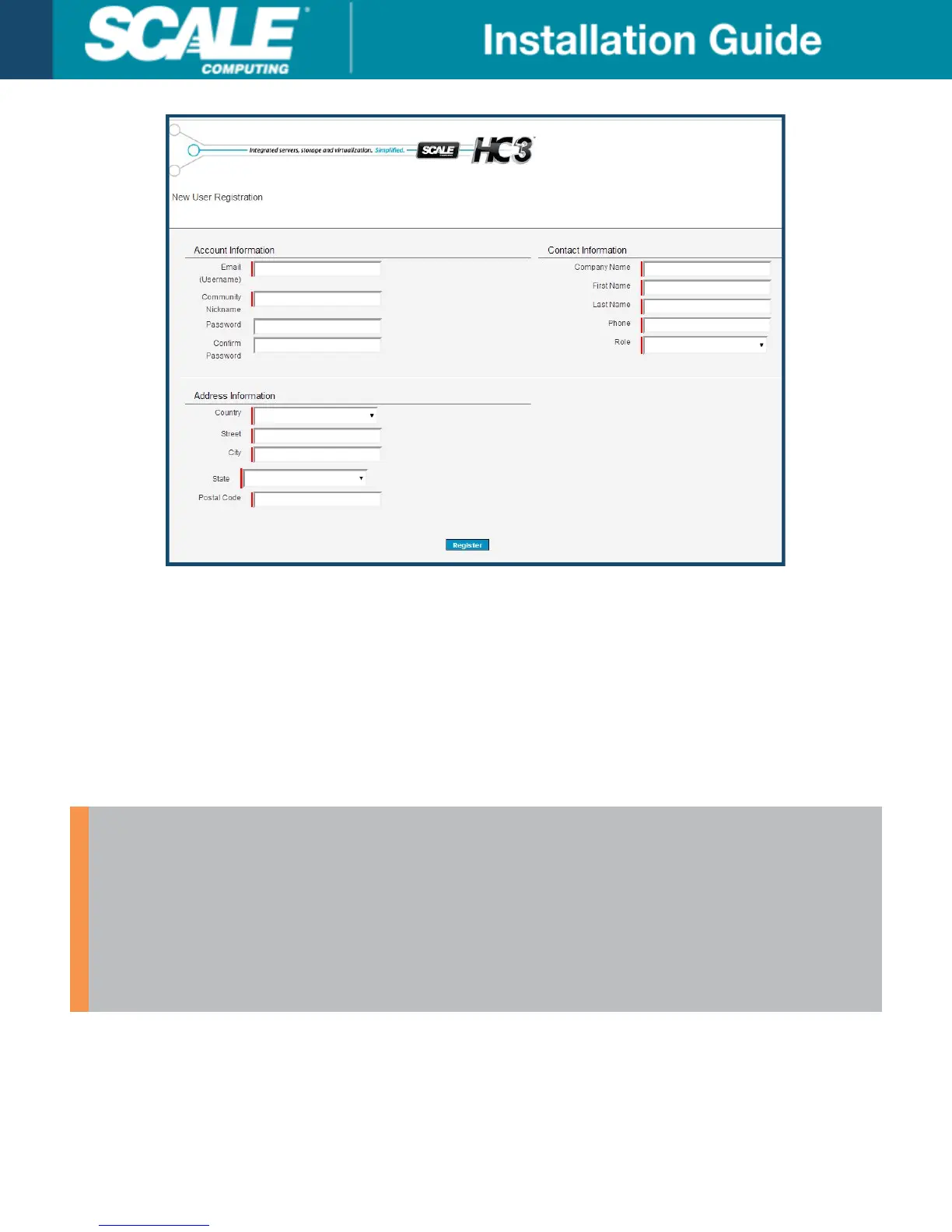
7. The registration screen is the same for partners, distributors, and customers; only the pathway differs. Ensure
you are at the correct landing page by verifying the URL.
8. Provide the appropriate information for the three categories: Account Information, Contact Information, and
Address Information. The Email (Username) field will default to your Portal username for future access. The
Community Nickname field will be your general-use name in the forums and chat boards. All fields marked in
red are required.
9. Disregard the Password and Confirm Password fields. Your password is generated for you after registration
and sent to you by email. If you do fill out a password here it is ignored by the system.
10. Click Register once the form is complete. Your request is logged and reviewed for approval.
WARNING
When you first log into the Scale Computing Portal be sure to fill out your 'My Profile'
information from the top navigation bar. You can also adjust the time zone while scheduling
individual services.
The selected time zone in your profile will help to determine scheduling availability for your
installation. Contact the Customer Success Coordinator and/or ScaleCare Support if you need
assistance accessing the Portal or adjusting the time zone.
Environment Questionnaire
If you haven’t already, be sure to complete the environment questionnaire linked in your initial welcome email. It will
look similar to the image below.
©
Scale Computing 2019 Version 3.0: 02/2019 | 15



 To Next Page