System Initialization
Prior to initializing the system ensure all nodes have been successfully configured.
Initialize the System
All installations should be scheduled at least 24 hours in advance. The ScaleCare engineer assisting you will provide
the necessary credentials during the scheduled installation time.
All system initialization is done from the command line using a monitor and keyboard. Systems are configured
in a top-to-bottom configuration, with the top node in the rack being the designated 'first' node. The 'first node'
classification has no bearing on system operations outside of the installation configuration.
1. Hook the monitor and keyboard to the top node in the system. Log in to the node using the provided
credentials.
a. If you are utilizing the SNS configuration run the command to initialize the single node.
sudo singleNodeCluster=1 scclusterinit
b. If you are utilizing the cluster configuration, this command will initialize a system comprised of all the
previously configured nodes.
sudo scclusterinit
2. You may be prompted for a password. Use the same password as the node login.
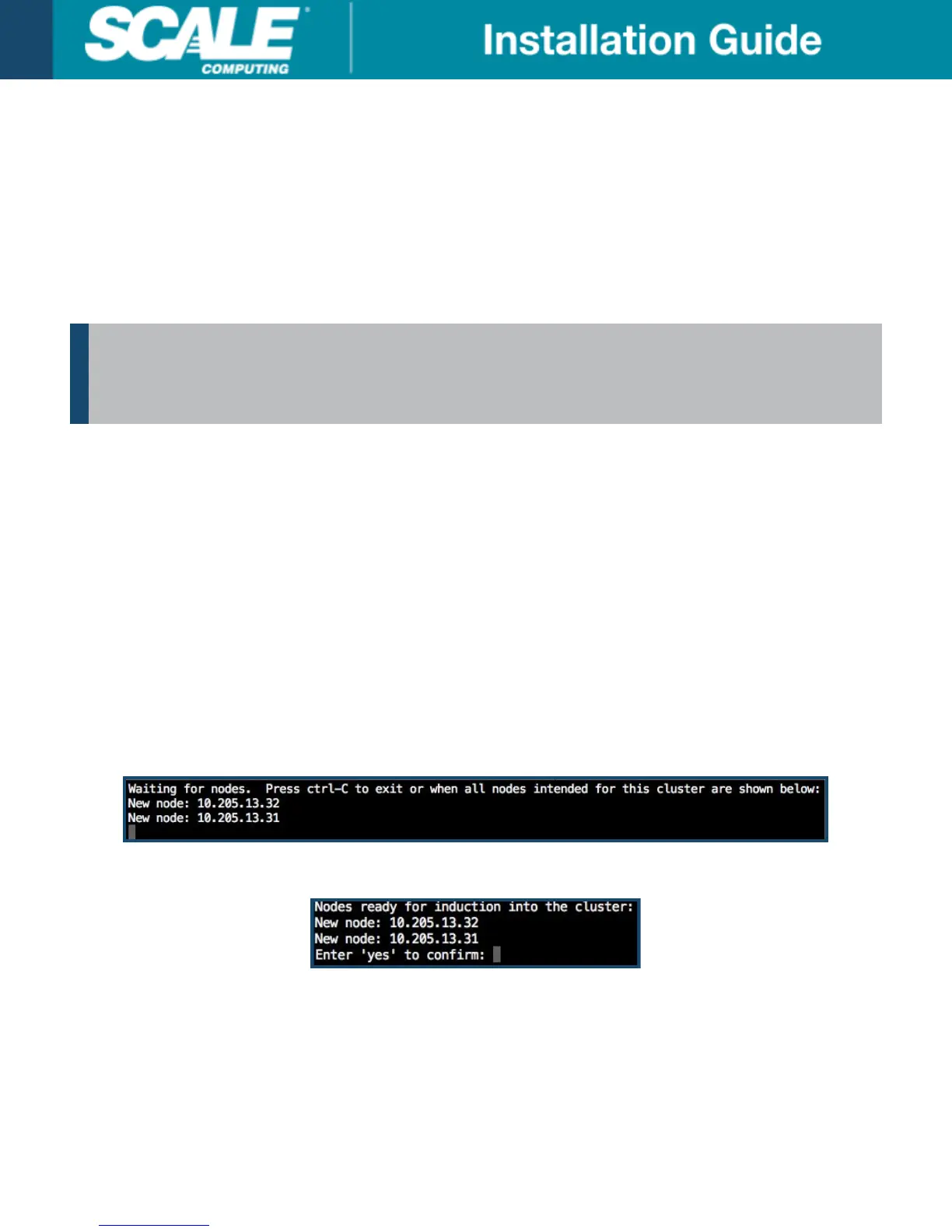
3. Configured nodes will be listed on the screen. Verify all nodes that were configured are displayed on the list
for system initialization, as seen below. If utilizing the SNS configuration only the single node will be shown.
4. When all nodes are shown follow the prompt and press CTRL+c to proceed.
5. Enter yes to complete the system initialization as seen in the example below.
6. It will take approximately 15-20 minutes for the nodes to initialize in a cluster configuration. It will take
approximately 10-15 minutes for a node to initialize in a SNS. Once complete the HC3 web interface will be
accessible using the configured LAN IP of the node(s).
7. See the applicable User Guide for your software version for information on first-time system configuration if
needed.
©
Scale Computing 2019 Version 3.0: 02/2019 | 20



 To Next Page