EasyManua.ls Logo

Scanreco G5 Pocket System - User Manual

Scanreco G5 Pocket System
34 pages
Print Icon
To Next Page IconTo Next Page
Loading...
Instruction Manual
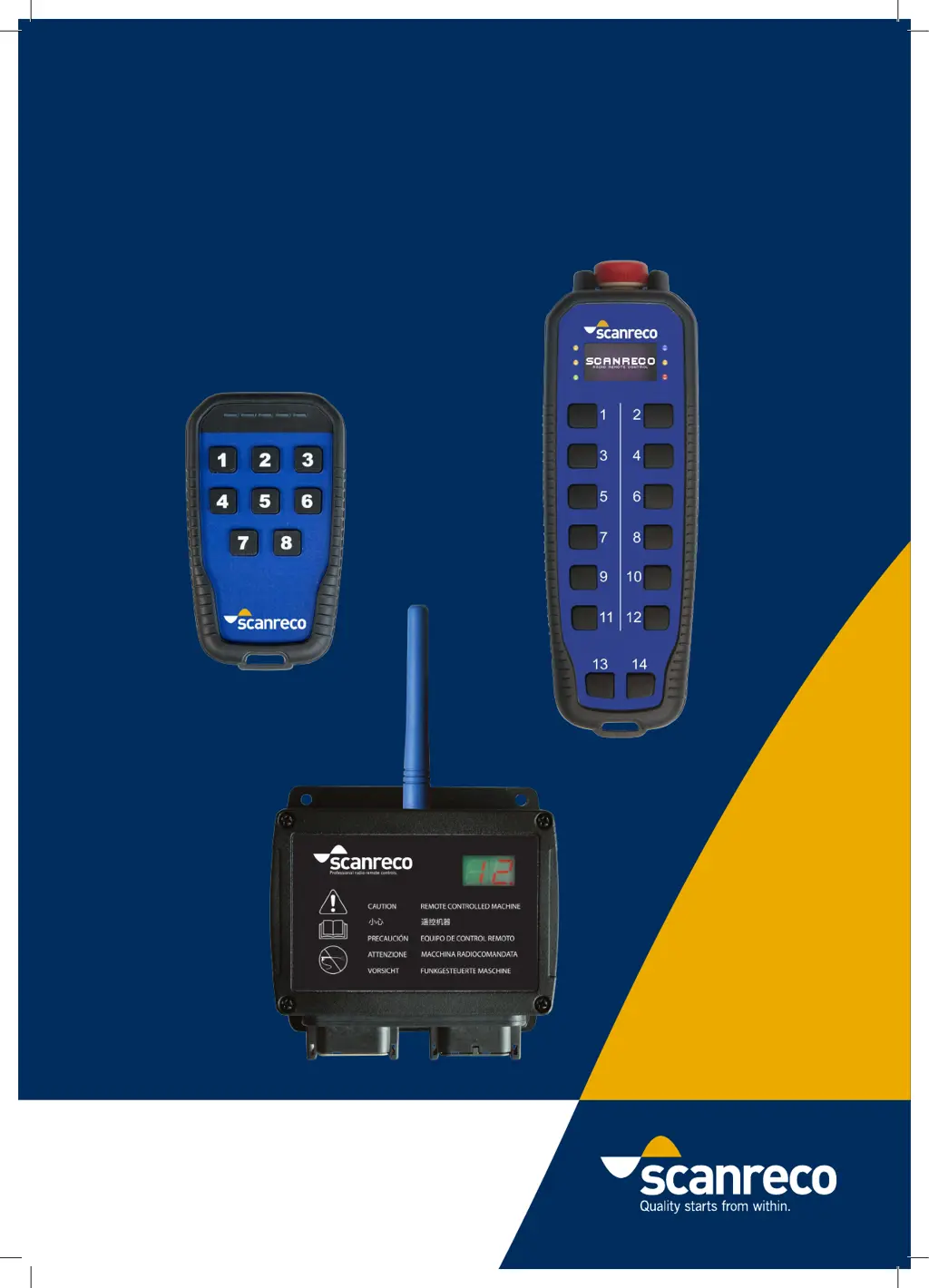
G5 Rocket Flex/Pocket System
Document: 66068
Revision: A
Language: English

Questions and Answers

  • L
    leericardoAug 17, 2025
    Why communication between Scanreco G5 Pocket System Remote Control Transmitter and Receiver cannot be established?
    • S
      Shannon PetersonAug 18, 2025
      If communication between the Scanreco Remote Control transmitter and receiver cannot be established, it may be because the transmitter and receiver are not paired. Follow the instructions in chapter 10.2 to pair them.
  • J
    Jennifer McmillanAug 20, 2025
    What to do if pairing has no effect on Scanreco G5 Pocket System?
    • W
      Wesley ScottAug 20, 2025
      If pairing of your Scanreco Remote Control has no effect, the battery in the transmitter may be low. Replace the battery in the transmitter.
  • M
    micheleholmesAug 22, 2025
    What to do if Scanreco G5 Pocket System display shows “Po-00” or “Po-Id”?
    • C
      Cassandra MosleyAug 22, 2025
      If the display on the Scanreco Remote Control receiver shows “Po-00” or “Po-Id”, set both jumpers to the “Jumper rest” position. This issue arises when a jumper inside is set to Configuration mode or Pairing mode.
  • J
    Joseph FlemingAug 26, 2025
    How to fix Scanreco G5 Pocket System Remote Control display on CU showing “Po-00” or “Po-Id”?
    • G
      Gregory ChurchAug 26, 2025
      If the display on the Scanreco Remote Control CU is showing “Po-00” or “Po-Id”, it means that the jumper inside is set to Configuration mode or Pairing mode. Set both the jumpers to the 'Jumper rest'.
  • S
    suzanne66Aug 27, 2025
    How to fix Scanreco Remote Control transmitter that does not start?
    • K
      Kevin ParrishAug 28, 2025
      If the Scanreco Remote Control transmitter does not start, check the batteries to ensure they are not depleted. Also, verify that the receiver is powered on by checking the receiver display.
  • J
    Jacqueline HicksAug 30, 2025
    Why is nothing shown on the Scanreco Remote Control receiver display?
    • A
      Austin SuarezAug 30, 2025
      If nothing is shown on the Scanreco Remote Control receiver display, check the power supply to ensure it is properly connected.
  • M
    Mitchell FosterSep 2, 2025
    Why some buttons on Scanreco G5 Pocket System transmitter do not work?
    • G
      Gary McdanielSep 2, 2025
      If some buttons on the Scanreco Remote Control transmitter do not work, check if the buttons are operational by following the instructions in chapter 12.3. Contact the machine installer to learn how to connect a button to an output, as the button may not be connected to any output.
  • D
    Derek DavisSep 4, 2025
    Why my Scanreco Remote Control HCU does not start?
    • D
      dunndanielSep 4, 2025
      If the Scanreco Remote Control HCU (Handheld Control Unit) doesn't start, the batteries might be depleted. Please check the batteries. Alternatively, the CU (Control Unit) may not be powered. In that case, check the CU display.
  • J
    James MorrisSep 6, 2025
    What to do if communication between Scanreco Remote Control HCU and CU cannot be established?
    • J
      Jacqueline EvansSep 6, 2025
      If communication between the Scanreco Remote Control HCU and CU cannot be established, it might be because the HCU and CU are not paired. Follow the instructions in chapter 9.2 to pair them.
  • T
    Trevor DouglasSep 9, 2025
    What to do if nothing is shown on the Scanreco G5 Pocket System CU display?
    • R
      ryan88Sep 9, 2025
      If nothing is shown on the Scanreco Remote Control CU display, the power supply may not be connected. Check the power supply.

Summary

General Information

Safety Information

General Safety

General safety instructions and important warnings for system operation.

Pre-operational Checks

Operator responsibilities and checks before system operation.

System Information

System Overview

Overview of the SCANRECO G5 system for mobile machinery.

G5 Pocket Transmitter

Product Description

Description of the G5 Pocket Transmitter features and components.

Versions

Details on the different G5 Pocket Transmitter models and configurations.

Functionality

Explanation of the G5 Pocket Transmitter's operational functions.

Battery Installation and Replacement

Instructions for installing and replacing batteries in the G5 Pocket Transmitter.

Technical Data

Technical specifications and dimensions for the G5 Pocket Transmitter.

G5 Rocket Flex Transmitter

Product Description

Description of the G5 Rocket Flex Transmitter features and components.

Versions

Details on the different G5 Rocket Flex Transmitter models and configurations.

Functionality

Explanation of the G5 Rocket Flex Transmitter's operational functions.

Battery Installation and Replacement

Instructions for installing and replacing batteries in the G5 Rocket Flex Transmitter.

Technical Data

Technical specifications and dimensions for the G5 Rocket Flex Transmitter.

Battery Charger

Information about the battery charger for the G5 Rocket Flex Transmitter.

G5 Receiver

Product Description

Description of the G5 Receiver and its capabilities.

Versions

Details on the different G5 Receiver models and their output types.

Functionality

Explanation of the G5 Receiver's configuration requirements.

Technical Data G5 M19

Technical specifications for the G5 Receiver M19 model.

Technical Data G5 R5 & R10

Technical specifications for the G5 Receiver R5 and R10 models.

Technical Data G5 Receiver CAN

Technical specifications for the G5 Receiver CAN model.

Receiver Dimensions

Physical dimensions of the G5 Receiver unit.

Radio Information

Installation Recommendation

General Information

General recommendations for assembling the G5 system.

Receiver Assembly

Instructions for mounting the G5 Receiver unit.

Torque Values

Recommended torque values for screws during assembly.

Startup and LED Indication

Programming

General Description

Overview of system configuration methods.

Safe Pairing

Procedure for securely pairing a Transmitter with a Receiver.

Set to Factory Defaults

Instructions for resetting system settings to factory defaults.

Product Care

Storage

Recommendations for storing the G5 Transmitter and Receiver.

Maintenance

Recommended maintenance checks for the G5 system.

Cleaning

Guidelines for cleaning the G5 Transmitter and Receiver.

Troubleshooting

General Troubleshooting

General guidance for troubleshooting G5 system issues.

Common Issues and Solutions

Common scenarios and solutions for G5 system problems.

Transmitter Test Mode

Procedure for testing Transmitter buttons and LEDs.

Spare Parts

List of Spare Parts

Catalog of available spare parts for the G5 system.

Accessories

Accessories List

List of optional accessories for the G5 system.

Programmed Assignment Template

Scanreco G5 Pocket System Specifications

General IconGeneral
BrandScanreco
ModelG5 Pocket System
CategoryRemote Control
LanguageEnglish

Related product manuals