Cat. No. 9.900.900.730
CopyRight © 2013
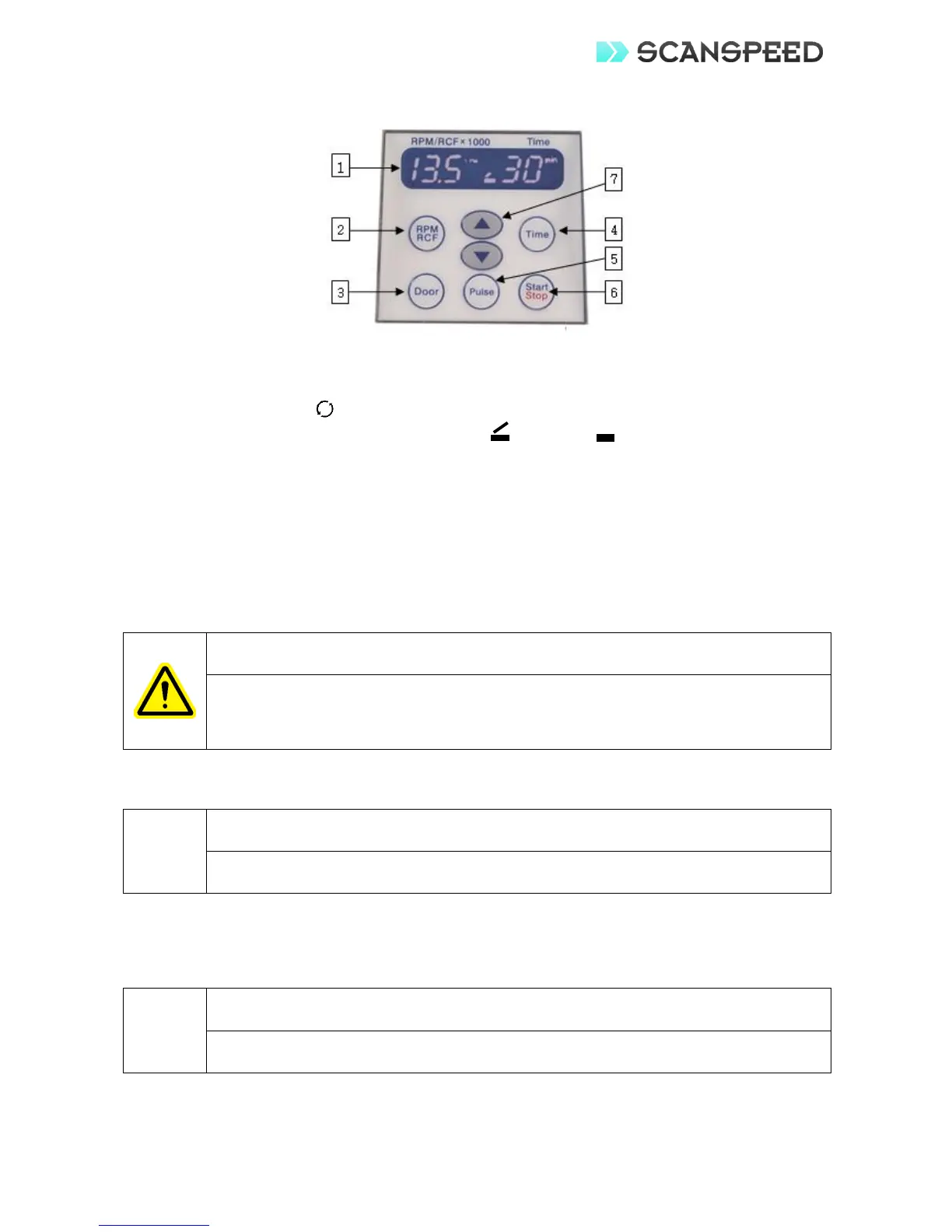
7 Front control panel description
1. Display LCD control panel: Displays set values and actual operating conditions
Speed/Force (RPM/RCF): Displays rotor speed/force in RPM/RCF x 1000
Centrifugation:
Status of door: Indicates door status as for open or for closed.
Time: Displays remaining time in min or sec.
2. Speed/force Setting Button: Press to set speed/force value and to switch between RPM and
RCF.
3. Door Button: Press to open door.
4. Time Setting Button: Press to set run time between 1 min to 30 min.
5. Pulse Button: Press to use for quick separation.
6. Start & Stop Button: Press to start and stop operation.
7. Up & Down Arrow
8 Installation
Safety regulations require a safety zone of 30 cm around the centrifuge that
needs to be marked to indicate that neither hazardous materials nor persons
should be permitted within the area during operation.
Proper ventilation is necessary to prevent the overheating of samples.
1. Inspect the instrument and the parts for any visible signs of shipping damage.
Any claims for damage must be filed within 48 hours with the transportation carrier.
2. Unpack the unit and verify the contents of the package.
3. Place the instrument on a clean, flat, level, and vibration free surface.
4. Plug the power cord into the appropriate power outlet.
Check that the power supply corresponds with
requirements.
5. Turn the power on. The switch is located on the rear side of the unit.
6. Once the power is applied, the door will be opened automatically.


 To Next Page