- 34 -
www.SCEPTRE.com
SCEPTRE C Series UHD TV User Manual
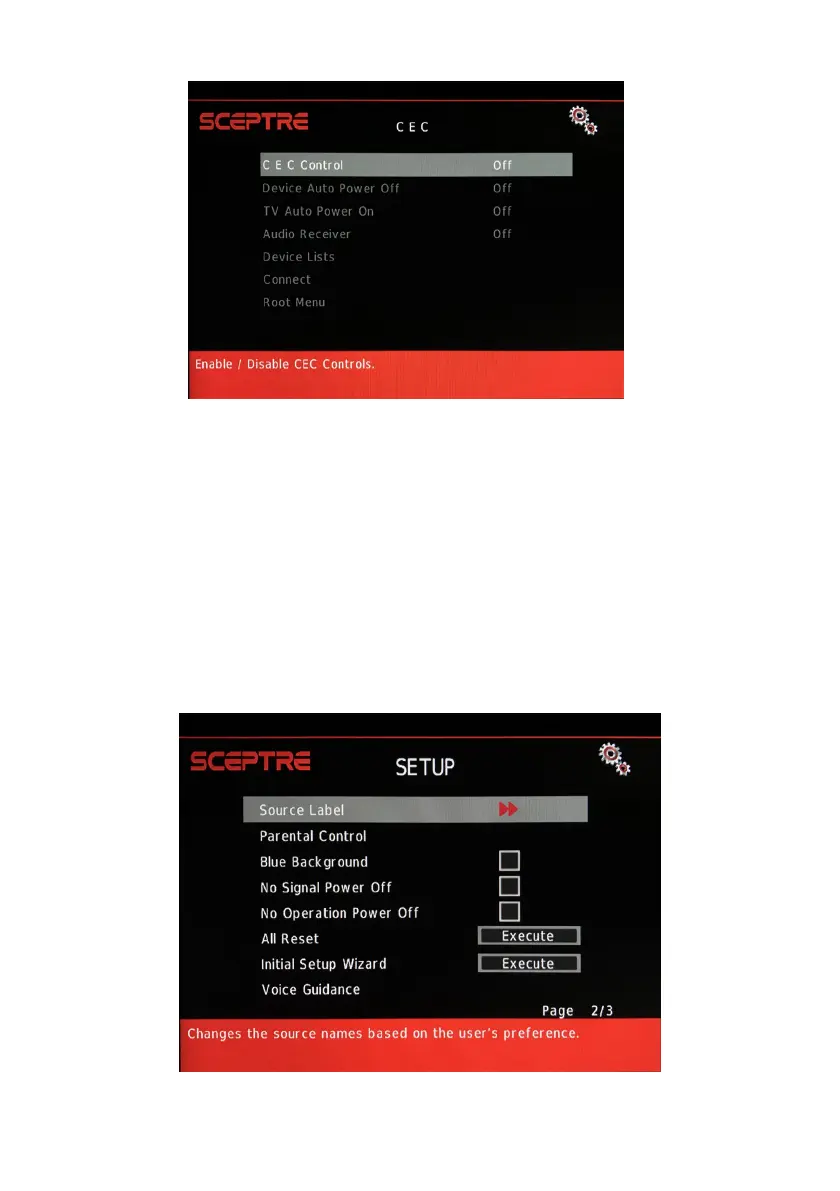
VII. CEC – This function adjusts consumer electronics control options.
i. CEC CONTROL – This turns on or off the CEC controls.
ii. DEVICE AUTO POWER OFF – This enables the display remote
to turn off CEC compatible devices (ie DVD player that supports
CEC).
iii. TV AUTO POWER ON – This enables the display to turn on if
you press the CEC compatible device’s remote to power on.
iv. AUDIO RECEIVER – This enables the display to use audio return
channel function via source HDMI 1.
v. DEVICE LISTS – This shows the current CEC compatible
devices connected.
vi. CONNECT – This turns on CEC devices through this menu.
vii. ROOT MENU – This shows CEC compatible device’s own menu.
VIII. TV MODE – Allows the user to select between RETAIL MODE or HOME
MODE. Retail mode uses more electricity however offers better performance.
Home mode offers less power usage at the expense of just regular
performance.
IX. SOURCE LABEL – This feature edits the name of each source.


 To Next Page
 Loading...