- 11 -
www.SCEPTRE.com
SCEPTRE UMR Series UHD Display User Manual
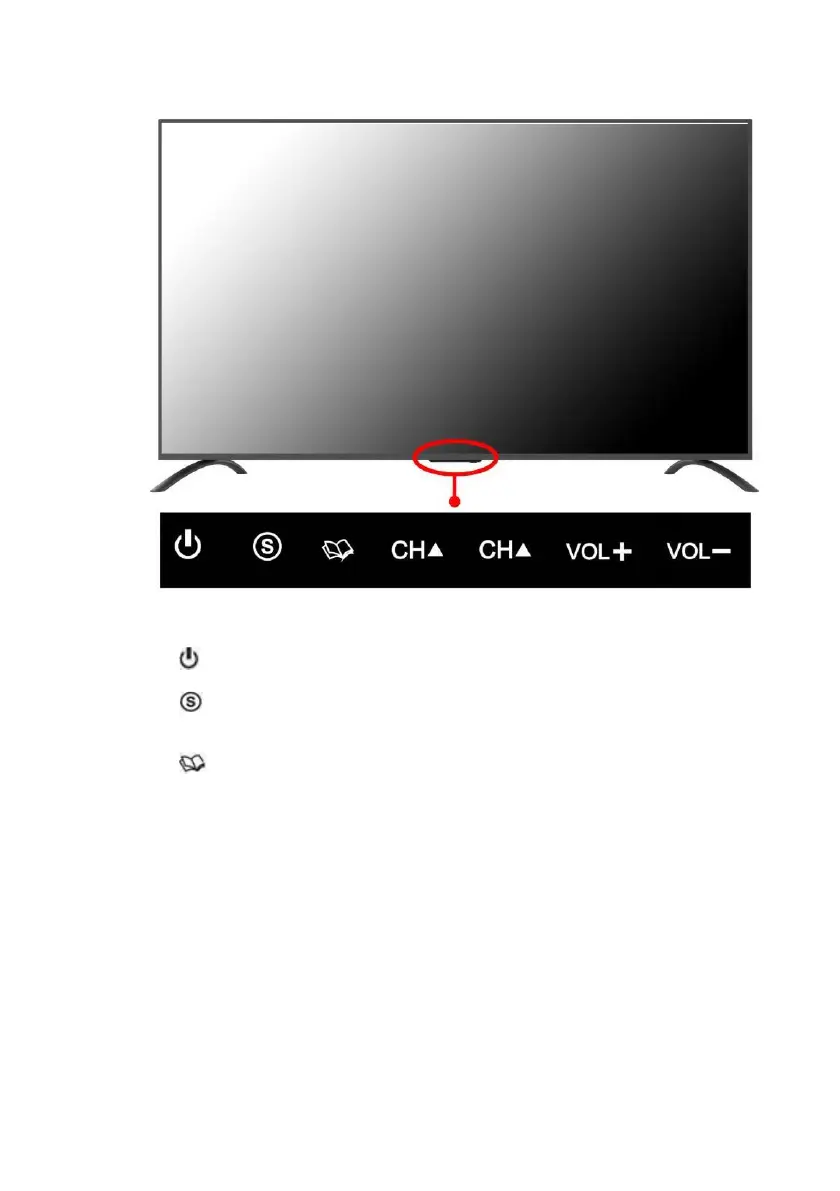
Side Control Buttons
1. – Turn on the display by pressing the button once. Press the button again to
turn off the display.
2. – This button switches between all the different sources of the display. When
the OSD is active, this button acts as the enter button and confirms the menu
selection.
3. – This button activates the On Screen Display (OSD). If a sub-menu is active,
pressing this button will exit the OSD.
4. CH(▲) – This button changes the display channel up. If the OSD is active, this
button functions as up for the menu.
5. CH(▼) – This button changes the display channel down. If the OSD is active, this
button functions as down for the menu.
6. VOL(+) – This button increases the display’s volume. If a sub-menu is active,
pressing this button will move the select right.
7. VOL(-) – This button decreases the display’s volume. If a sub-menu is active,
pressing this button will move the selection left.


 To Next Page
 Loading...