- 38 -
www.SCEPTRE.com
SCEPTRE UMR Series UHD Display User Manual
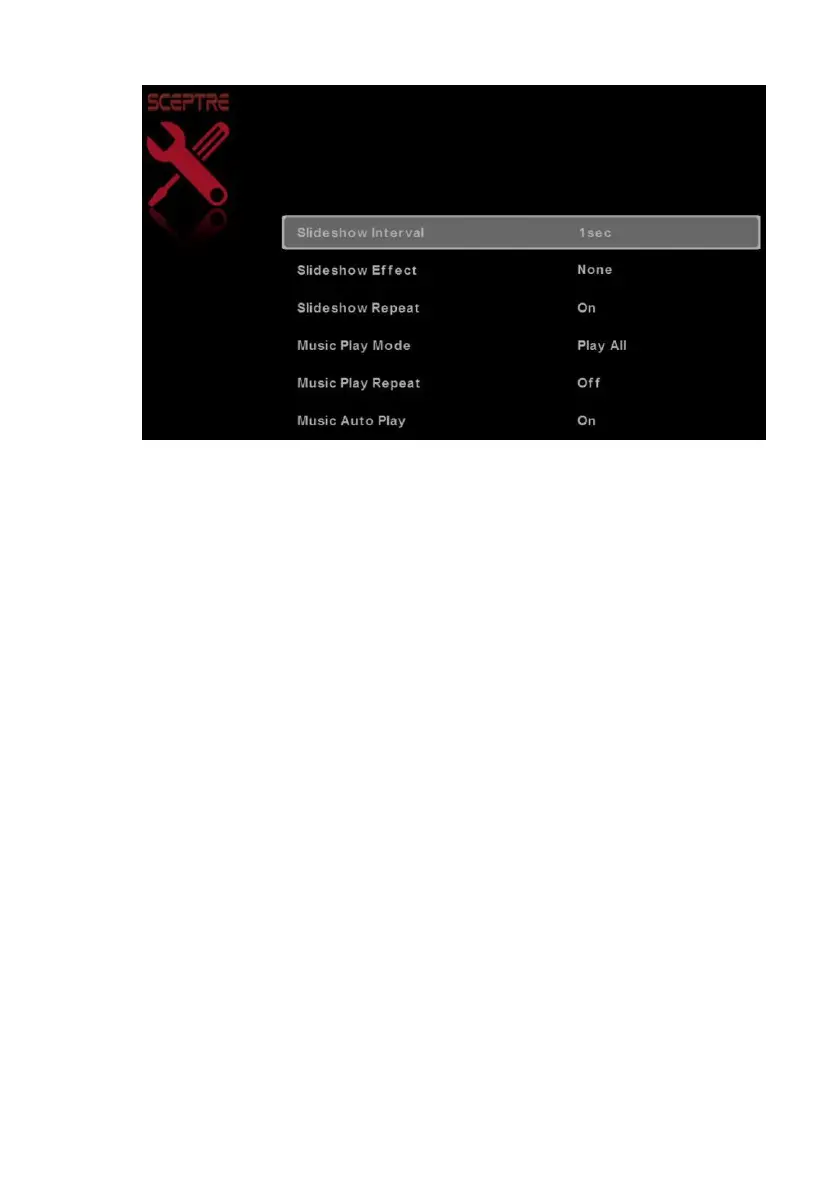
Media Setting
1.
SLIDESHOW INTERVAL – This option adjusts the time interval of a displayed picture.
2.
SLIDESHOW EFFECT – This option adjusts the video effects when pictures interchange.
3.
SLIDESHOW REPEAT – This option toggles the repeat function for displaying pictures.
4.
MUSIC PLAY MODE – This option adjusts the music playing option.
5.
MUSIC PLAY REPEAT – This option toggles the repeat function for playing music.
6.
MUSIC AUTO PLAY – This function toggles the auto play feature which will play any
music found in the USB flash drive once you insert the flash drive.
Technical Limitation
1.
The USB port does not support USB hubs.
2.
The USB flash drive supports FAT32 and FAT16 file system only.
3.
The biggest file size is 2 gigabyte (FAT32).
4.
The picture function only supports JPEG file (baseline only, progressive is not
supported).
5.
The music function only supports MP3 that is from 32-48k Hz using a data rate of
32-320 kbps.
6.
All USB functions are operated by the remote control. None of the buttons physically
located on the display will respond to USB functions.


 To Next Page
 Loading...