www.schaerer.com
25
BASCA - EN
Version 06 01.2010
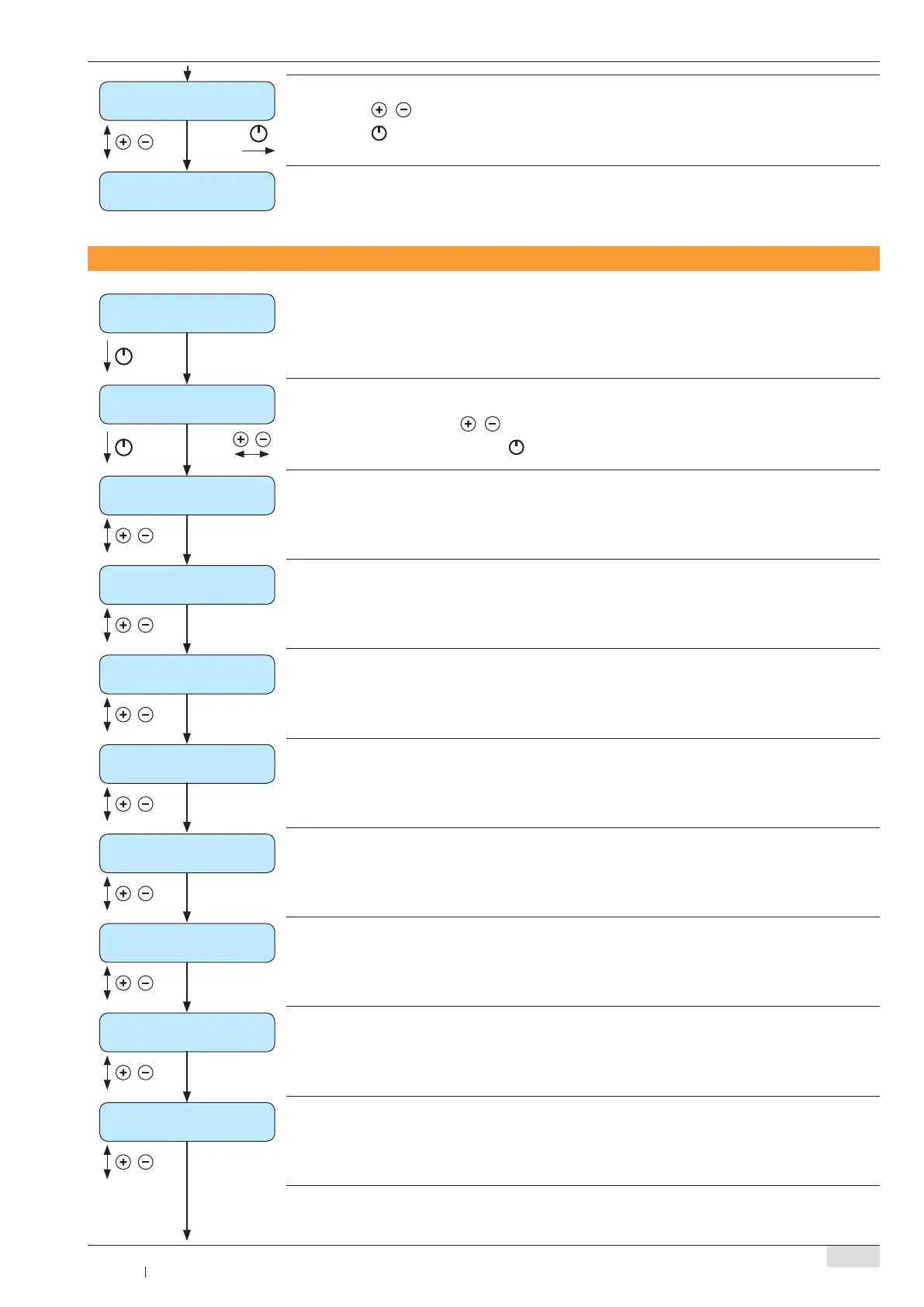
clear daily counters
execute with ‘ON’
Use the ► / to continue without erasing the daily counter
Use the ►
button to erase the counter
daily counters
read out counters
To access a menu, see “ ► Programming overview: CHEF card”, page 23
machine counters
Range: Daily counters / service counters / machine counters / cleaning statistics / error statistics
Select counter using the ►
/ buttons
Show selected counter using the ►
button
dispensed prod. (all)
XXX
All product purchases are displayed ►
coffee products
XXX
Coffee product purchases are displayed ►
cappuccino / milk coffee
XXX
Cappuccino and coffee with milk product purchases are displayed ►
milk / milk foam
XXX
Milk and foam product purchases are displayed ►
decafeinated
XXX
Decaffeinated (DECAF) product purchases are displayed ►
double products (2x)
XXX
Double product purchases are displayed ►
hot water
XXX
Hot water purchases are displayed ►
steam products
XXX
Steam purchases are displayed ►
Read out counters: Machine counters



 To Next Page