www.schaerer.com
50
BASCA - EN
Version 06 01.2010
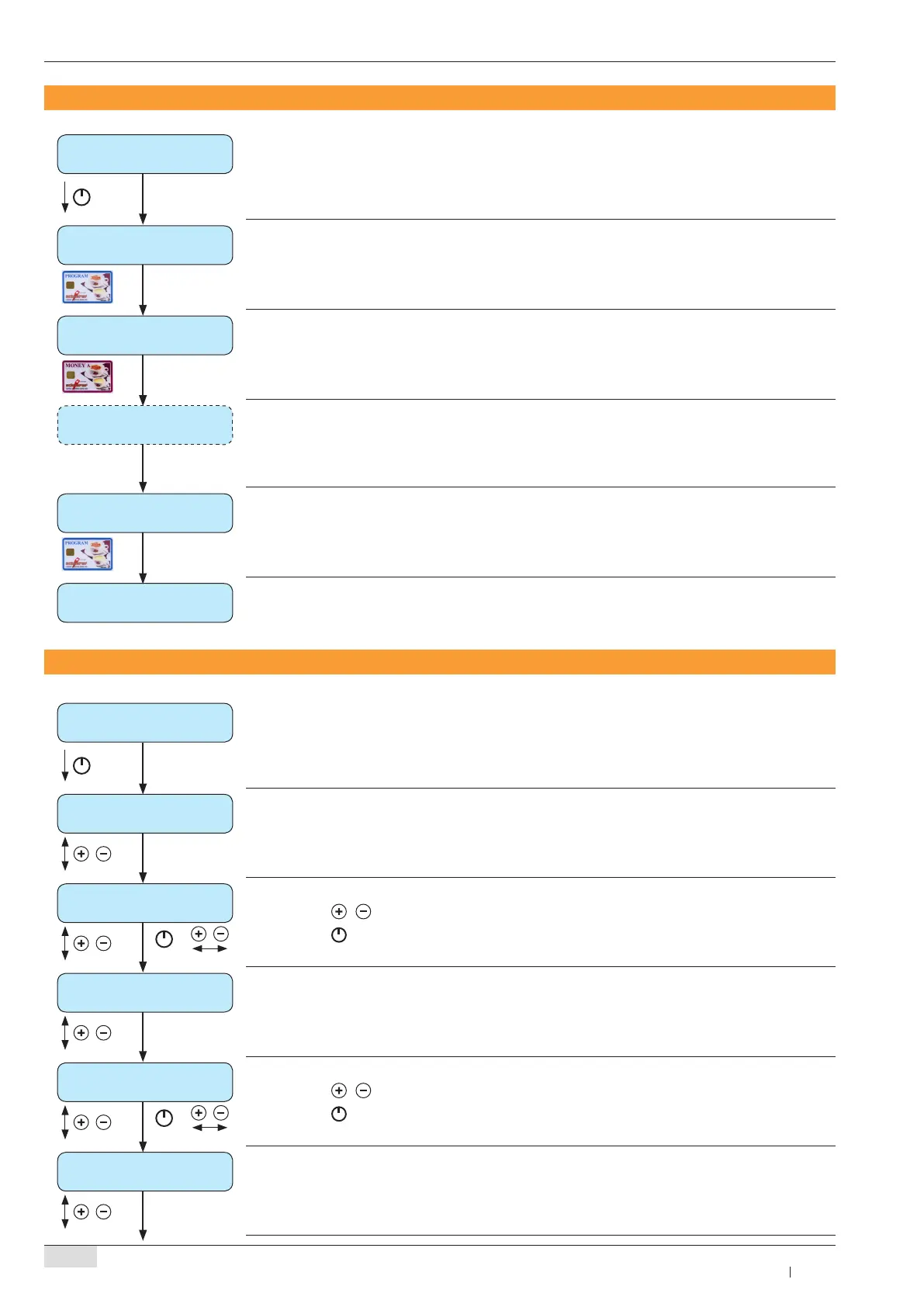
erase MONEY card
► To access a menu, see “Programming overview: PROGRAM card”, page 48
remove card
Remove PROGRAM card ►
insert card
PROGRAM card to quit
Insert MONEY A or MONEY B card ►
The amount on the MONEY card will be erased ►
card erased
remove card
Remove the MONEY card when the message “ ► card erased” appears on the display
insert card
PROGRAM card to quit
Repeat the procedure above for every desired MONEY card ►
Insert PROGRAM card to quit ►
erase MONEY card
show turnover data
► To access a menu, see “Programming overview: PROGRAM card”, page 48
coins (total)
XXXX.XX
The total counter for money will be shown ►
+
coins (erasable)
XXXX.XX
Use the ► / to continue without erasing the counter
Use the ►
button to erase the counter
token (total)
XXXX.XX
The total counter for token will be shown ►
+
token (erasable)
XXXX.XX
Use the ► / to continue without erasing the counter
Use the ►
button to erase the counter
CCI / CSI (total)
XXXX.XX
The total counter for CCI / CSI will be shown ►
Erase MONEY card
Show turnover data



 To Next Page