※ Please make sure the edge of
Wind X2 is 8cm or more away
from window frames or corners
before cleaning (as in fig. Page
11).
“Z|N” Cleaning Mode
Press the button on remote or App, Wind X2 will clean the glass
with “N” & “Z” shaped path.
Notice:
• Wind X2 will return to the start position after automatical cleaning is
finished, it is normal that some times the start position and return position
are slightly different.
•
The cleaning path is for reference, please subject to the actual
products.
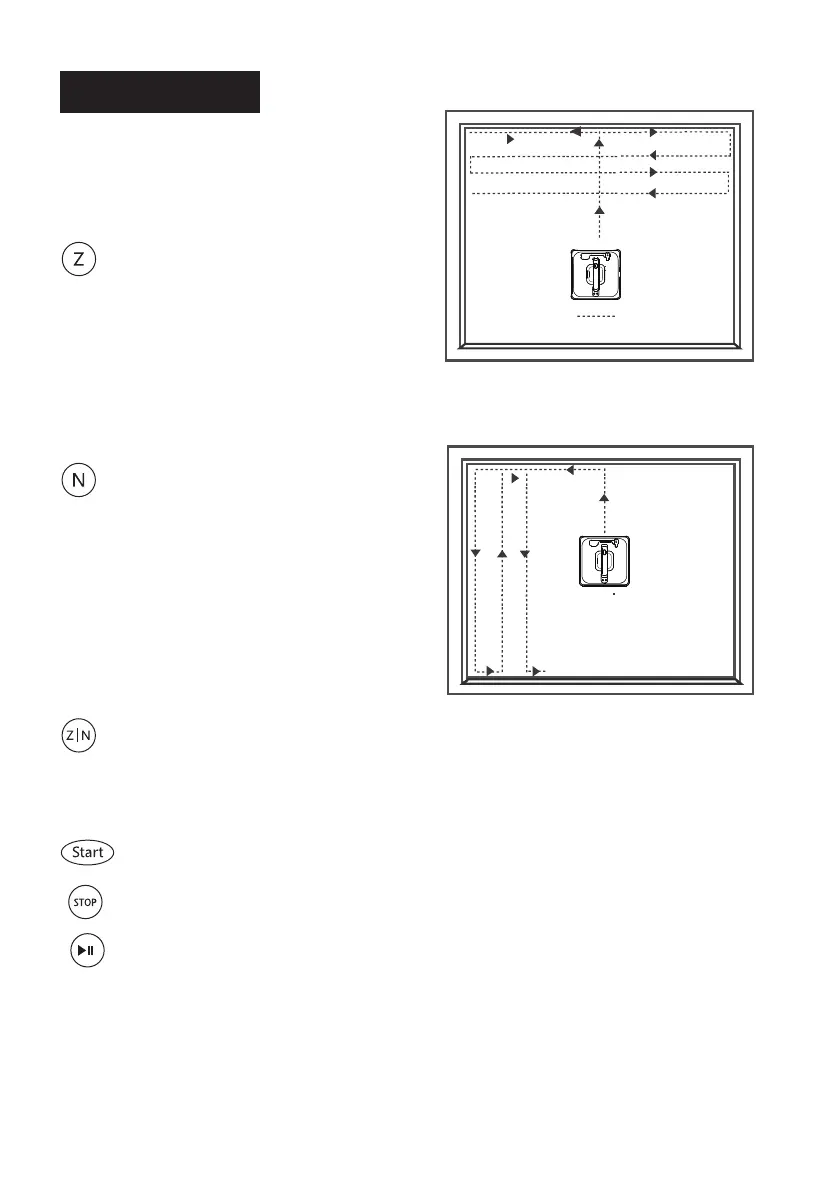
“Z” Cleaning Mode:
Start Wind X2 in the center of the
glass. It will detect the frame
upwards first, and the frame left
second, after that, it will start
cleaning with “Z” shaped path.
“N” Cleaning Mode:
Start Wind X2
in the center of the
glass. It will detect the frame
upwards first, and the frame left
second, after that, it start cleaning
with “N” shaped path.
“Z” Shaped Path
8
Cleaning Modes
Schbot
Schbot
Wind X2
Robot Window Cleaner
“N” Shaped Path
Schbot
Wind X2
Robot Window Cleaner
: press the button to start cleaning.
: press the button to stop cleaning.
: press the btton to pause/resume cleaning.


 To Next Page