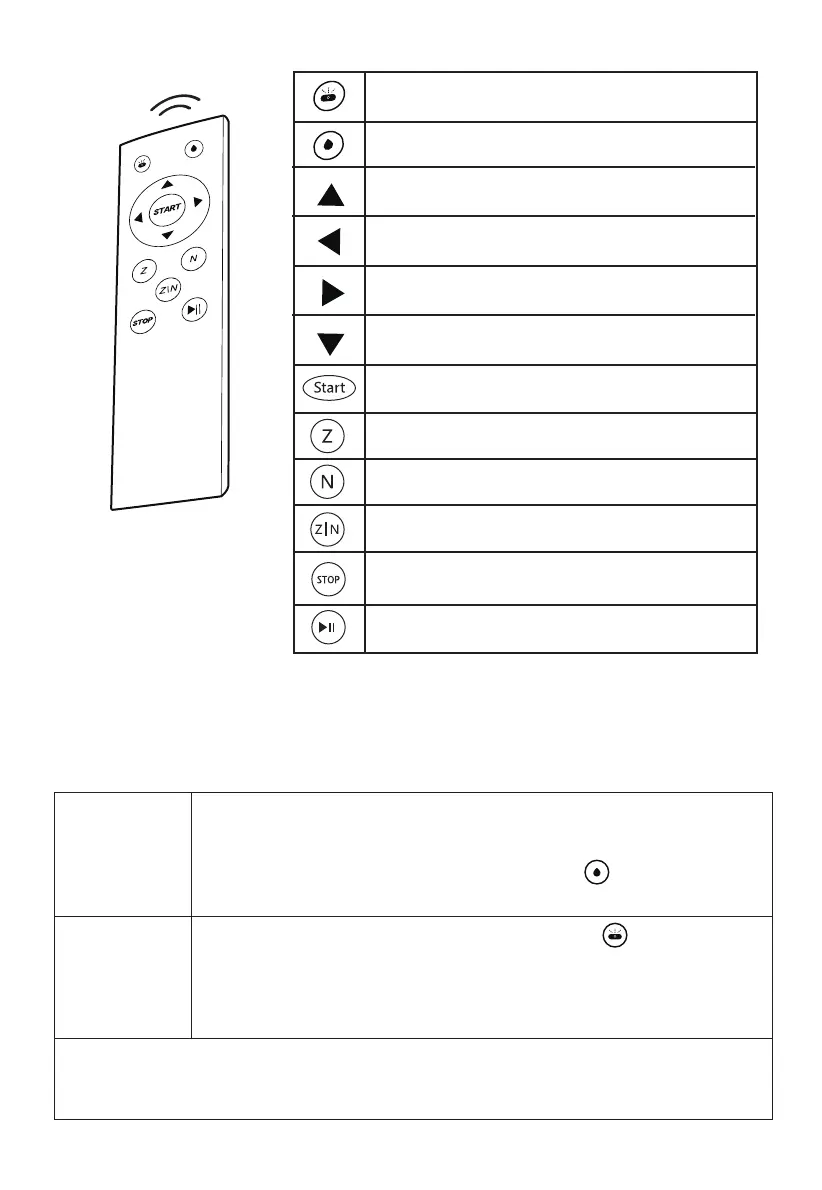
Auto/Manual Water Spraying Switch
Manual Spraying Button
Manual Move Up
Manual Move Left
Manual Move Right
Manual Move Down
Start Cleaning Button
Auto “Z” Cleaning Type
Auto “N” Cleaning Type
Auto “Z” and “N” Cleaning Type
Stop Cleaning
Pause/Resume
Remote Control
7
Schbot
Schbot
Self-Water-Spraying System
Auto Mode
Press the Auto/Manual Water Spraying Switch at manual
mode, Wind X2 will enter the Auto water-spraying mode, and
the indicator is blinking blue.
Users can select th
e spray interval with 3s, 5s, 8s and 10s mode
via App(”s” is a time coefficient, not exactly equal to seconds).
Manual Mode
Hold and press the switch on Wind X2 to turn Wind X2 on, press
the start button, it will enter Manual water-spraying mode by
default, and the indicator is solid blue.
Users can press the manual spraying button on remote or
App to spray the water manually.
Attention:
The above setting and operating is for reference, we reserve the right to changes
in settings and operatings which are subject to change without prior notice.


 To Next Page