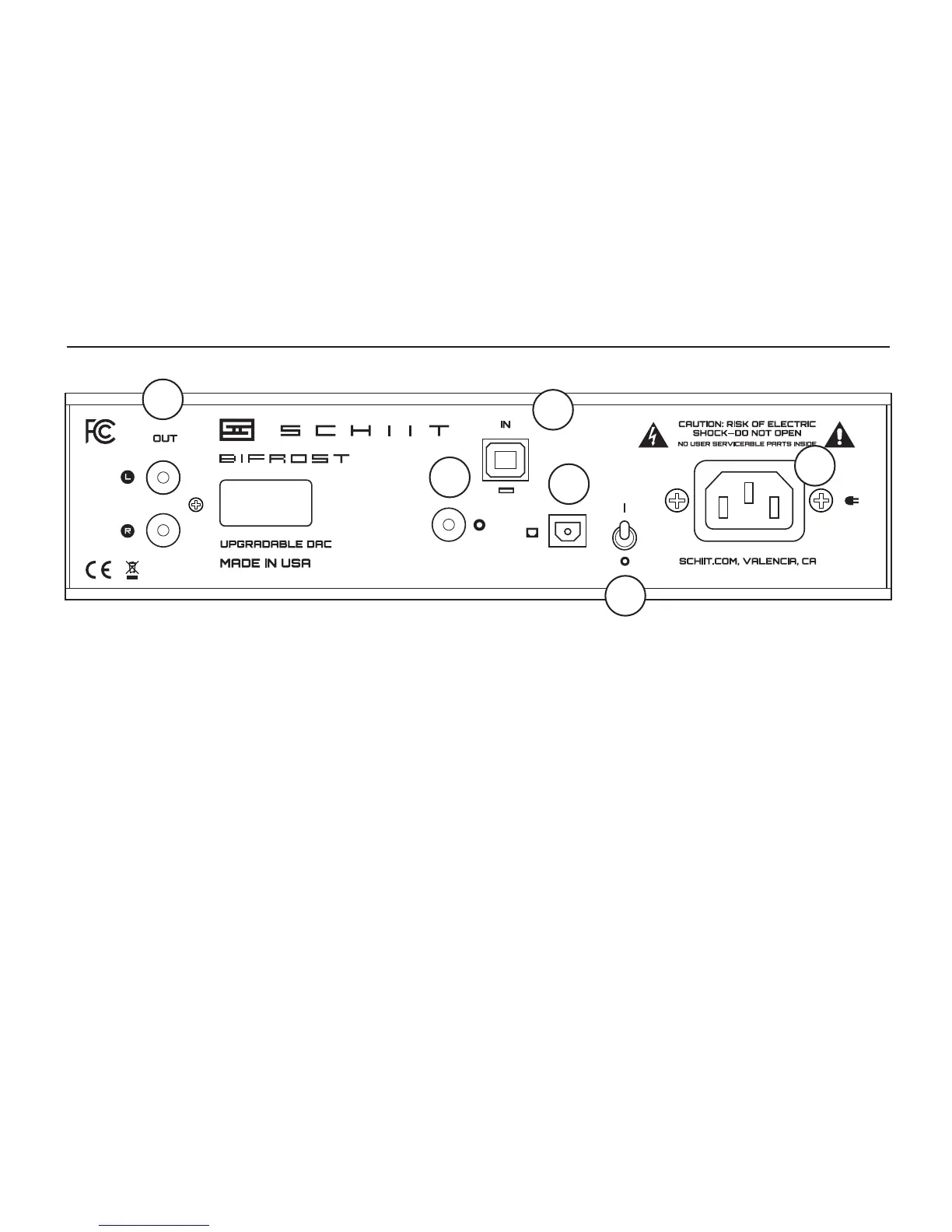
1 RCA Outputs. Connect to your preamp, head-
phone amp, or integrated amp. Use SYS, Saga,
or Freya if you need volume control for a speaker
amp or powered monitors.
2 Coaxial Input. Connect your coaxial output
source with . . . wait for it . . . a coaxial cable!
3 Optical Input. Use a standard Toslink cable
to connect to the optical input. If you’re using a
digital source with a combined headphone jack/
Toslink jack, use a Toslink with a 1/8” plug on
one side, and a standard Toslink on the other.
REAR CONNECTIONs
4 USB Input. Use a standard USB A-B, 2.0-rated
cable 2m or less in length to connect.
5 Power Switch. Up is on. Down is off. It doesn’t
go sideways.
6 AC Input. Plug the power cord in here. Plug
the other end into a wall outlet of the correct
voltage. Trying to run a 115V unit on 230V will
result in a blown fuse, no music, and a void
warranty.
SCH-04
00000001
115VAC 12W
1
2
3
4
5
6



 To Next Page