Page 1.25
Chapter 1
Operating Elements
SCHILLER AT-2plus 6-Channel ECG Unit
SERVICE HANDBOOK Issue 1 June 1998
Memory and Data Transmission Option (cont.)
Erasing Memory Files
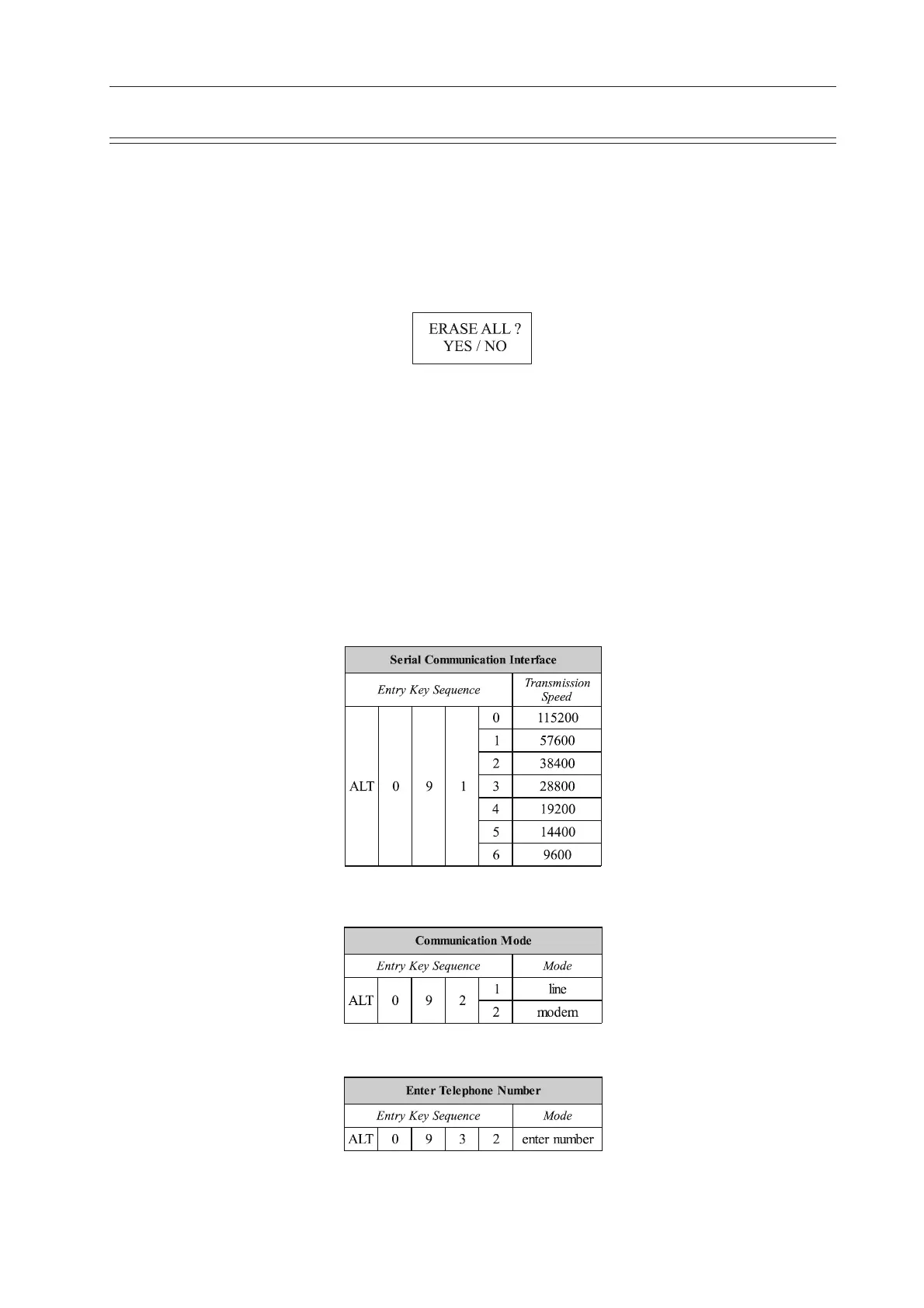
To erase the contents of the memory (delete all files) when the memory files are displayed, press
and hold the ALT key and press the key `E `
ALT + E
When YES is selected the message `ERASING` appears in the message box (under the date and
time box), during the erasing process.
Transmitting Stored Files
The contents of the memory can be transmitted to the SEMA-200 data management program,
either directly using the RS-232 connector of the computer, or over the telephone system. Sending
directly is termed LINE transmission; sending over the telephone system requires a modem and
this form of sending is termed MODEM.
Transmission Settings
The speed settings options for the AT-2plus are as follows:
The mode of transmission is as follows:
Enter the telephone number as follows:
Note: The modem initialisation commands, entered when the modem is first connected,
are also entered in this screen.













 To Next Page