Why Schlage Locks deadbolt does not extend after pushing and rotating thumbturn?
- BBrandon WardSep 23, 2025
The reason the deadbolt does not extend after pushing and rotating the thumbturn is that the Lock and Leave feature is disabled.


Why Schlage Locks deadbolt does not extend after pushing and rotating thumbturn?
The reason the deadbolt does not extend after pushing and rotating the thumbturn is that the Lock and Leave feature is disabled.
Why doesn't my Schlage door lock unlock with the user code?
If your Schlage door lock isn't unlocking with the user code, the User Code entered is not a valid User Code.
Why is my Schlage Locks blinking red but no codes have been entered?
If your Schlage lock is blinking red and no codes have been entered, the battery is dead and must be replaced.
Why can't I delete all User Codes on my Schlage Locks?
If you cannot delete all User Codes from your Schlage lock, it is possible that the Programming Code was entered incorrectly the second time.
What to do if my Schlage Locks is in Vacation Mode?
The reason the lock is not working as expected is that Vacation Mode is enabled. Disable Vacation Mode to restore normal operation.
What to do if I forgot my Schlage Locks programming code?
If you forgot your Schlage lock's Programming Code, check the front of the guide or the back of the keypad assembly for the default Programming Code.
How to fix Schlage Locks when you can unlock it without a code?
If you can unlock your Schlage deadbolt by simply pushing the button without entering a code, it means the lock was installed incorrectly and is not secure. To fix this, repeat the installation process, making sure the cam and bolt positions are correct, as outlined in the installation instructions.
Why is there a delay before my Schlage Locks unlock after entering a valid code?
If there is a delay before your Schlage lock unlocks after entering a valid User Code, the battery is likely low and needs to be replaced.
Why can't I add a new User Code to my Schlage door lock?
If you cannot add a new User Code to your Schlage door lock, it may be because 19 User Codes already exist. Delete a User Code before adding a new one.
Why is there a delay before unlock after entering a valid User Code on my Schlage door lock?
If you're experiencing a delay before the Schlage door lock unlocks after entering a valid User Code, the battery is likely low and should be replaced.
Document your purchase and register your warranty online for support and product information.
Essential guide containing important information for operating and maintaining your lock.
Explanation of why keys are necessary for a keyless lock, especially during battery failure.
Contact information and resources for technical support, troubleshooting, and FAQs.
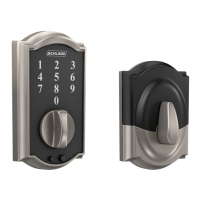
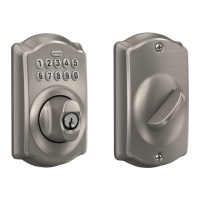
Identification and description of the external parts of the keypad lock for BE365 model.
Component used for entering codes for programming and unlocking the lock.
Part of the lock used to lock or unlock the door after code entry or button press.
The key cylinder used for emergency override or manual key operation.
Component on the inside of the door used to lock or unlock the deadbolt.
The keypad located on the exterior of the keypad lever lock.
Description of how the interior and exterior levers function to retract the latch.
The key cylinder for the keypad lever lock, used in emergency situations.
Functionality of the thumbturn on the FE595 keypad lever lock.
Step-by-step instructions for locking and unlocking the deadbolt from the outside.
Procedure for locking the deadbolt, which may require pressing the Schlage button.
Procedure for unlocking the deadbolt using a valid user code.
Instructions for replacing the batteries in your lock to ensure reliable operation.
Information regarding the performance and recommendation for lithium batteries.
Steps to use a key for access when the battery is dead or codes are unknown.
How to disable the keypad completely, requiring a key for unlocking.
Instructions for temporarily unlocking the keypad lock using a user code.
Procedure to set the FE595 model to remain unlocked.
Using a key to unlock keypad locks when the battery is dead or codes are unavailable.
Clarification on the functional differences between FE575 Auto Lock and FE595 Flex Lock.
Steps to replace the battery in the FE595 keypad lock model.
Steps for replacing the battery in the FE575 keypad lock model.
Interpreting the color and blinking patterns of the Schlage button for lock status.
Indicates the lock is in programming mode.
Signals a correct user code entry or successful programming.
Indicates incorrect codes, programming errors, or low battery status.
Six-digit code used to enter programming mode; does not unlock the lock.
Four-digit codes used to unlock the lock, with up to 19 codes storable.
Information on where to find the factory-default programming and user codes.
Guides for adding, deleting, and changing programming and user codes.
Step-by-step process for adding new user codes to the lock.
Instructions for removing existing user codes from the lock.
Procedure to update the lock's master programming code.
Overview of advanced features available for customizing lock behavior.
Activates vacation mode to prevent entry by any user code.
Deactivates vacation mode, allowing normal user code operation.
Option to turn the lock's audible beeper on or off.
Resets the lock by removing all programmed user codes.
Control feature for deadbolt locking from outside without a code.
Advice on rotating codes to ensure even wear on keypad buttons.
Information on the maximum number of user codes that can be stored.
Resources for diagnosing and resolving common lock issues.
Procedure to reset the lock to its original factory default settings.
Emphasizes the need to locate default codes before restoring factory settings.
Reference to available downloads related to the product.
Instructions for preparing doors for FE575/FE595 keypad lever installation.
User manual for the FE575 keypad lock, including installation and preparation.
Door preparation instructions for FE575/FE595 models with existing holes.
Installation manual for the FE575 keypad lock, detailing tools needed.
Installation manual for the BE365 keypad deadbolt, including preparation.
User guide for Schlage Control Smart Locks with Engage technology.
Document your purchase and register your warranty online for support and product information.
Essential guide containing important information for operating and maintaining your lock.
Explanation of why keys are necessary for a keyless lock, especially during battery failure.
Contact information and resources for technical support, troubleshooting, and FAQs.
Identification and description of the external parts of the keypad lock for BE365 model.
Component used for entering codes for programming and unlocking the lock.
Part of the lock used to lock or unlock the door after code entry or button press.
The key cylinder used for emergency override or manual key operation.
Component on the inside of the door used to lock or unlock the deadbolt.
The keypad located on the exterior of the keypad lever lock.
Description of how the interior and exterior levers function to retract the latch.
The key cylinder for the keypad lever lock, used in emergency situations.
Functionality of the thumbturn on the FE595 keypad lever lock.
Step-by-step instructions for locking and unlocking the deadbolt from the outside.
Procedure for locking the deadbolt, which may require pressing the Schlage button.
Procedure for unlocking the deadbolt using a valid user code.
Instructions for replacing the batteries in your lock to ensure reliable operation.
Information regarding the performance and recommendation for lithium batteries.
Steps to use a key for access when the battery is dead or codes are unknown.
How to disable the keypad completely, requiring a key for unlocking.
Instructions for temporarily unlocking the keypad lock using a user code.
Procedure to set the FE595 model to remain unlocked.
Using a key to unlock keypad locks when the battery is dead or codes are unavailable.
Clarification on the functional differences between FE575 Auto Lock and FE595 Flex Lock.
Steps to replace the battery in the FE595 keypad lock model.
Steps for replacing the battery in the FE575 keypad lock model.
Interpreting the color and blinking patterns of the Schlage button for lock status.
Indicates the lock is in programming mode.
Signals a correct user code entry or successful programming.
Indicates incorrect codes, programming errors, or low battery status.
Six-digit code used to enter programming mode; does not unlock the lock.
Four-digit codes used to unlock the lock, with up to 19 codes storable.
Information on where to find the factory-default programming and user codes.
Guides for adding, deleting, and changing programming and user codes.
Step-by-step process for adding new user codes to the lock.
Instructions for removing existing user codes from the lock.
Procedure to update the lock's master programming code.
Overview of advanced features available for customizing lock behavior.
Activates vacation mode to prevent entry by any user code.
Deactivates vacation mode, allowing normal user code operation.
Option to turn the lock's audible beeper on or off.
Resets the lock by removing all programmed user codes.
Control feature for deadbolt locking from outside without a code.
Advice on rotating codes to ensure even wear on keypad buttons.
Information on the maximum number of user codes that can be stored.
Resources for diagnosing and resolving common lock issues.
Procedure to reset the lock to its original factory default settings.
Emphasizes the need to locate default codes before restoring factory settings.
Reference to available downloads related to the product.
Instructions for preparing doors for FE575/FE595 keypad lever installation.
User manual for the FE575 keypad lock, including installation and preparation.
Door preparation instructions for FE575/FE595 models with existing holes.
Installation manual for the FE575 keypad lock, detailing tools needed.
Installation manual for the BE365 keypad deadbolt, including preparation.
User guide for Schlage Control Smart Locks with Engage technology.
| Lock Type | Deadbolt |
|---|---|
| Keypad | Yes |
| Material | Metal |
| Keyless Entry | Yes |
| Number of User Codes | 19 |
| ANSI/BHMA Grade | Grade 2 |
| Weather Resistance | Yes |
| Power Source | 9V Battery |
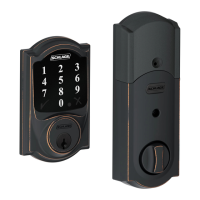
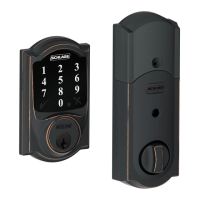
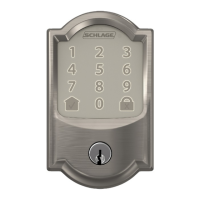
| Finish Options | Aged Bronze, Satin Nickel |
| Backset | Adjustable 2-3/8 to 2-3/4 inches |
| Operation | Keypad |
| Warranty | Limited Lifetime |