EasyManua.ls Logo

Schlage Connect Smart Deadbolt - User Manual

Schlage Connect Smart Deadbolt
20 pages
Print Icon
To Next Page IconTo Next Page
Loading...
Quick Start Guide
Question and Answer IconNeed help?

Do you have a question about the Schlage Connect Smart Deadbolt and is the answer not in the manual?

Summary

Parts Identification

Getting Started and Support

Interactive Experience

Access online resources for enhanced installation guidance, warranty, and information.

Tools Required

Specifies the necessary Phillips screwdriver and warns against using a power drill for installation.

Customer Support

Provides contact phone numbers for customer support in the USA, Canada, and Mexico.

Installation Steps

Install the Bolt

Adjust bolt length and center the slot in the hole for proper installation.

Install the Strike

Install the strike into the door frame for enhanced security.

Install the Touchscreen

Route cable and align tailpiece for correct touchscreen mounting.

Install the Inside Backplate

Route cable and secure the inside backplate with screws.

Battery Cover Removal

Instructions on how to remove the battery cover.

Connect the Cable

Connect the internal cable, noting its specific orientation.

Secure the Lock

Align tailpiece and tuck wire to properly secure the lock to the door.

Install Screws

Install the screws, starting with the lower one first.

Install Batteries and Cover

Insert batteries and slide the cover back on.

Set Up Your Lock

Enter user codes and initiate the lock's setup routine.

Test Your Lock

Verify lock functionality by testing bolt operation and code entry.

Enroll Your Lock

Enroll the lock with your smart home system, observing status lights.

Lock and Unlock Operation

Code Management

Add and Delete Codes

Procedure for adding or deleting user codes, including code length requirements.

Factory Default Reset

Summary

Parts Identification

Getting Started and Support

Interactive Experience

Access online resources for enhanced installation guidance, warranty, and information.

Tools Required

Specifies the necessary Phillips screwdriver and warns against using a power drill for installation.

Customer Support

Provides contact phone numbers for customer support in the USA, Canada, and Mexico.

Installation Steps

Install the Bolt

Adjust bolt length and center the slot in the hole for proper installation.

Install the Strike

Install the strike into the door frame for enhanced security.

Install the Touchscreen

Route cable and align tailpiece for correct touchscreen mounting.

Install the Inside Backplate

Route cable and secure the inside backplate with screws.

Battery Cover Removal

Instructions on how to remove the battery cover.

Connect the Cable

Connect the internal cable, noting its specific orientation.

Secure the Lock

Align tailpiece and tuck wire to properly secure the lock to the door.

Install Screws

Install the screws, starting with the lower one first.

Install Batteries and Cover

Insert batteries and slide the cover back on.

Set Up Your Lock

Enter user codes and initiate the lock's setup routine.

Test Your Lock

Verify lock functionality by testing bolt operation and code entry.

Enroll Your Lock

Enroll the lock with your smart home system, observing status lights.

Lock and Unlock Operation

Code Management

Add and Delete Codes

Procedure for adding or deleting user codes, including code length requirements.

Factory Default Reset

Overview

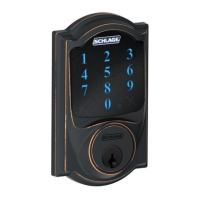
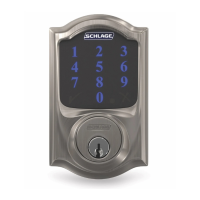
The Schlage Connect Smart Deadbolt is a keyless entry system designed to enhance home security and convenience. This smart deadbolt integrates with smart home systems, allowing users to control and monitor their door lock remotely. The device features a touchscreen keypad for code entry and a traditional keyhole for backup access.

Function Description

The primary function of the Schlage Connect Smart Deadbolt is to provide secure, keyless access to a home. Users can lock and unlock their door by entering a unique user code on the touchscreen keypad. The deadbolt supports user codes between 4 and 8 digits, with a default length of 4 digits. For added security, the first 4-6 digits of a user code must be different from the first 4-6 digits of the programming code.

The deadbolt also includes a traditional key cylinder, allowing for manual key override in case of battery depletion or other issues. This dual-access approach ensures that users are never locked out of their home.

Integration with smart home systems is a core feature of the Schlage Connect. The deadbolt can be enrolled into compatible smart home hubs or panels, enabling remote locking/unlocking, status checks, and potentially integration with other smart devices for automated routines. For instance, users can check if their door is locked from their smartphone or set up a routine to lock the door automatically at a certain time.

The device includes a setup routine that automatically configures the bolt's movement once batteries are installed and a default user code is entered. This simplifies the initial setup process, ensuring the bolt extends and retracts correctly.

Usage Features

The Schlage Connect Smart Deadbolt offers several user-friendly features for daily operation:

  • Keyless Entry: The touchscreen keypad allows for convenient keyless entry. Users simply enter their personal code to unlock the door.
  • One-Touch Locking: To lock the door from the outside, users can simply tap the Schlage logo on the touchscreen. This provides a quick and easy way to secure the home when leaving.
  • Manual Locking/Unlocking: From the inside, the door can be locked or unlocked using the thumbturn. This provides immediate control over the deadbolt without needing to interact with the keypad.
  • User Code Management: The deadbolt allows for the addition and deletion of user codes. This is particularly useful for granting temporary access to guests, service providers, or family members without distributing physical keys. The process involves entering a 6-digit programming code, then selecting to add or delete a user code, and finally entering the desired user code twice for confirmation.
  • Smart Home Integration: The deadbolt can be enrolled into a smart home system. This typically involves placing the smart home system into enrollment mode, then pressing a button on the deadbolt's internal assembly. A yellow flashing light indicates enrollment in progress, while a solid green light confirms successful enrollment. A red light indicates an enrollment issue, prompting the user to repeat the process. This integration enables remote control and monitoring through a smart home app.
  • Backup Key Access: In situations where the batteries are dead or the user code is forgotten, a traditional backup key can be used to unlock the deadbolt. This ensures reliable access even in unforeseen circumstances.
  • Visual and Auditory Feedback: The touchscreen provides visual feedback during operation, such as indicating successful enrollment or code entry. The device may also provide auditory cues to confirm actions.

Maintenance Features

Maintaining the Schlage Connect Smart Deadbolt primarily involves battery replacement and occasional troubleshooting:

  • Battery Installation and Replacement: The deadbolt is powered by batteries, which are installed by removing the battery cover on the inside assembly. The manual provides clear instructions for installing the batteries and sliding the cover back on. When batteries need replacement, the cover is easily removed, new batteries are inserted, and the cover is reattached.
  • Cable Connection: During installation, the cable connecting the touchscreen assembly to the inside assembly must be properly connected. The connector is designed to fit only one way, simplifying the process and preventing incorrect connections.
  • Wire Management: The manual emphasizes tucking the wire into a designated channel during installation to prevent it from being pinched or damaged, ensuring long-term functionality.
  • Factory Default Reset: If the programming code is forgotten or if the lock needs to be moved to a different door, a factory default reset can be performed. This process involves disconnecting the batteries, pressing and holding down the Schlage logo on the touchscreen, and then reconnecting the batteries while still holding the logo. This restores the lock to its original default settings, including the default user codes, which are typically found on a label on the back of the inside assembly or in the guide. After a reset, the lock needs to be set up again, similar to the initial installation process.
  • Troubleshooting Guides: The manual provides guidance for common installation and usage issues. For example, if the bolt doesn't extend or retract during testing, users are advised to check online instructions and ensure the spindle is aligned properly. If the tailpiece is difficult to install or the door hole seems too small, removing a spacer might be necessary, as detailed in the online instructions. Similarly, if the strike reinforcer is difficult to install, specific help is available in the online instructions.
  • Online Resources: The manual directs users to an online portal (instructions.allegion.com) for improved installation experience, interactive instructions, warranty information, and reference materials. This digital resource serves as a comprehensive support hub for users.
  • Customer Support: Contact information for customer support in the U.S.A., Canada, and Mexico is provided, allowing users to seek assistance for any issues they encounter.

The Schlage Connect Smart Deadbolt is designed for straightforward installation using a Phillips screwdriver, with a specific warning against using power drills to prevent damage. The installation steps are clearly outlined, from installing the bolt and strike to connecting the internal components and setting up the lock. Attention to detail, such as ensuring the "TOP" indicator on the bolt and backplate is facing correctly, is highlighted to ensure proper functionality. The design prioritizes both security and user convenience, making it a robust solution for modern home access.

Schlage Connect Smart Deadbolt Specifications

General IconGeneral
Lock TypeDeadbolt
KeypadYes
Keyless EntryYes
Power Source4 AA batteries
Backup PowerNo
User CodesUp to 30
Operating Temperature-40°F to 140°F (-40°C to 60°C)
ANSI GradeGrade 1
KeywaySchlage C Keyway
Auto-LockYes
ConnectivityZ-Wave
Finish OptionsSatin Nickel, Matte Black
AlarmYes
Voice Assistant CompatibilityAmazon Alexa
Smart Home CompatibilityZ-Wave systems
Door Thickness1-3/8" to 1-3/4"
Backset2-3/4"
InstallationDIY
WarrantyLimited lifetime mechanical
Alarm TechnologyBuilt-in alarm

Related product manuals