
 Need help?
Do you have a question about the Schneider Airsystems AIRBASIC 2 and is the answer not in the manual?
Instructions for storing the manual for long-life operation.
Importance of reading safety instructions and symbols.
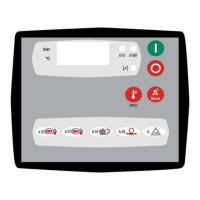
Overview of the control panel, its display, LEDs, and buttons.
Explains display messages, values, and LED indicators for operation.
Details the functions of the ON, OFF, RESET, and TEMP/PROGR buttons.
Explains the meaning of green LED indicators (x10, x100, load/unload modes, ready to start).
Procedures for starting the compressor in "OFF" and "---" status, including remote control.
Describes controller checks before starting and startup sequences with pressure switch/transducer.
Explains load/unload control with pressure switch and transducer, including LED indicators.
Details how to control loading and unloading using a remote contact.
Explains local/remote switch-off, turn-off delay, and safety restarting delay.
Explains how to view maintenance codes (S01-S06) and their meanings.
Procedure for resetting maintenance timers (S01-S06) when the compressor is OFF.
How to view total operating hours ("h-t") and load operating hours ("h-L").
How to enter parameter programming mode and adjust values using buttons.
Table listing all parameters with descriptions, units, ranges, and default values.
Detailed explanation of parameters related to pressure and oil temperature.
Detailed explanation of parameters related to temperature, timers, and delays.
Detailed explanation of parameters related to restarts, maintenance, and units.
Detailed explanation of parameters related to restart, alarms, outputs, and inputs.
Alerts for maintenance needs or approaching shutdown levels, resettable.
Faults protecting the compressor from failure or extreme conditions, stopping or inhibiting startup.
Diagram showing rear view of connections and input/output terminals.
Details M1-M5 connectors, their pins, functions, and statuses.
Details M6 and M7 connectors, their pins, functions, and statuses.
Lists power supply, memory, hardware inputs/outputs, display, buttons, and operating conditions.
 General
| Brand | Schneider Airsystems |
|---|---|
| Model | AIRBASIC 2 |
| Category | Controller |
| Language | English |

 To Next Page