washMaster Installation guide
539715.AB Page 14 / 21 07.2019
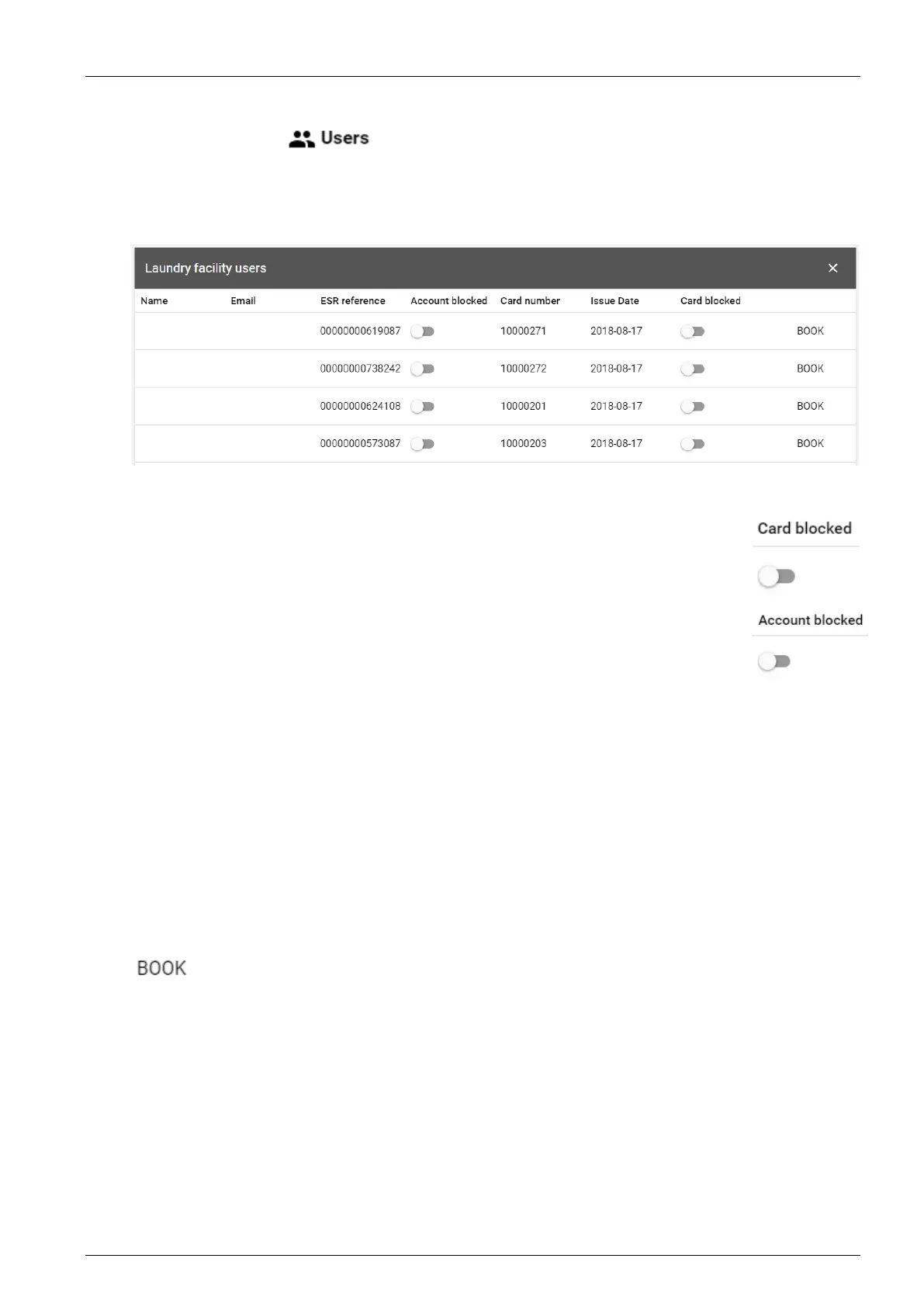
3.1.10 User overview
In the “Users” menu you can see which RFID cards are in use by users of a
property management company.
The cards are visible as soon as they have been used for the first time to execute a programme
or to query the credit balance.
If users have registered online, their name and e-mail address will be displayed.
3.1.11 Deactivate card
A card can be deactivated, e.g. in case of loss.
Find the card in the user overview and block it with the switch under “Card
blocked”.
3.1.12 Deactivate account
An account can be deactivated, for example, when a tenant moves out. In this
case, the assigned card can no longer be used.
Search for the account in the user overview and block it with the button under
“Account blocked”.
If a user has requested an account closure, his account will be automatically blocked.
3.1.13 Adjust balance manually
You can change the balance of an account manually. In this way, for example, you can set the
initial credit.
Find the card in the user overview and click on the “Book” button.
You can change the balance of an account manually. In this way, for example, you can set the
initial credit.
To do this, search for the card in the user overview and click on the “Book” button.
A window appears showing the current account balance and an amount can be loaded or
debited.




 To Next Page