washMaster Installation guide
539715.AB Page 2 / 21 07.2019
1 Short description
To wash with the washMaster module, you need a user card – as with the CRM. In addition
each customer has an online account. The credit is no longer stored on the card, but online.
The account is updated when the machine is online.
washMaster module Instruction no. 539 671
washMaster ID Reader Instruction no. 539 702
Retrofit set washMaster from september 2018 Product no. 51 076
Retrofit set washMaster up to september 2018 WA Product no. 51 077
Retrofit set washMaster up to september 2018 WT Product no. 51 078
2 Setting of machine parameters
Activate the washMaster module in the “Machine parameters” menu.
Further settings can then be made under “Additional functions”.
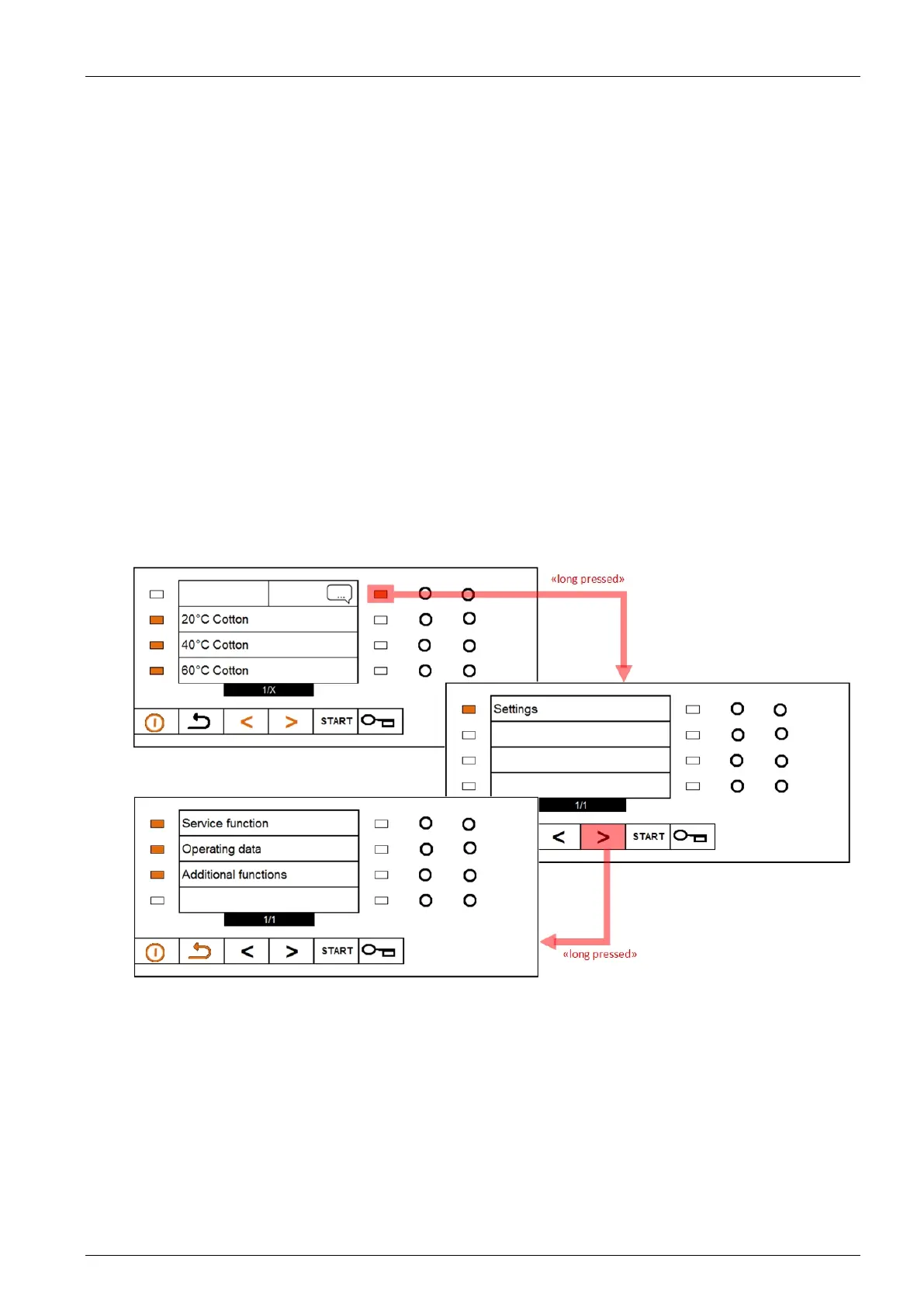
Access the “Settings” menu by a long press on the red highlighted bar (5 seconds).
Call the “Service functions” and “Additional functions” by long press (5 seconds) on the arrow
button “Forward”.
2.1 Machine parameters
Set the parameter “Interface” to “Connectivity” and the parameter “Payment systems” to “Card”.
The exact procedure can be found in the service manual.



 To Next Page