EasyManua.ls Logo

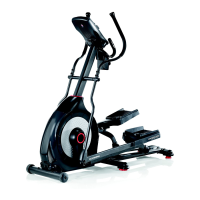
Schwinn 411 - User Manual

Schwinn 411
36 pages
Print Icon
To Next Page IconTo Next Page
Loading...
ASSEMBLY MANUAL / OWNER’S MANUAL
/

Other manuals for Schwinn 411

Questions and Answers

  • C
    collinsjamesAug 16, 2025
    What to do if Schwinn 411 Elliptical Trainer won't turn on?
    • J
      John GainesAug 16, 2025
      Ensure the Schwinn Elliptical Trainer is plugged into a functioning wall outlet. Check that the connection is secure and undamaged; if damaged, replace the adapter or the connection at the unit. Verify all wires in the cable are intact; replace the cable if any are visibly crimped or cut. Confirm the cable is securely connected and properly oriented, ensuring the small latch on the connector lines up and snaps into place. Inspect the console display for cracks or damage; replace the console if damaged. If the console shows only a partial display and all connections are good, replace the console. If the issue persists after these steps, contact customer service or your local distributor.
  • E
    Erik WellsAug 18, 2025
    What to do if Schwinn 411 Elliptical Trainer operates but Bluetooth® HR not displayed?
    • R
      Ryan MaciasAug 18, 2025
      Ensure the strap is directly against your skin and the contact area is wet. If the strap has replaceable batteries, install new ones. Try moving the Schwinn Elliptical Trainer away from sources of interference like TVs or microwaves. If eliminating interference doesn't solve the problem, replace the strap. If the heart rate still doesn't function, replace the console.
  • M
    Miranda MeadowsAug 22, 2025
    Why resistance does not change on Schwinn 411 Elliptical Trainer?
    • G
      Gabrielle PhillipsAug 22, 2025
      Check for any visual signs that the console of your Schwinn Elliptical Trainer is damaged and replace it if necessary. Inspect all wires in the cable for crimps or cuts, and replace the cable if any damage is found. Ensure the cable is securely connected and properly oriented, reseating all connections and making sure the small latch on the connector lines up and snaps into place. If the magnets move, adjust them until they are within the proper range. If the servo motor is not functioning properly, replace it. If the issue persists after these steps, contact customer service or your local distributor for assistance.
  • G
    garciajenniferAug 25, 2025
    How to stop drive train click or tick noise on Schwinn 411?
    • G
      Gabriella SpencerAug 26, 2025
      Disconnect the left and right foot assemblies and rotate the crank on your Schwinn Elliptical Trainer. If the sound persists, replace the crank/pulley assembly. If the sound does not come from the rotating crank, check the foot assemblies and upper/lower handlebars. Manually move the foot, leg, and handlebar assemblies to isolate the sound. Replace the part making the sound. Tightly secure all hardware on the stabilizers and the base of the console mast.
  • A
    Amanda ReyesAug 28, 2025
    Why Schwinn 411 Elliptical Trainer console shuts off while in use?
    • C
      Christopher BarnesAug 28, 2025
      First, make sure the Schwinn Elliptical Trainer is plugged into a working wall outlet. Then, check the adapter and its connection to the unit for any damage, replacing them if necessary. Inspect the cable for cuts or crimps and replace it if damaged. Ensure the cable is securely connected, with the latch properly aligned. Next, unplug the unit from the electrical outlet for 3 minutes, then reconnect it. Also, verify that the magnet is correctly positioned on the pulley and that the speed sensor is aligned with the magnet and connected to the data cable. Realign or replace the sensor if needed.
  • J
    Jose DavisAug 31, 2025
    What to do if Schwinn 411 Elliptical Trainer operates but Contact HR not displayed?
    • M
      Michelle WheelerAug 31, 2025
      Make sure the cable is securely connected to the console. Check that the cables from the handlebars and to the console are secure and undamaged. Ensure your hands are centered on the HR sensors, kept still, and applying relatively equal pressure to each side. Using a conductive electrode cream (heart rate cream) can improve conduction. If these steps don't work, the static handlebar should be replaced.
  • B
    Bianca MaxwellSep 2, 2025
    How to fix Schwinn 411 Elliptical Trainer rocks or does not sit level?
    • R
      Randy FrenchSep 3, 2025
      Adjust the levelers on your Schwinn Elliptical Trainer until the machine is level. If the surface is extremely uneven, the adjustment may not be enough, so move the machine to a more level area.
  • J
    James BoothSep 6, 2025
    What to do if Schwinn Elliptical Trainer has no speed or RPM reading?
    • R
      Ryan BanksSep 6, 2025
      Ensure all wires in the cable are intact. If any are cut or crimped, replace the cable. Be sure the cable is connected securely and oriented properly, ensuring the small latch on the connector lines up and snaps into place. Also, make sure the magnet is in place on the pulley. The speed sensor should be aligned with the magnet and connected to the data cable. Realign the sensor if necessary, and replace it if there is any damage to the sensor or the connecting wire.
  • R
    Richard KingSep 9, 2025
    How to fix foot pedals loose on Schwinn Elliptical Trainer?
    • A
      allentaraSep 9, 2025
      Tightly secure all hardware on the pedal arms and handlebar arms of your Schwinn Elliptical Trainer.
  • P
    Paula DavidsonSep 12, 2025
    How to fix squeaking noise on Schwinn 411?
    • J
      James AndersonSep 12, 2025
      Loosen the pivot rod bolt slightly until the noise goes away. White lithium grease can also be applied for a temporary fix. Apply silicone lubricant to a dry cloth and wipe the rails to eliminate roller noise.

Summary

IMPORTANT SAFETY INSTRUCTIONS

SAFETY WARNING LABELS AND SERIAL NUMBER

FCC Compliance

Details FCC compliance for the machine and power supply, including interference guidelines.

General Usage Warnings

Key safety warnings regarding machine usage, user age, weight limits, and medical consultation.

SPECIFICATIONS

Before Assembly Location

Guidance on selecting the proper location and ensuring adequate space for safe operation.

Basic Assembly Tips

Key points to follow during assembly, including reading safety instructions and using correct tools.

PARTS LIST AND DIAGRAM

HARDWARE AND TOOLS

ASSEMBLY INSTRUCTIONS

Attach Rail Assembly to Frame

Connect the Rail Assembly to the main Frame Assembly using specified hardware.

Connect Console Mast and Cables

Attach the console mast and connect necessary cables to the frame.

Attach Legs to Frame

Securely attach the left and right legs to the main frame assembly.

Attach Handlebar Arms and Pivot Rod

Connect the arm pivot rod and lower handlebar arms to the frame.

Attach Pedals to Frame

Mount the foot pedals onto the frame assembly using the provided hardware.

Attach Upper Handlebars

Secure the upper handlebar arms to the frame.

Attach Pivot and Handlebar Shrouds

Install the pivot shroud and handlebar shrouds onto the machine.

Attach Water Bottle Holder

Mount the water bottle holder onto the frame assembly.

Connect Console to Frame

Connect the console cables and attach the console unit to the frame securely.

Connect AC Adapter and Final Inspection

Connect the AC adapter and perform a final inspection of the assembled machine.

BEFORE YOU START

Moving the Machine

Instructions on how to safely move the assembled elliptical machine using transport rollers.

Leveling the Machine

Steps to level the machine on an uneven surface for stable operation.

FEATURES OVERVIEW

CONSOLE FEATURES

Keypad Functions

Explanation of the functions of each button on the console keypad.

Console Display Metrics

CONNECTIVITY AND SOFTWARE

Schwinn Toolbox App Updates

Using the app to update machine software and check for new features.

Bluetooth Heart Rate and Sensors

Connecting Bluetooth heart rate straps and using contact sensors.

HEART RATE CALCULATIONS

OPERATIONS

Exercise Preparation and Safety

Guidance on clothing, exercise frequency, and safe mounting/dismounting procedures.

Console Modes and Power Management

Explanation of power-up, idle mode, welcome screen, and auto shut-off features.

WORKOUT PROGRAMS

Manual (Quick Start) Program

How to start and use the basic quick start workout program without preset information.

Interval Program

Details on the HIIT Interval Program, including sprint and recovery periods.

Challenge Programs Overview

Overview of automated programs with customizable goals like Rolling Hills and Pike's Peak.

Heart Rate Control Program

Setting Workout Goals

Modify Display and Resistance

Workout Control and Summary

MAINTENANCE

Daily Maintenance Checks

Routine checks and cleaning procedures performed before each use.

Weekly Maintenance Tasks

Procedures for cleaning rollers, rails, and checking for smooth operation.

Monthly Maintenance and Tightening

Checking hardware tightness and cleaning with approved solvents.

MAINTENANCE PARTS DIAGRAM

MAINTENANCE PARTS LIST

TROUBLESHOOTING

No Display or Power Issues

Troubleshooting steps for issues with the console display or unit not turning on.

Heart Rate Sensor Problems

Resolving issues with contact and Bluetooth heart rate sensors not displaying correctly.

Speed;RPM or Error Code Issues

Troubleshooting speed/RPM readings and error messages like 'Please Stride'.

Resistance and Console Errors

Unit Stability and Noise Issues

Workout Squeaking Noise

Rail Roller Squeaking

WARRANTY INFORMATION

Warranty Coverage and Exclusions

Details on who is covered, what is covered, and what is excluded from the warranty.

Service, Legal Notes, and Limitations

Instructions for service, limitations of remedies, and applicable state/international laws.

Schwinn 411 Specifications

General IconGeneral
Stride Length18 inches
Resistance Levels16
DisplayLCD
Weight Capacity300 lbs
Programs13
Bluetooth ConnectivityNo
Resistance TypeMagnetic
Product Weight100 lbs
Heart Rate MonitorContact grip
FlywheelPerimeter Weighted

Related product manuals