EasyManua.ls Logo

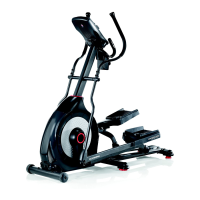
Schwinn 430 - User Manual

Schwinn 430
44 pages
Print Icon
To Next Page IconTo Next Page
Loading...
ASSEMBLY MANUAL / OWNER’S MANUAL
Manual en Español Latino Americano:
http://www.schwinnfitness.com
270 /
230 /
430 /
470 /
2.5

Other manuals for Schwinn 430

Questions and Answers

  • B
    Beth RiddleAug 17, 2025
    What to do if my Schwinn Elliptical Trainer console won't turn on?
    • J
      John CruzAug 17, 2025
      First, ensure the unit is plugged into a functioning wall outlet. Check that the connection is secure and undamaged; replace the adapter or connection at the unit if either is damaged. Make sure all wires in the cable are intact, and replace the cable if any are visibly crimped or cut. The cable should be connected securely and oriented properly, with the small latch on the connector lined up and snapped into place. Inspect the console display for cracks or damage, and replace the console if damaged. If the console only has a partial display and all connections are fine, replace the console.
  • B
    Brenda PerkinsAug 20, 2025
    What to do if the Schwinn Elliptical Trainer fan won't turn on?
    • C
      Charles GarciaAug 20, 2025
      Check that all wires in the cable are intact; if any are cut or crimped, replace the cable. Be sure the cable is connected securely and oriented properly, with the small latch on the connector lined up and snapped into place. Unplug the unit from the electrical outlet for 3 minutes, then reconnect it.
  • J
    Jessica ShannonAug 22, 2025
    How to fix a squeaking noise in my Schwinn 430 Elliptical Trainer?
    • M
      Melissa WheelerAug 22, 2025
      Loosen the pivot rod bolt slightly until the noise goes away. You can also apply white lithium grease for a temporary fix. Apply silicone lubricant to a dry cloth and wipe the rails to eliminate roller noise.
  • K
    kenneth16Aug 25, 2025
    How to troubleshoot drive train click noise on Schwinn 430?
    • M
      Margaret AguilarAug 26, 2025
      Disconnect the left and right foot assemblies and rotate the crank. If the sound persists, replace the crank/pulley assembly. Manually move the foot, leg, and handlebar assemblies to isolate the sound. Replace the part making the sound.
  • D
    dianeryanAug 27, 2025
    Why does my Schwinn 430 console shut off during use?
    • M
      myersnathanAug 27, 2025
      Ensure the unit is plugged into a functioning wall outlet and that the connection is secure and undamaged; replace the adapter or connection if damaged. Check that all wires in the cable are intact, replacing the cable if any are cut or crimped. Confirm the cable is securely connected and properly oriented, with the small latch aligned and snapped into place. Unplug the unit from the electrical outlet for 3 minutes, then reconnect it. Also, check that the magnet is in place on the pulley and that the speed sensor is aligned with the magnet and connected to the data cable. Realign the sensor if necessary, and replace it if there's any damage to the sensor or the connecting wire.
  • D
    Dana WilsonAug 30, 2025
    How to fix Schwinn 430 E2 error code on the console?
    • E
      Eric OwensAug 30, 2025
      Ensure all wires in the cable are intact; if any are cut or crimped, replace the cable. Also, verify that the cable is connected securely and oriented properly, making sure the small latch on the connector lines up and snaps into place.
  • R
    Ryan SandersSep 1, 2025
    Why is my Schwinn 430 not showing speed or RPM?
    • S
      Sean FisherSep 1, 2025
      First, check that all wires in the cable are intact; replace the cable if any are cut or crimped. Ensure the cable is connected securely and oriented properly, with the small latch on the connector lined up and snapped into place. Verify that the magnet is in place on the pulley. Also, check that the speed sensor is aligned with the magnet and connected to the data cable; realign the sensor if necessary, and replace it if there is any damage to the sensor or the connecting wire.
  • E
    Elizabeth PollardSep 4, 2025
    How to make my Schwinn 430 sit level?
    • T
      turnerkevinSep 4, 2025
      Adjust the levelers until the machine is level. Keep in mind that the adjustment may not compensate for extremely uneven surfaces, so consider moving the machine to a more level area.
  • W
    wbryantSep 6, 2025
    How to troubleshoot 'Contact HR' not displayed on Schwinn 430 Elliptical Trainer?
    • N
      Nicole KramerSep 7, 2025
      Ensure the cable is securely connected to the console. Verify that the cables from the handlebars and the cable to the console are secure and undamaged. Be sure your hands are centered on the HR sensors, kept still, and applying relatively equal pressure to each side. Note that sensors may have difficulty with dried-out or calloused hands; a conductive electrode cream can help improve contact.
  • R
    Robert BarrettSep 9, 2025
    What to do if my Schwinn 430 Elliptical Trainer fan won't turn on, but the console works?
    • S
      Sherry DurhamSep 9, 2025
      Unplug the unit from the electrical outlet for 5 minutes. Remove any material from the fan. If necessary, detach the console to help with removal. Replace the console if you are unable to remove the blockage.

Summary

Important Safety Instructions - Assembly

Safety Warning Labels and Serial Number

FCC Compliance

Details the unit's compliance with FCC regulations regarding radio frequency interference.

Specifications and Pre-Assembly

Before Assembly

Guidance on preparing the workspace and understanding assembly requirements.

Basic Assembly Tips

Essential advice for a smooth and correct assembly process.

Parts List

Hardware and Tools Required

Tools

Details of included and recommended tools for assembly and maintenance.

Equipment Assembly Instructions

Step 1: Attach Front Stabilizer to Frame

Connects the front stabilizer bar to the main frame structure.

Step 2: Attach Rail Assembly to Frame Assembly

Secures the rail assembly to the primary frame.

Step 3: Attach Manual Lift Assembly

Installs the manual lift mechanism using the arm pivot rod.

Step 4: Connect Cable and Attach Console Mast

Connects console wiring and mounts the console support.

Step 5: Attach Legs to Frame Assembly

Secures the left and right leg components to the frame.

Step 6: Attach Arm Pivot Rod and Lower Handlebar Arms

Connects the arm pivot rod and lower handlebar arms.

Step 7: Attach Pedals to Frame Assembly

Installs the left and right foot pedals onto the frame.

Step 8: Attach Upper Handlebar Arms

Secures the upper handlebar arms to the main structure.

Step 9: Route Cables and Attach Static Handlebar

Manages wiring and attaches the static handlebar assembly.

Step 10: Attach Water Bottle Holder

Mounts the water bottle holder to the frame.

Step 11: Remove Hardware from Console

Detaches necessary hardware from the console unit.

Step 12: Connect Cables and Attach Console

Connects console wiring and attaches the console unit.

Step 13: Connect AC Adapter

Connects the AC power adapter to the machine.

Step 14: Final Inspection

Verifies all connections and assembly for safe operation.

Before You Start Operation

Moving the Machine

Instructions for safely transporting the fitness equipment.

Leveling the Machine

Procedures to ensure the machine is stable and level on uneven surfaces.

General Safety Instructions

Equipment Features Overview

Console Operation and Controls

Keypad Functions

Details the purpose and operation of each button on the console keypad.

Lower Display Data and Metrics

Contact Heart Rate Sensors

Machine Operations and Usage

What to Wear

Provides recommendations for suitable athletic apparel for safe and effective exercise.

How Often Should You Exercise

Offers guidance on recommended exercise frequency and scheduling for optimal results.

Mounting and Dismounting Your Machine

Safe procedures for getting on and off the elliptical.

Workout Incline Adjustment

How to adjust the incline for varied workout intensity.

Console Modes and Initial Setup

Power-Up, Idle, and Auto Shut-Off Modes

Describes console states and automatic power-saving features.

Initial Setup Procedures

Steps for configuring date, time, and measurement units upon first use.

Workout Programs and User Profiles

Quick Start Program

Instructions for starting a basic manual workout without pre-set programs.

User Profiles Management

How to create, select, and edit user profiles for personalized tracking.

User Profile Configuration

Resetting User Profiles

Process for clearing and resetting saved user profile data.

Workout Customization

Changing Resistance Levels

Methods for adjusting workout resistance during exercise.

Profile Programs Overview

Introduction to pre-programmed workout routines categorized by intensity.

Advanced Workout Modes

Workout Profile and Goal Program

Setting up custom workouts with specific goals like distance or time.

Fitness Test Program

Procedure for assessing and tracking physical fitness improvements.

Workout Control and Management

Heart Rate Control (HRC) Programs

Using heart rate to automatically adjust workout intensity.

Pausing or Stopping Workouts

How to manage workout states, including pausing and ending sessions.

Workout Results and Tracking

Results and Cool Down Mode

Viewing workout summaries and post-exercise cool-down.

GOAL TRACK Statistics and Achievements

Accessing workout history, progress, and personal bests.

Health Metrics and Data Management

BMI Measurement and Calculation

Using console data to calculate Body Mass Index.

Console Setup Mode

Maintenance and Care

Daily Maintenance Checks

Routine inspections and cleaning after each use.

Weekly Maintenance

Checks and cleaning for smooth operation and longevity.

Monthly or 20-Hour Checks

Periodic checks for hardware tightness and lubrication.

Maintenance Parts Identification

Troubleshooting Common Issues

Product Warranty Information

Schwinn 430 Specifications

General IconGeneral
Resistance Levels20
Stride Length20 inches
User Profiles2
Max User Weight300 lbs
DisplayLCD
Programs22
Heart Rate MonitoringContact grips
Dimensions70.1" L x 28.2" W x 63.2" H
FlywheelPerimeter weighted, high speed, high inertia flywheel

Related product manuals